
Unquestionably, Microsoft Windows is the number one desktop operating system in the world, as well as having a significant share of the server operating system market. Multi-million-dollar organizations rely heavily on Windows Server and Active Directory to provide a safe, secure networked environment for their business operations. Such an enterprise infrastructure alone can generate thousands of events per second that range anywhere from benign user authentication events to logs indicating a severe software failure, or even more serious events such as DoS attacks or intrusion attempts.
Perhaps, you may have wondered why these events are logged and how important they are for your business. Well, some of these events contain information that can alert organizations to security threats while others could help technicians troubleshoot software failures. At the same time, depending on your industry and the local laws that apply to your organization, some of these events are required to be logged and retained for a specific period of time to meet compliance mandates. Audit logging is a significant part of most compliance programs.
In regards to logging on Windows, we are in luck. All Windows systems, whether workstation or server editions, enable businesses to monitor all types of event logs using Windows Event Log: application, security, system, etc.
What is Windows Event Log?
Basically, Windows Event Log is Microsoft Window’s logging subsystem. It is made up of various components including the low-level logging of events from practically all running processes, an API that enables other applications to search for specific events, and the Event viewer that provides a direct, centralized console view of various categories of event logs. The processes that generate events are further divided into several unique event channels that represent streams of events from specific sources. The most common of these channel groups are Application and Services Logs that contain channels dedicated to applications and, secondly, Windows Logs that capture system events.
For viewing these events, Event Viewer serves as the default user interface.
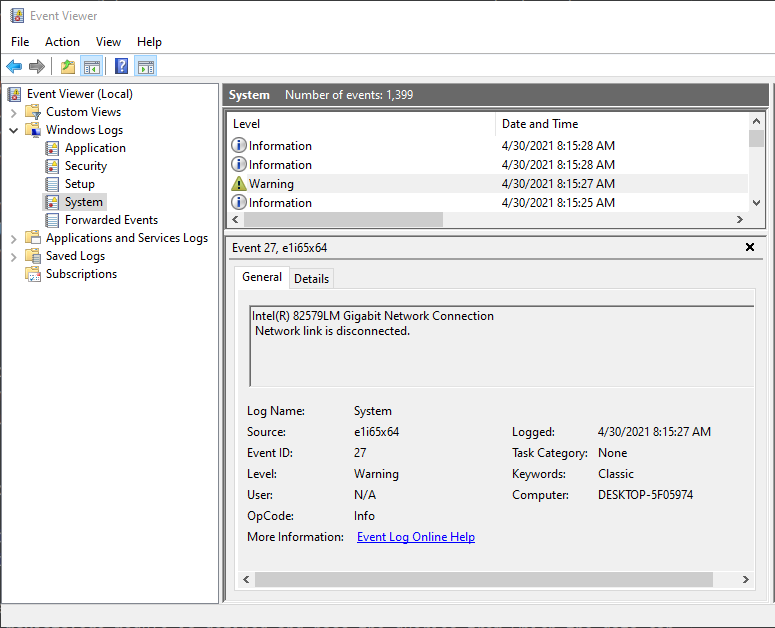
It provides different modes for viewing events and the ability to search for specific types of events or data in them. However, for large enterprises that manage thousands of events per second, this view does not suffice for extensive analysis, because administrators would most likely be overwhelmed by searching through such vast amounts of log data.
Hence, many enterprises seek log analytics solutions that can provide threat detection and data correlation among other features. Even more importantly, they need a versatile log collection tool that can forward these logs to any SIEM — locally or cloud-based, regardless of the vendor.
Windows Event Log collection with NXLog
NXLog is a flexible and resourceful log collection tool with a modular architecture which makes collecting logs as straightforward as possible. In other words, your business has control over what to collect and how, all by editing a simple configuration file. NXLog provides a unique feature that makes log collection on Windows platforms a breeze.
The im_msvistalog module lets you collect data natively from Windows Event Log. This lightweight component connects directly to the Windows Event Log API without any additional middleware, making data collection not only agile but intuitively simple. In fact, you can not only collect, but also monitor data from a multitude of channels, including those created by event providers. Additionally, data can be read using the same XML format available in Event Viewer. These events can then be processed and forwarded to meet any business requirements or compliance mandates.
Besides the features listed above, NXLog’s im_msvistalog comes with other flexible capabilities such as its ability to process the new EVTX file format which comes with a number of improvements over its predecessor, EVT. Another advantage of this powerful module includes the facility of collecting events remotely with MSRPC.
With the vast number of possibilities provided by NXLog for Windows Event Logging, your enterprise will certainly be able to forward events efficiently to any SIEM solution. Not only that, but have them managed correctly, all by incorporating a flexible, highly configurable, modular tool that conforms to your business needs and workflow, not the other way around.


