
Back in the day, Gordon Moore made relatively accurate observations and projections about the exponential growth of transistors on semiconductors. It still amazes me, yet very few predicted the incredible growth of system interconnectedness and the vast amount of data it generates. It is estimated that 90% of all data was created in the last two years. Given that everything is connected, the need for telemetry is growing at an unprecedented rate, and so is the need to efficiently channel and manage telemetry data.
What is telemetry?
Telemetry is the ecosystem built around collecting metrics remotely. Telemetry collects telemetry data; the systems or chains of systems that collect this data are called telemetry pipelines or telemetry data pipelines. In this post, we look into that.
In the English language, telemetry is a foreign word, originating from the French télémètre, which is a compound word consisting of télé (meaning far) and mètre (meaning a device for measuring). The essence of the word implies remote observation and collection of metrics. Implementing the definition of the expression in the modern IT world, telemetry means a set of tools or a framework that collects and transmits telemetry data from sensors on devices from remote or inaccessible places.
What is a telemetry pipeline?
A telemetry pipeline (also known as a telemetry data pipeline) is a system for collecting, processing, and routing telemetry data (logs, metrics, and traces) from sources to destinations in order to enable real-time analysis and monitoring.
In the metrics collection system, the telemetry pipeline is responsible for collecting and shifting data to its destination, and you could consider it a subset of the observability pipeline, which also includes tools for data visualization, analysis, alerting, and so on.
Telemetry pipelines can handle diverse data types and provide real-time or near-real-time data processing. A telemetry pipeline works based on the same principles as a "conventional" log data pipeline. The main differences are the type of data it shifts and the time sensitivity of the data. Given these differences, they need different handling, priorities, and routes.
Benefits of telemetry pipelines
The main benefits of deploying a telemetry pipeline are:
-
Unified and consistent observability data — Telemetry pipelines normalize and enrich logs, metrics, and traces before forwarding the information. This ensures consistent, structured data regardless of the original source, improving analysis and reducing noise.
-
Cost reduction — Telemetry data pipelines can discard low-value data, sample high-volume sources, and compress or transform valuable data. These processes lower storage and ingestion costs in observability platforms.
-
Vendor flexibility — A well-designed telemetry data pipeline can seamlessly route data to multiple destinations, avoiding lock-in to a specific solution.
-
Improved performance and reliability — A telemetry pipeline can reduce application performance overhead and provide a more reliable collection of data. Telemetry pipelines also help decouple your systems from your monitoring tools.
-
Faster, more actionable insights — By filtering, transforming, and enriching the collected data, telemetry pipelines empower support teams to act faster, detecting issues and improving the analysis process.
What is the importance of collecting metrics?
Imagine you operate a complex industrial control system, for example, in a crude oil refinery or a wind farm on the open sea, to mention a few exciting cases when telemetry and the data gathered from it could be paramount for your operation. In such environments, the smallest resonance in the system matters, and even the pressure in the smallest pipe can be critical for the safety of those working there. On the other hand, you might also be operating a long production line where downtime is expensive, and you want to minimize the risk of losing money.
According to a Gartner report, telemetry pipelines are projected to be used in 40% of logging solutions by 2026 due to the complexity of distributed architectures. Read more on Gartner.
A well-designed and implemented telemetry strategy and a thoughtfully crafted telemetry pipeline are the two fundamental pillars of your metrics collection. They also play a crucial role in your IT security and operational continuity. A telemetry data pipeline enables real-time monitoring and analysis of system performance to identify and resolve issues swiftly.
-
Helps optimize system resources and improve overall reliability and efficiency.
-
Aids mission-critical elements of your operational chain.
-
Facilitates proactive maintenance and observability by providing timely insights with relevant, fresh data.
What is the secret to building a telemetry pipeline?
Having a dedicated toolchain for your telemetry operation, accommodating a safe and swift route to your telemetry data has many advantages. When planning and building a telemetry pipeline, there are a few principles to keep in mind.
Toolchain selection for collection
Choose tools, such as the following examples, that enable efficient data collection and support filtering mechanisms to ensure only relevant telemetry data is collected.
-
NXLog Platform is an on-premises solution for centralized log management without complexity or cost surprises, built to handle the challenges of telemetry data management, making it a great telemetry pipeline solution.
-
OpenTelemetry is an open-source framework that provides unified APIs, SDKs, and tools for generating, collecting, and exporting logs, metrics, and traces to enable standard, vendor-neutral observability. OpenTelemetry is supported seamlessly by NXLog Platform.
Data filtering and trimming
Early in the telemetry pipeline, filter and trim the telemetry data to eliminate redundant information entering the rest of the "journey". This step reduces log noise and improves the efficiency of data flow. In addition, many SIEM and analytics systems charge their customers by the amount of data ingested, so this step can also significantly lower costs.
Data normalization
Standardize the collected telemetry data by normalizing it into a common format that makes it easier to compare and analyze it. Normalizing your telemetry data also helps in later stages by easing correlation.
How does a telemetry pipeline work?
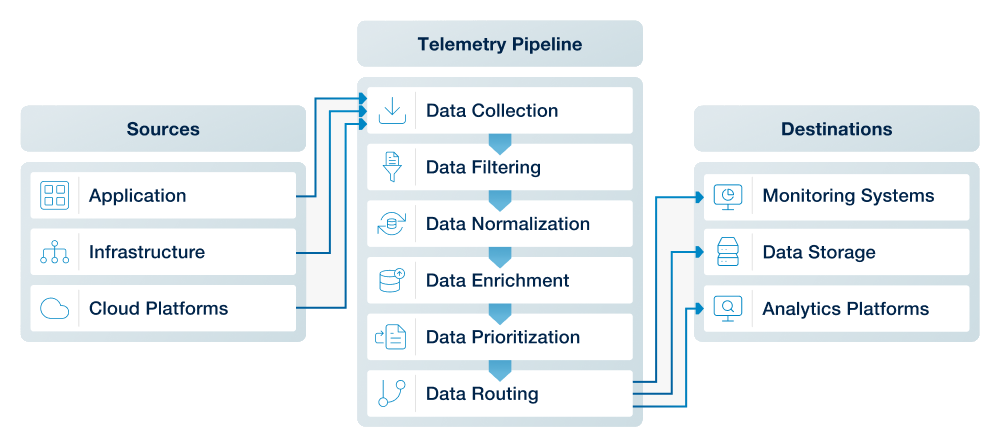
A telemetry pipeline architecture must support the three main steps of a telemetry pipeline workflow:
-
Data collection — Multiple sources such as applications, infrastructure, and services like cloud platforms generate logs, metrics, and traces. That telemetry data is gathered by local collection agents and sent to the telemetry pipeline.
-
Data processing — Once the data has been collected, the pipeline processes it in preparation for analysis. This includes data cleansing and aggregation to reduce data noise and simplify the data.
-
Data routing and delivery — Finally, the telemetry pipeline determines where the data should go, with destinations such as data storage systems, metrics backends, APM platforms, and SIEM tools. Those systems receive and ingest the data for visualization, alerting, querying, and analysis.
When is collecting telemetry data beneficial?
Telemetry data collection is particularly valuable in environments with complex, distributed, or mission-critical systems. Here are some scenarios where telemetry pipelines shine:
- Monitoring distributed systems
-
-
Without telemetry pipelines — Monitoring each part of a distributed system separately leads to gaps in visibility. A microservice failure may not be linked to a database issue, causing delayed fixes.
-
Risks — Increased downtime, missed issues, and inefficient system management.
-
With telemetry pipelines — Centralized monitoring across services allows fast detection and resolution of issues, improving system uptime and performance.
-
For more insights into the challenges of handling telemetry data, check out this DevOps article.
- Managing critical infrastructure
-
-
Without telemetry pipelines — Independent monitoring systems in healthcare, finance, or IT security can miss critical failures, risking safety and compliance.
-
Risks — Delayed detection of failures, potential safety risks, and regulatory penalties.
-
With telemetry pipelines — Centralized data collection ensures real-time issue detection and compliance, reducing risks and improving reliability.
-
- Optimizing high-volume data processing
-
-
Without telemetry pipelines — High data volumes overwhelm traditional systems, making it hard to filter relevant insights and increasing costs.
-
Risks — Wasted resources, missed insights, and delayed responses.
-
With telemetry pipelines — Telemetry pipelines filter and route relevant data efficiently, reducing costs and enabling faster decision-making.
-
In summary, telemetry pipelines are essential for ensuring the smooth operation of complex systems, enhancing performance, and enabling proactive management.
Telemetry pipeline versus observability pipeline
Many people are confused and think these concepts are the same and interchangeable. However, they are not the same. Let’s see why.
Telemetry pipelines focus on collecting and processing data like logs, metrics, and traces from different parts of a system. Telemetry pipelines are a key part of observability pipelines, providing the data needed to understand and monitor the system effectively.
Observability pipelines do more by combining this data with other information to give a full picture of how the system is doing.
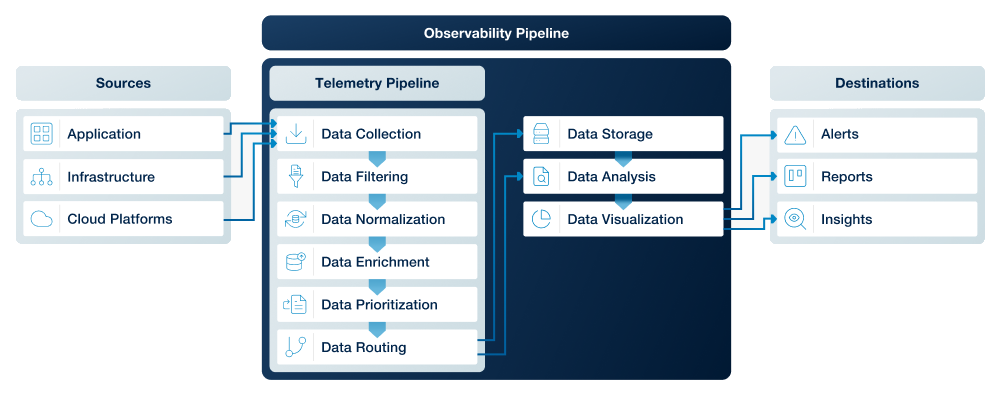
Simply put, telemetry pipelines gather the data, and observability pipelines work with that data to help you visualize and understand what’s happening in your system.
| Scope | Telemetry pipeline | Observability pipeline |
|---|---|---|
Purpose |
Collect and transport raw telemetry data (logs, metrics, traces) from sources to storage or analysis tools. |
Transform, enrich, correlate, and route telemetry data to enable deeper system understanding and troubleshooting. |
Data processing |
Minimal processing, primarily forwarding data. |
Advanced processing, including enrichment, sampling, filtering, redaction, and normalization. |
Flexibility |
Usually fixed or limited in how data is modified before delivery. |
Highly configurable, supports dynamic routing, schema changes, and policy-driven manipulation. |
Outcome |
Ensures data reaches its destination reliably. |
Ensures data is meaningful, cost-efficient, and actionable for observability platforms. |
Main advantage |
Simple, reliable, lightweight, and easy to operate at scale. |
Delivers high-quality, curated data that reduces noise and observability costs. |
Main disadvantage |
Raw data can be high-volume, costly, and less useful without downstream processing. |
More complex to design, maintain, and tune due to transformations and policies. |
Read more about choosing the right observability pipeline.
FAQ
This FAQ covers some of the most commonly asked questions about telemetry pipelines:
When do you need a telemetry pipeline?
You need a telemetry pipeline when your organization is managing very high telemetry data volumes, operating in a highly regulated environment, or relying on multiple monitoring and analytics tools that require consistent, centralized data handling. It becomes essential whenever you need to reduce observability costs, standardize data across diverse systems, or gain flexibility in how and where your telemetry is routed.
What are the cost implications of telemetry pipelines?
Telemetry pipelines may introduce some new infrastructure and operational overhead, but they significantly reduce downstream monitoring and storage costs by filtering, sampling, and optimizing high-volume telemetry data. Organizations can also balance expenses by selecting their telemetry tools to maximize cost efficiency and monitoring their pipeline.
How do telemetry pipelines enhance data security?
Telemetry pipelines enhance data security by ensuring important security logs are collected and delivered in real-time while reducing noise so analysts can identify threats faster. They also prevent sensitive data leaks by filtering or transforming data internally before it leaves the organization’s controlled environment.
How do telemetry pipelines support regulatory compliance?
Telemetry pipelines support regulatory compliance by enforcing consistent data handling policies such as redacting sensitive information, standardizing formats, enforcing retention policies and ensuring auditable data flows across systems. They also enhance data security by enabling encryption, access controls, and controlled routing of sensitive telemetry to approved destinations only.
Conclusion
Telemetry pipelines are an important part of modern observability systems because they help the safe and swift transition of your telemetry data from your remote sources. They are responsible for the collection and transmission of the information needed to keep everything running smoothly and help identify and fix issues early. While they’re just one piece of the puzzle, they’re crucial for making sure your systems are in their best shape. As IT systems become more connected and complex, having a solid telemetry strategy to collect remote metrics will only become more important.


