
Compliance frameworks don’t have a checkbox for "we know it’s a problem, but we can’t afford to fix it right now." Yet that’s the position thousands of organizations find themselves in — bound by regulation to meet security standards that their operating systems are physically incapable of supporting.
If you run Windows XP, Server 2003, or any other unsupported OS in a regulated environment, the compliance obligation doesn’t go away just because the upgrade path is blocked. What changes is how you meet it — and how much work that takes.
The gap between the rules and reality
The reasons organizations still run legacy Windows are well documented: million-dollar medical devices with no driver support for modern platforms, factory control systems tied to regulatory certifications that cost more to redo than the hardware itself, proprietary data formats that only the legacy application can read. These are legitimate engineering and financial constraints, not negligence.
But compliance auditors aren’t evaluating your budget. They’re evaluating whether you’ve met the standard — or whether you can demonstrate that you’ve done everything reasonable to address the gap. Understanding exactly where legacy systems fall short of each framework is the first step toward building that case.
PCI DSS v4.0: patching, encryption, and audit logs
The Payment Card Industry Data Security Standard (PCI DSS) is arguably the most prescriptive of the three frameworks when it comes to legacy systems. Several requirements become difficult or impossible to meet on unsupported operating systems.
Requirement 6 (Develop and Maintain Secure Systems and Software) mandates that organizations protect all system components from known vulnerabilities by installing vendor-supplied security patches. Under PCI DSS v4.0, Requirement 6.3.3 specifies that critical-severity patches must be installed within 30 days of release. When your OS vendor stopped issuing patches over a decade ago, this requirement cannot be met as written, and no amount of wishful thinking or security theater will make it happen when there are no patches to install.
Requirement 4 (Protect Cardholder Data with Strong Cryptography During Transmission Over Open, Public Networks) requires strong encryption for cardholder data transmitted over open, public networks. Legacy systems often cannot support current TLS versions or cipher suites that meet the standard’s expectations. PCI DSS explicitly prohibits SSL and early TLS (1.0) as security controls — protocols that may be the only options available on older platforms.
Requirement 10 (Log and Monitor All Access to System Components and Cardholder Data) requires organizations to implement audit logging mechanisms that track user access to cardholder data and system components. The logs need to capture specific events, be protected from tampering, and be retained for at least 12 months. Generating this telemetry from a system that can’t run modern logging agents is a real challenge.
The good news: PCI DSS has a formal mechanism for situations where a requirement can’t be met as stated. Compensating controls allow an organization to satisfy the intent of a requirement through alternative means, provided the organization documents a legitimate technical or business constraint and demonstrates that the compensating control sufficiently mitigates the associated risk. PCI DSS v4.0 also introduced a "Customized Approach," which allows organizations to design tailored security controls that meet the security objective of a requirement, even if the specific implementation differs from the defined approach. For legacy systems, compensating controls might include network segmentation that isolates the legacy device from the cardholder data environment, enhanced monitoring of all traffic to and from the system, restricted physical and logical access, and additional logging through network-level tools when host-based logging isn’t feasible.
The key word here is documented. An assessor needs to see that you identified the gap, evaluated the risk, implemented an alternative, and tested it. A legacy system running in a corner with no documentation is a finding. The same system with a written risk assessment, compensating controls, and a migration plan is a managed exception.
HIPAA: addressable doesn’t mean optional
The HIPAA Security Rule (45 CFR §164.308, §164.310, §164.312) protects electronic protected health information (ePHI) through administrative, physical, and technical safeguards. For organizations running legacy Windows systems in healthcare environments — and there are many — the technical safeguards under §164.312 are where the friction shows up.
Audit controls (§ 164.312(b)) require covered entities to implement mechanisms that record and examine activity in information systems containing ePHI. This is a required standard — not optional, not flexible. If a legacy system handles or stores ePHI, you need to be able to produce audit logs from it. On a system that can’t run modern security agents, that’s a problem with no easy workaround.
Encryption and decryption (§ 164.312(a)(2)(iv)) is classified as an "addressable" implementation specification. In HIPAA terminology, "addressable" does not mean optional. It means the covered entity must assess whether the control is reasonable and appropriate for its environment. If it is, the entity must implement it. If it isn’t — for example, because the system can’t support current encryption standards — the entity must document why and implement an equivalent alternative measure.
A legacy Windows system that can’t support AES-256 or current TLS versions puts the organization in a position where it must formally document the limitation and implement compensating measures: network-level encryption for data in transit, physical access restrictions, segmentation, and enhanced monitoring. The documentation must reference the organization’s risk analysis findings.
Protection from malicious software (§ 164.308(a)(5)(ii)(B)) requires procedures for guarding against, detecting, and reporting malware. When your OS is no longer supported by any major antivirus vendor, meeting this requirement demands creative alternatives — application whitelisting, network-based intrusion detection, or behavioral monitoring at the network perimeter.
The common thread across HIPAA’s technical safeguards is that the rule was written to be technology-neutral and scalable to different organizational sizes and complexities. That flexibility is both a strength and a risk. It gives organizations room to address legacy system limitations through alternative controls, but it also means that "we couldn’t do it" is never an acceptable answer on its own. The question an auditor — or the HHS Office for Civil Rights during an investigation — will ask is: "What did you do instead, and can you prove it?"
NIS2: risk management with teeth
The EU’s NIS2 Directive (Directive 2022/2555), which member states were required to transpose into national law by October 2024, takes a different approach. Rather than prescribing specific technical controls, NIS2 mandates that essential and important entities implement "appropriate and proportionate" cybersecurity risk-management measures based on an all-hazards approach.
Article 21 of the directive lists ten minimum categories of measures, several of which directly intersect with the legacy system problem.
Policies on risk analysis and information system security require organizations to assess and manage security risks across IT and operational technology. An unsupported OS is, by definition, a known and quantifiable risk. Failing to identify and document it in your risk analysis would be a clear gap.
Security in network and information systems acquisition, development, and maintenance includes vulnerability handling and disclosure. When a system cannot receive patches and has a well-documented catalog of unresolved vulnerabilities, the organization must demonstrate what compensating measures are in place.
Policies on the use of cryptography and encryption require appropriate use of encryption to protect data. Legacy systems that can’t support modern cryptographic standards need documented alternatives.
Incident handling requires detection, reporting, and response capabilities. NIS2 also imposes strict incident reporting timelines — an early warning within 24 hours and a detailed notification within 72 hours. Detecting incidents on systems you can’t monitor is difficult. Reporting on incidents you didn’t detect is impossible.
NIS2’s enforcement provisions add urgency. Essential entities face administrative fines of up to €10 million or 2% of global annual revenue, whichever is higher. The directive also introduces personal accountability for senior management, who can be held responsible for failures in cybersecurity risk management. "We have legacy systems we can’t upgrade" won’t shield leadership from liability if the organization hasn’t documented the risk and implemented proportionate controls.
One significant nuance: NIS2 is still relatively new, and implementation varies across member states. The European Commission proposed targeted amendments in January 2026 to increase legal clarity and simplify compliance. Organizations should monitor their national transposition for specific guidance on how legacy system risks should be documented and mitigated. ENISA (the EU Agency for Cybersecurity) has published implementation guidance that emphasizes evidence-backed compensating controls for systems that can’t be patched — including network segmentation, restricted access, and continuous monitoring.
The common denominator: visibility
Across all three frameworks, one requirement shows up consistently, in different language but with the same intent: you must be able to see what’s happening on your systems.
PCI DSS calls it audit logging (Requirement 10). HIPAA calls it audit controls (§164.312(b)). NIS2 frames it as incident detection and handling (Article 21). The label changes, but the expectation is the same: if a system processes, stores, or transmits protected data, you need to produce evidence of what happened on it, when, and by whom.
This is where legacy systems create the sharpest compliance pain. Most modern logging and monitoring tools require a supported OS to run their agents. When the OS is unsupported, many vendors simply don’t offer an option. The result is a monitoring gap on the systems that, from a compliance and risk standpoint, need monitoring the most.
Closing that gap requires lightweight log collection agents that can operate within the constraints of older 32-bit systems — limited memory, limited disk, limited API support — while still forwarding the event data that auditors and security teams expect. It’s not about making the old system compliant on its own. It’s about connecting it to the rest of your monitoring infrastructure so that the data exists and can be reviewed.
This is no longer a gap you have to engineer around on your own. NXLog Agent now supports 32-bit Windows, down to Windows XP and Server 2003. It buffers logs locally for unreliable links and bundles an OpenSSL build that provides TLS 1.2 on platforms that otherwise can’t encrypt traffic in transit. That covers exactly what PCI DSS Requirement 4 and HIPAA’s encryption specification expect. The collector pulls the audit-relevant Windows events from the Security log and forwards them to your SIEM as JSON over an encrypted connection:
<Extension json>
    Module         xm_json
</Extension>

<Input security_events>
    Module         im_mseventlog
    Sources        Security
    <Exec>
        if ($EventID NOT IN (528, 529, 530, 531, \
                             532, 533, 534, 535, \
                             536, 537, 538, 539, \
                             540, 632)) { (1)
            drop();
        }
    </Exec>
</Input>

<Output siem>
    Module         om_ssl
    Host           siem.example.com:6514
    CAFile         %CERTDIR%/ca.pem
    CertFile       %CERTDIR%/agent-cert.pem
    CertKeyFile    %CERTDIR%/agent-key.pem
    Exec           to_json();
</Output>

<Route eventlog_to_siem>
    Path           security_events => siem
</Route>| 1 | Legacy event IDs used by Windows XP and Server 2003 (pre-Vista/2008 audit scheme) for monitoring logons, logoffs, and users added to security-enabled global groups. |
The encrypted, structured audit trail this produces is the documented evidence an assessor asks for.
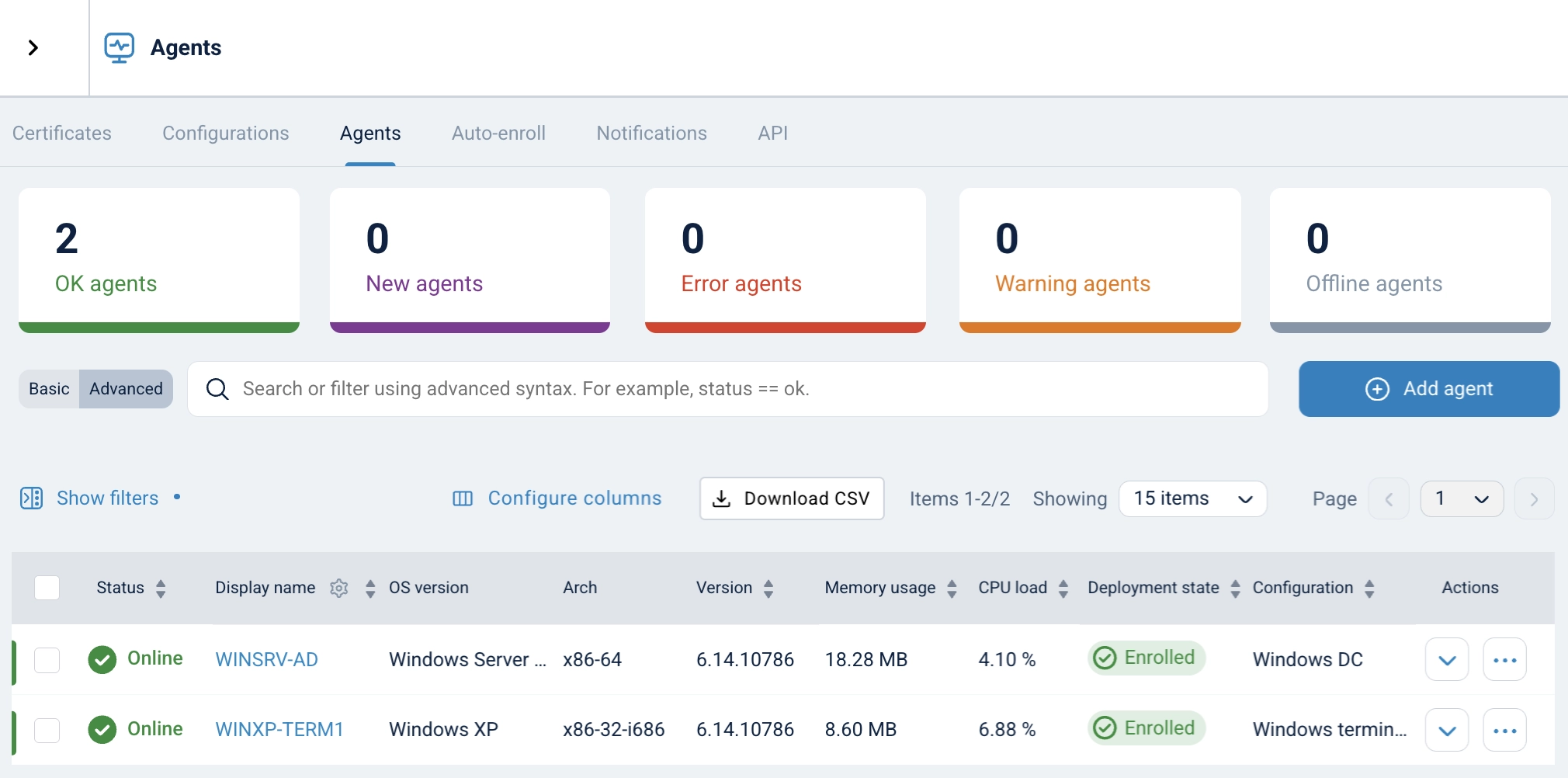
The legacy host shows up in the same Agents view as every other system in the fleet — proof that the audit trail exists and is being centrally monitored, not just a claim in a compliance document. It’s available now on the NXLog downloads page.
Compliance is a posture, not a binary
None of the frameworks discussed here will give you a free pass for running unsupported software. But none of them demand the impossible, either. What they all require is a defensible posture: evidence that you’ve identified the risk, evaluated your options, implemented reasonable compensating controls, and documented the entire process.
For legacy systems, that posture looks like this:
-
Inventory. Know which systems are running unsupported software, where they sit in your network, and what data or processes they touch.
-
Risk assessment. Document the specific compliance gaps each legacy system creates, mapped to the relevant framework requirements.
-
Compensating controls. Implement and document alternatives — network segmentation, restricted access, enhanced monitoring, network-level encryption — that address the intent of each requirement you can’t meet as written.
-
Monitoring. Ensure legacy systems produce the logs and telemetry that auditors expect, even if that requires specialized tooling for older platforms.
-
Migration planning. Show that legacy systems have a documented path toward replacement, even if the timeline is measured in years.
The worst compliance outcome isn’t running a 20-year-old operating system. It’s running one with no paper trail, no compensating controls, and no plan. Auditors can work with an organization that has acknowledged and managed its risks. They can’t work with one that hasn’t looked.


