
The SentinelOne outage showed why visibility isn’t optional—even when your defenses keep running.
On May 29, 2025, organizations running SentinelOne experienced something unsettling: their security controls kept working, but they couldn’t see what was happening.
A software flaw in SentinelOne’s infrastructure control system caused a global service disruption that lasted several hours. According to reports, the incident significantly impacted customers' ability to manage their security operations and access important data.
Endpoint protection continued functioning. Agents kept monitoring. But security teams lost access to their management consoles and related services.
For those hours, defenders were flying blind.
The hidden risk in centralized visibility
Modern security operations depend on centralized visibility platforms. When those platforms fail, even functioning security controls become nearly useless.
During the SentinelOne outage, security teams couldn’t:
-
Investigate alerts or anomalies
-
Adjust policies or response actions
-
Access historical data for threat hunting
-
Confirm whether endpoints were still protected
-
Respond to potential incidents with full context
The agents themselves kept working, but without visibility into what they were detecting or the ability to manage responses, security operations ground to a halt.
This incident highlights a critical dependency: your security architecture is only as reliable as your ability to see what’s happening.
What telemetry resilience looks like
The SentinelOne outage was resolved within hours, and to their credit, endpoint protection continued operating. But the incident raises an important question: how should organizations design telemetry infrastructure to maintain visibility even when primary systems fail?
- Multiple telemetry destinations
-
Sending security telemetry to a single platform creates a single point of failure. A resilient pipeline routes data to multiple destinations based on use case—SIEM for correlation, data lake for long-term analysis, specialized tools for specific threat detection.
- Local buffering and retention
-
When network connectivity fails or a cloud service goes down, telemetry shouldn’t disappear. Local buffering ensures data gets captured and forwarded once connectivity resumes. You don’t lose the visibility you need for incident reconstruction.
- Independent monitoring of monitoring systems
-
If your primary security dashboard fails, how do you know? Independent health checks and metrics collection from your telemetry pipeline itself can alert you to visibility gaps before you discover them during an incident.
- Context preservation across platforms
-
When you need to shift from one analysis tool to another—whether due to an outage or tactical needs—contextual data should follow. Enriched telemetry that includes asset information, user context, and threat intelligence remains valuable regardless of which platform you’re viewing it in.
Metrics data: the overlooked visibility layer
Traditional security monitoring focuses on discrete events: alerts, logs, authentication attempts. But metrics data provides a different kind of visibility that can persist even when event-based systems fail.
Metrics answer questions like:
-
Is CPU usage on critical systems normal?
-
Are network traffic patterns consistent with baseline behavior?
-
Is disk I/O suggesting data exfiltration or encryption activity?
-
Are services responding within expected timeframes?
During the SentinelOne outage, organizations with separate metrics collection could still monitor system health and spot anomalies, even without access to their primary security console.
This layered approach to visibility—events plus metrics, multiple destinations, independent collection paths—creates resilience that single-platform strategies can’t match.
The operational impact of visibility loss
Several hours without security visibility might sound manageable, but consider the operational reality:
- Incident response delays
-
If an alert fired during the outage, teams couldn’t investigate. By the time visibility returned, critical forensic data might have aged out or been overwritten.
- Compliance concerns
-
Many regulatory frameworks require continuous monitoring and timely incident detection. Extended visibility outages create documentation challenges and potential compliance gaps.
- Decision-making paralysis
-
Security leaders faced a difficult choice during the outage: continue operations without visibility, or pause activities until monitoring returns? Neither option is ideal.
- Stakeholder confidence
-
Explaining to executives that "the security tools are working, but we can’t see what they’re doing" doesn’t inspire confidence.
Building visibility that lasts
The SentinelOne incident wasn’t a security breach—it was an availability issue that affected visibility. But that distinction matters less than you might think. Whether visibility disappears due to an outage or an attacker disabling monitoring, the result is the same: security teams operating without the information they need.
Organizations can reduce this risk by treating telemetry management as critical infrastructure:
- Design for redundancy
-
Route telemetry to multiple destinations. If one platform fails, others remain available.
- Enrich data before routing
-
Add context at collection time, not just at analysis time. Enriched telemetry remains valuable even if you need to analyze it with different tools than originally planned.
- Monitor your monitoring
-
Track the health of your telemetry pipeline itself. Know immediately when data stops flowing or platforms become unavailable.
- Reduce dependence on single vendors
-
While platforms like SentinelOne provide significant value, your visibility architecture shouldn’t collapse if any single vendor experiences issues.
Configuring NXLog Agent for resilient telemetry
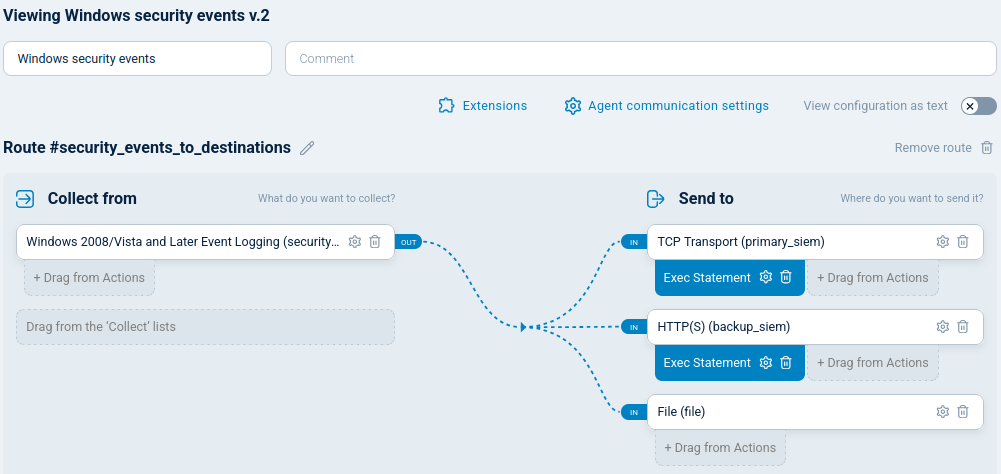
NXLog Agent implements the multi-destination architecture described above with a straightforward configuration. The following example reads Windows Security events and routes them simultaneously to a primary SIEM, a secondary backup destination, and a local file buffer:
<Extension json>
    Module         xm_json
</Extension>

<Input security_events>
    Module         im_msvistalog
    <QueryXML>
        <QueryList>
            <Query Id="0">
                <Select Path="Security">*</Select>
            </Query>
        </QueryList>
    </QueryXML>
</Input>

<Output primary_siem>
    Module         om_tcp
    Host           primary-siem.example.com:1514
    FlowControl    FALSE
    Exec           to_json();
</Output>

<Output backup_siem>
    Module         om_http
    URL            https://backup-siem.example.com/api/logs
    ContentType    application/json
    FlowControl    FALSE
    Exec           to_json();
</Output>

<Output file>
    Module         om_file
    File           'C:\Logs\security-events.log'
</Output>

<Route security_events_to_destinations>
    Path           security_events => primary_siem, backup_siem, file
</Route>primary_siem-
Forwards events to the main SIEM over TCP. If this destination becomes unavailable, the other routes continue processing independently.
backup_siem-
Routes the same events to a secondary destination as JSON over HTTP — a separate platform that remains accessible even if the primary fails.
file-
Writes events to a local file as a durable fallback, so no data is lost while the network destinations are unreachable. The buffer can be replayed once connectivity is restored.
The broader lesson
The SentinelOne outage was resolved quickly and without reports of security incidents resulting from the visibility gap. That’s good news, as this type of situation is a magnet for significant problems. But it’s also a reminder that availability matters as much as functionality.
Your security controls can be working perfectly, but if you can’t see what they’re doing, you’re taking risks you might not intend to take.
A well-designed telemetry management pipeline creates visibility that persists across platform failures, routes data where it’s needed most, and provides multiple layers of insight—events, metrics, and context—so your security operations don’t depend on any single point of failure.
If you’re thinking about how to reduce dependence on single platforms or want to improve your telemetry infrastructure, our team can walk you through how resilient telemetry management keeps your visibility online when it matters most.


