
From years of supporting NXLog Agent deployments across many environments, we’ve learned that while Linux generates a wealth of security logging, much of it remains underutilized. Critical security events are buried across multiple log files and subsystems, making it more complicated than it should be to spot suspicious activity.
Efficient Linux security logging requires knowledge of which events matter and where to get them. Authentication attempts, privilege changes, package installations, audit events, and system shutdown events can all tell a story when viewed together. The challenge is extracting these events and transforming them into structured, actionable data that security teams can monitor and correlate.
In this article, we’ll walk through the Linux security events we’ve found to be the most valuable in real-world investigations and show how NXLog Platform helps bring them together in a consistent, security-focused way. In other words, whether you need to centralize logs for compliance or strengthen detection capabilities, we’ll show you how to gain better visibility with less noise.
What is Linux security logging?
Linux security logging is the recording of security-related events on a Linux system. These Linux security logs provide a trail of who attempted to do what, when it happened, and whether the action succeeded. For security teams, this type of event logging is essential for monitoring system activity and establishing accountability.
Typical Linux security events include user authentication and authorization actions (such as logons and logoffs), privilege escalations using tools like sudo or su, and changes to user accounts or system configurations.
Linux systems capture these events in various log files under /var/log/, including auth.log and audit.log.
However, each file only contains part of the overall picture, and events from different files need to be stitched together to provide a reliable foundation for effective Linux security monitoring.
Why Linux security logging matters
Linux security logging is critical in understanding what is really happening on a system. By centralizing security events from different subsystems, you can provide your security team with the visibility they need to detect suspicious behavior, investigate incidents, and demonstrate compliance. Without an effective Linux security logging strategy, important signals remain hidden across multiple log files.
In practice, meaningful security monitoring depends on collecting and correlating events from key areas of the operating system. There are four categories of Linux security events that provide valuable insights for security monitoring:
- Authentication and authorization events
-
User logins and logoffs, use of
sudo, and changes to user accounts or privileges. - Package management events
-
Software installations and removals, updates, and loading kernel modules.
- Security subsystem events
-
Also known as
auditd, it provides detailed audit events, including system calls, file access, and policy-defined activities. - System shutdown and log truncation events
-
Reboots, shutdowns, and logging being truncated or turned off.
Together, these categories cover the core activities that answer the most critical security questions: who accessed the system, what changed, and whether those actions were expected. The sections that follow break down each category in detail and show how you can collect these security events for effective monitoring.
Authentication and authorization events
Authentication and authorization events capture how users access the system and the level of privilege they have once logged in.
Authentication includes user login attempts (both successful and unsuccessful) and the opening and closing of user sessions.
On the other hand, authorization actions include switching users with su, executing commands with elevated privileges with sudo, and changing access control, including user account creation, deletion, or password changes.
In short, these authentication logs provide visibility into who is using the system and what privileged actions they perform.
Most Linux distributions write authentication activity to log files under /var/log/:
-
Debian and Ubuntu systems use
/var/log/auth.log -
Red Hat-based distributions use
/var/log/secure.
These log files also contain sudo events, typically including the invoking user, the target user, and the command that was executed.
Additionally, failed SSH login attempts and authentication failures from other services are also logged here.
Monitoring authentication logs is critical for detecting external and internal threats.
Repeated failed login attempts can indicate brute-force or credential-stuffing attacks, while logins at unusual times or from unexpected IP addresses may point to compromised credentials.
Likewise, unexpected sudo or su activity, especially from accounts that do not usually require elevated access, can be an early sign of privilege escalation.
By closely monitoring these authentication and authorization events, you can gain early visibility into some of the most common attack paths on Linux systems.
Collecting authentication events
NXLog Agent can collect events from these log files in real time, convert them to structured data, and forward them to a centralized location, such as a SIEM. For example, you can configure a File input module instance to tail the relevant log file for your Linux system and use the Syslog extension to parse the events:
User          root (1)

<Extension syslog>
    Module    xm_syslog
</Extension>

<Input auth_events>
    Module    im_file

    # Debian/Ubuntu
    File      '/var/log/auth.log'

    # Red Hat
    File      '/var/log/secure'

    Exec      syslog->parse_syslog();
</Input>| 1 | Grants NXLog Agent access to read log files in the /var/log/ directory. |
As you can see, this is far more practical than manually combing through raw log files or writing custom scripts to extract the events.
Package management events
Installing a new package, removing an existing one, or updating critical system components all affect a system’s attack surface. If a malicious package is introduced or a security-related package is removed without authorization, you want to be able to trace when it happened and who initiated the change. For this reason, package management activity is an important class of Linux security events.
Linux systems log package installations and removals under /var/log:
-
On Debian and Ubuntu, package management events are logged in
/var/log/dpkg.log. Higher-level package operations performed withaptare also summarized in/var/log/apt/history.log, butdpkg.logis typically the most complete source. -
On Red Hat-based systems, package management events are captured in
/var/log/yum.logor/var/log/dnf.logon newer systems.
These log files record every package action with a timestamp, making them a reliable source of truth for package changes.
Kernel module activity is another aspect of package monitoring with security implications.
When a module is inserted using tools such as insmod or modprobe, the operating system generates kernel messages that can be monitored to track this activity.
While there is no dedicated log file, Linux systems usually write events related to kernel module loading and unloading to log files such as /var/log/kern.log on Ubuntu or /var/log/messages on Red Hat-based systems.
Unexpected package installations or removals may indicate the presence of a backdoor, unauthorized administrative access, or attempts to weaken security. Likewise, monitoring kernel module changes can help detect rootkit activity, as many kernel-level threats rely on loading malicious modules. By tracking these package management events, you gain an additional layer of visibility into changes that could alter a system’s security posture.
Collecting package management events
NXLog Agent can collect package management events in real time, convert them to structured data, and forward them to a centralized location, such as a SIEM. For example, you can configure a File input module instance to tail the relevant log file for your Linux system and use a regular expression to parse the events:
User          root (1)

# Debian/Ubuntu
<Input dpkg_events>
    Module    im_file

    File      '/var/log/dpkg.log'

    <Exec>
        # Example dpkg.log line:
        # 2025-12-19 10:22:18 install openssh-server:amd64 <none> 1:9.6p1-3ubuntu1

        if $raw_event =~ /^(\d{4}-\d{2}-\d{2})\s+(\d{2}:\d{2}:\d{2})\s+(\w+)\s+([^\s:]+):?([^\s]*)\s+(.*)$/
        {
            $EventTime = parsedate($1 + " " + $2);
            $Action    = $3;
            $Package   = $4;
            $Arch      = $5;
            $Details   = $6;
        }
    </Exec>
</Input>| 1 | Grants NXLog Agent access to read log files in the /var/log/ directory. |
With such a configuration, you can create a software inventory change log that your security team can monitor and alert on with minimal effort.
Security subsystem events
Linux includes a dedicated security auditing framework, the Linux Audit subsystem, commonly referred to as auditd after its user-space daemon. auditd provides a fine-grained and authoritative record of security-related activity.
When properly configured, it produces some of the most detailed Linux security logs available.
Audit logs capture low-level system activity such as file access attempts, system calls executed by a process, and changes to critical configuration files. These events are written to /var/log/audit/audit.log in a key-value format and include rich context such as timestamps, user and group IDs, process IDs, the syscall involved, and the outcome of the action (success/failure).
From a security perspective, auditd events are invaluable for compliance reporting and forensic investigations that require detailed audit trails.
At the same time, audit logs can be extremely verbose and are not typically forwarded via syslog by default, which means they are often overlooked until after an incident occurs.
Collecting auditd logs
NXLog Agent can collect audit events in real time, convert them to structured data, and forward them to a centralized location, such as a SIEM.
For example, you can configure a File input module instance to tail audit.log and use the Key-Value Pairs extension to parse the events:
User                root (1)

<Extension kvp>
    Module          xm_kvp
    KVPDelimiter    ' '
    KVDelimiter     =
    EscapeChar      '\'
</Extension>

<Input linux_audit>
    Module          im_file
    File            '/var/log/audit/audit.log'
    Exec            kvp->parse_kvp();
</Input>| 1 | Grants NXLog Agent access to read log files in the /var/log/ directory. |
Alternatively, NXLog Agent also has a dedicated Linux Audit System input module. Check out our Linux Audit system integration guide for more details and configuration examples.
System shutdown and log truncation events
System shutdown and reboot events are essential for understanding system availability.
Linux systems log shutdowns and reboots under /var/log:
-
Debian and Ubuntu systems record shutdown and reboot activity in
/var/log/syslogthroughsystemdmessages. These events are often accompanied by session closures in/var/log/auth.log. -
Red Hat-based systems log similar events in
/var/log/messagesand startup details in/var/log/boot.log.
Unexpected reboots can indicate an attacker forcing a restart to apply changes that require a reboot or mask malicious activity, making these events valuable security indicators.
Log truncation events are an even stronger security concern, as they often indicate deliberate attempts to erase evidence.
Clearing a log file, such as /var/log/auth.log, after gaining elevated privileges, is a common technique to cover tracks.
Detecting this behavior is possible through audit rules in the Linux Audit subsystem or file integrity monitoring.
Together, shutdown and log truncation events provide context that complements authentication, package, and audit logs. Forwarding these events to a SIEM ensures they are available even if the system is compromised, giving your security team reliable visibility into both system state changes and potential efforts to hide malicious activity.
Collecting shutdown and log truncation events
NXLog Agent can collect system events in real time, convert them to structured data, and forward them to a centralized location, such as a SIEM. For example, you can configure a File input module instance to tail the relevant log file for your Linux system and use the Syslog extension to parse the events.
Additionally, NXLog Agent provides the File Integrity Monitoring input module that you can use to monitor important security log files.
User                root (1)

<Extension syslog>
    Module          xm_syslog
</Extension>

<Input system_messages>
    Module          im_file

    # Debian/Ubuntu
    File            '/var/log/syslog'

    # Red Hat
    File            '/var/log/messages'

    Exec            syslog->parse_syslog();
</Input>

<Input file_integrity>
    Module          im_fim

    # Debian/Ubuntu
    File            '/var/log/auth.log'

    # Red Hat
    File            '/var/log/secure'

    ScanInterval    3600
</Input>| 1 | Grants NXLog Agent access to read log files in the /var/log/ directory. |
NXLog Agent configuration – Putting it all together
By this point, it should be clear that effective Linux security logging requires more than collecting a single log file. NXLog Agent’s role is to bring these disparate logs together in a consistent way. Besides collecting the events, it can normalize and enrich them with additional context before forwarding them to a central location.
The following is a unified NXLog Agent configuration for collecting the Linux security logs discussed above on Debian/Ubuntu systems.
User                root (1)

<Extension syslog> (2)
    Module          xm_syslog
</Extension>

<Extension kvp> (3)
    Module          xm_kvp
    KVPDelimiter    ' '
    KVDelimiter     =
    EscapeChar      '\'
</Extension>

<Extension json> (4)
    Module          xm_json
</Extension>

<Input linux_events> (5)
    Module          im_file
    File            '/var/log/auth.log'
    File            '/var/log/syslog'
    Exec            syslog->parse_syslog();
</Input>

<Input dpkg_events> (6)
    Module          im_file
    File            '/var/log/dpkg.log'
    <Exec>
        if $raw_event =~ /^(\d{4}-\d{2}-\d{2})\s+(\d{2}:\d{2}:\d{2})\s+(\w+)\s+([^\s:]+):?([^\s]*)\s+(.*)$/
        {
            $EventTime = parsedate($1 + " " + $2);
            $Action    = $3;
            $Package   = $4;
            $Arch      = $5;
            $Details   = $6;
        }
    </Exec>
</Input>

<Input linux_audit> (7)
    Module          im_file
    File            '/var/log/audit/audit.log'
    Exec            kvp->parse_kvp();
</Input>

<Input file_integrity> (8)
    Module          im_fim
    File            '/var/log/auth.log'
    ScanInterval    3600
</Input>

<Output siem> (9)
    Module          om_tcp
    Host            192.168.1.100:514
    Exec            to_json();
</Output>

<Route linux_security_to_siem>
    Path            linux_events, dpkg_events, linux_audit, file_integrity => siem
</Route>| 1 | Grants NXLog Agent access to read log files in the /var/log/ directory. |
| 2 | The Syslog extension provides procedures to parse syslog messages into fields. |
| 3 | The Key-Value Pairs extension provides procedures to parse strings containing key-value pairs. |
| 4 | The JSON extension provides the procedure to convert events to JSON format. |
| 5 | Collects authentication and system logs. |
| 6 | Collects package management logs. |
| 7 | Collects Linux Audit subsystem events. |
| 8 | Monitors the auth.log file for changes. |
| 9 | Forwards events in JSON format to a SIEM over TCP. |
You can easily apply this configuration to one or more agents by creating a configuration in NXLog Platform and assigning it to the relevant agents.
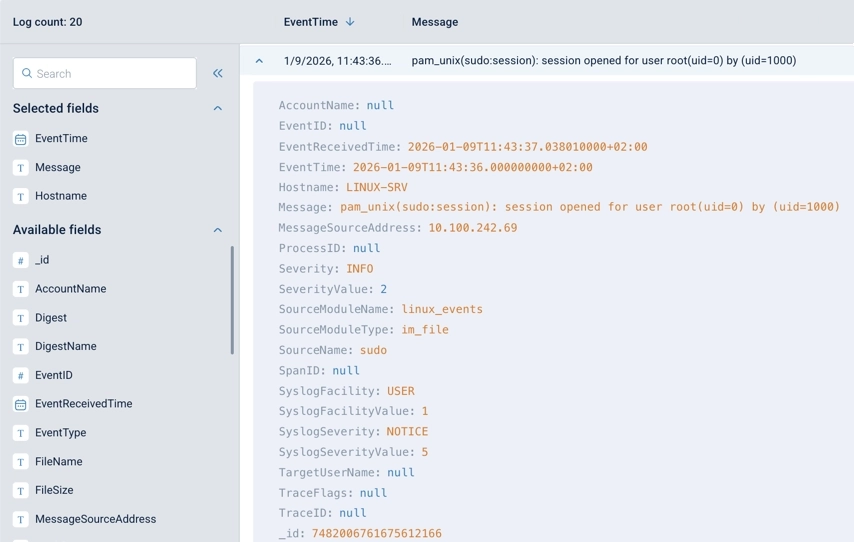
You can also send these logs to NXLog Platform itself, where you can search and inspect them as structured records, as shown below.
Conclusion
Linux systems generate critical security logs, but without a structured approach, that logging remains fragmented and unused. In this article, we focused on extracting the Linux security events that matter most and explained how they provide visibility. By proactively centralizing these logs, your security team can monitor and detect suspicious behavior, respond to incidents faster, and maintain a reliable audit trail for compliance. Just as importantly, structured and normalized events are easier to analyze, whether by humans or AI-driven detection systems.
For a deeper look at analyzing Linux security logs downstream, see our article on Linux security monitoring with Elasticsearch and Kibana.
FAQ
- Why is the Linux Audit subsystem (auditd) necessary if authentication logs exist?
-
Authentication logs only record high-level events, such as successful or failed logins. On the other hand,
auditdcaptures low-level security events that include detailed information about system calls, file access, SELinux denials, and policy-defined actions. Audit logs are essential for fine-grained monitoring, compliance requirements, and forensic investigations. - How does NXLog Agent help manage Linux security logging across different distributions?
-
NXLog Agent provides a unified way to collect, parse, and normalize Linux security logs across distributions such as Debian, Ubuntu, RHEL, and SLES. It can collect events from multiple log files and subsystems, including authentication logs, package management logs, auditd events, and system logs, and convert them into a consistent format. This reduces complexity in heterogeneous environments and allows you to apply the same monitoring, alerting, and compliance logic across Linux distributions.
- How does centralizing Linux security logs improve detection and response?
-
Centralizing Linux security logs preserves critical security events outside the systems where they are generated, which is essential if a host becomes compromised and local logs are deleted. Additionally, centralizing the logs allows you to correlate events across multiple sources and systems, rather than reviewing them in isolation. This leads to faster incident detection, reduced blind spots, and better support for compliance reporting. Structured, centralized logs also enable advanced analytics, including automation and AI-based detection.


