
Somewhere in a hospital basement, an MRI machine hums along on Windows XP. Down the road, a CNC controller on a factory floor runs Windows Server 2003. Across town, a municipal utility manages water treatment with software that hasn’t seen an update since the second Bush administration.
These aren’t edge cases. They’re everywhere — and they represent one of the most underestimated risks in enterprise security today.
Still here, still running
It would be reasonable to assume that operating systems from the early 2000s have no place in a modern network. But assumptions don’t survive contact with reality.
According to StatCounter data from 2025, Windows XP still accounts for roughly 0.2—0.3% of the global desktop OS market. That percentage sounds trivial — until you apply it to an installed base of over a billion machines. We’re talking about millions of active systems worldwide. Windows Server 2003, Windows Vista, and other long-unsupported platforms add to that number, though precise figures are harder to pin down since many of these machines operate in closed networks that don’t show up in web-based telemetry.
The industries keeping these systems alive read like a list of critical infrastructure sectors: healthcare, manufacturing, energy, transportation, defense, and government services. In 2016, a study found that 90% of NHS trusts in the United Kingdom were still running machines on Windows XP. By the time WannaCry hit in May 2017, roughly 5% of the NHS IT estate — including medical equipment — still ran the unsupported OS, according to the UK National Audit Office.
Why they can’t just upgrade
The obvious question — why don’t these organizations just upgrade? — has a straightforward answer: they can’t. Or more precisely, the cost and risk of upgrading often exceeds the cost and risk of staying put, at least in the short term.
Consider a hospital MRI machine. The device itself costs millions. Its control software was written for Windows XP and validated through a regulatory certification process. Upgrading the OS would mean recertifying the entire system — assuming the hardware vendor even offers drivers for a newer platform, which they often don’t. The same logic applies to CNC machines, SCADA controllers, point-of-sale terminals, and laboratory instruments.
Manufacturing downtime is another factor. When a production line generates thousands of dollars per minute in output, the calculation around "just upgrade over the weekend" changes fast. Re-engineering a control stack, validating new software, and recertifying equipment can take months and cost far more than the hardware itself.
Then there’s the data problem. Decades of records may be locked in proprietary formats that only the legacy application can read. Manual transcription is expensive and error-prone. For healthcare clinics, legal offices, and small factories, data continuity often takes priority over an OS migration — at least until someone can budget a controlled transition project.
None of this is irrational. These are real engineering and financial constraints. But they create a security problem that grows worse with every passing year.
The security picture
Let’s be direct about what running an unsupported 32-bit Windows system means from a security standpoint.
- No patches, no fixes
-
Microsoft ended extended support for Windows XP in April 2014 and for Windows Server 2003 in July 2015. That’s over a decade without security updates. Every vulnerability discovered since then — and security researchers and attackers have had plenty of time to find them — remains permanently open and widely available for anyone searching for one.
- Known, cataloged, and weaponized vulnerabilities
-
These operating systems have been analyzed exhaustively by both the security research community and malicious actors. The result is a large and well-documented library of exploits, many of which are trivial to execute. Tools that automate these attacks are freely available.
- No support for modern security standards
-
Older Windows systems lack support for current TLS versions, modern cipher suites, and contemporary authentication protocols. When they do support encryption, they’re often limited to deprecated algorithms with known weaknesses. This means that even network traffic to and from these systems may be interceptable or tamperable.
- Expanding attack surface
-
As operational technology (OT) networks increasingly connect to corporate IT infrastructure and the internet, legacy systems that were once physically isolated now face exposure to threats they were never designed to withstand.
The WannaCry ransomware attack of 2017 made these risks painfully visible. The malware exploited a vulnerability in the Windows SMB protocol — a flaw for which Microsoft had issued a patch two months earlier, but only for supported operating systems. WannaCry struck over 230,000 machines across 150 countries. In the UK, at least 81 of 236 NHS trusts were affected, along with 603 other NHS organizations. Thousands of operations and appointments were canceled. Staff lost access to patient records and were forced to work with pen and paper.
The UK National Audit Office’s investigation found that every infected organization shared the same vulnerability: unpatched or unsupported Windows systems. NHS Digital stated that these organizations could have protected themselves through relatively simple measures — but those measures require, at minimum, knowing what you’re working with.
The visibility gap
This brings us to the core problem — and the reason legacy Windows systems deserve the label "blind spot."
Most modern security monitoring tools require a supported operating system. Endpoint detection and response (EDR) platforms, security information and event management (SIEM) agents, and log collection software all need to run on the machine they’re monitoring. When that machine runs Windows XP or Windows Server 2003, the options shrink dramatically. Many vendors have dropped support for these platforms entirely.
The result is a monitoring gap. The systems that are most vulnerable — the ones running unpatched, unencrypted, and unprotected — are often the ones you can see the least.
This creates a dangerous paradox. The assets most likely to be compromised are the assets least likely to generate the alerts, logs, and telemetry that your security team depends on to detect and respond to threats. An attacker who gains a foothold on a legacy system may operate undetected for weeks or months, using it as a pivot point to move deeper into the network.
Network segmentation helps. Isolating legacy devices on separate VLANs, restricting their internet access, and limiting lateral movement are all standard recommendations. But segmentation without monitoring is still flying partially blind. You know the legacy systems are isolated, but you don’t know what’s happening on them. You can’t detect if segmentation controls have been bypassed. You can’t see whether an insider or a supply-chain compromise has introduced malware directly onto the legacy device.
What visibility looks like
Meaningful security monitoring of legacy systems requires tools that can actually run on them. That means lightweight agents designed for the constraints of older hardware: 32-bit processors, limited memory, minimal disk space, and operating systems that lack modern APIs.
These agents need to do what any good log collection agent does — gather Windows Event Logs, monitor file integrity, track process execution, and forward data to a central SIEM or log management platform — but they need to do it within the narrow technical boundaries of a 20-year-old OS.
They also need to handle the network limitations gracefully. If the legacy system can’t speak modern TLS, the agent needs to offer alternative transport options that still protect data in transit as much as the environment allows, while flagging the limitation so security teams can account for it in their risk models.
This isn’t about making an old system secure. No amount of monitoring will patch a decade of missing updates. It’s about making the risk visible and measurable. When you can see what’s happening on a legacy system, you can detect anomalies, investigate incidents, and make informed decisions about where to invest in mitigation or replacement.
When this article describes the agent legacy systems need, it’s no longer describing something hypothetical. NXLog Agent now runs on 32-bit Windows, from Windows XP and Server 2003 onward. It collects Windows Event Log data, buffers locally when the link to your SIEM drops, and ships a TLS 1.2 build of OpenSSL so the data is encrypted in transit even where the OS itself can’t manage it. That turns the blind spot into a monitored endpoint. A minimal collector gathering security events from a legacy host and forwarding them to NXLog Platform looks like this:
<Extension json>
    Module         xm_json
</Extension>

<Input security_events>
    Module         im_mseventlog
    Sources        Security
</Input>

<Output nxlog_platform>
    Module         om_batchcompress
    Host           relay.example.com:6514
    UseSSL         TRUE
    CAFile         %CERTDIR%/ca.pem
    CertFile       %CERTDIR%/agent-cert.pem
    CertKeyFile    %CERTDIR%/agent-key.pem
    Exec           to_json();
</Output>

<Route security_events_to_nxlog_platform>
    Path           security_events => nxlog_platform
</Route>
The legacy host then shows up in the same Agents view in NXLog Platform as every other system being monitored — status, OS version, and health visible alongside modern hosts, not sitting in a blind spot outside the monitoring platform.
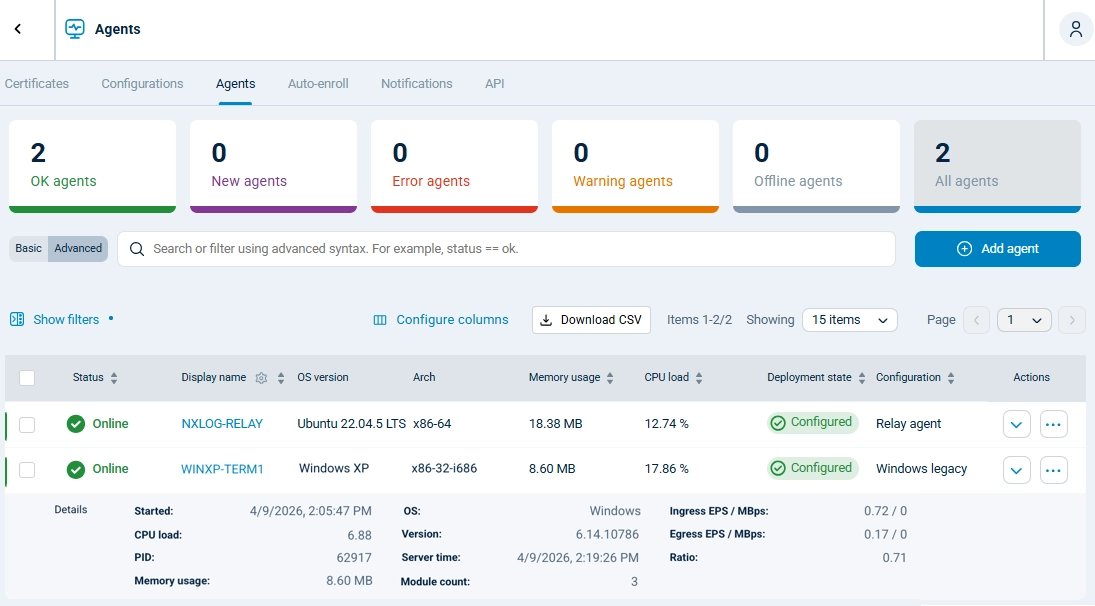
NXLog Agent for 32-bit Windows is available now on the NXLog downloads page.
Moving forward without moving on
The honest reality is that legacy Windows systems aren’t going away soon. The economic, regulatory, and technical barriers to replacement are real, and in many cases, the equipment they control will outlast several more OS generations.
That’s not an excuse to ignore them. It’s a reason to plan for them.
A practical approach starts with inventory: know exactly which legacy systems you have, where they sit in your network, and what they’re connected to. Then assess the risk each one represents based on its exposure, its function, and the sensitivity of the data it handles or the processes it controls.
Segmentation reduces exposure. Monitoring provides detection. Together, they transform a blind spot into a managed risk.
The WannaCry lesson wasn’t that legacy systems are dangerous — everyone already knew that. The lesson was that organizations didn’t have the visibility or the preparedness to act on what they knew. The trusts that were hit hardest weren’t necessarily the ones with the most Windows XP machines. They were the ones that couldn’t see what was happening on their networks and couldn’t respond when things went wrong.
Your legacy systems deserve the same monitoring attention as every other asset on your network. Not because they’re fixable, but because they’re there — and because the threats targeting them aren’t legacy at all.


