
A log collector is software that gathers log data from hosts, applications, and network devices, parses and filters it, and forwards it to a SIEM, data lake, or log store. It runs as an agent on each host, as a central listener that devices send to, or both.
A SIEM can only alert on events it receives. When a collector drops events during an outage or a burst, the SIEM gets no error, just fewer events. This guide shows where collectors lose data and how to prevent it. It ends with NXLog Agent configurations for Windows hosts, Linux hosts, and a site relay that you can adapt to your environment.
What is a log collector?
A log collector does five jobs:
- Collection
-
It reads events where they’re written: log files, operating system event APIs such as the Windows Event Log, and network ports where devices send syslog.
- Parsing and normalization
-
It turns raw text into named fields, so you can search a username or source IP the same way across every source.
- Filtering and enrichment
-
It drops events you don’t need and adds context, such as hostname or environment, before data leaves the source.
- Buffering
-
It holds events in memory or on disk when a destination is slow or down, then sends the backlog when it recovers.
- Forwarding
-
It delivers events to one or more destinations, such as a SIEM, a data lake, or another collector, over the transport you choose.
Collectors run in two places. An agent runs on the host that produces the logs. A relay, also called an aggregator, runs on a central server and receives logs from many sources.
You can chain the two. Agents on servers and workstations forward to a relay, and the relay also receives from devices that can’t run an agent.
Log collector vs. log shipper, log aggregator, telemetry pipeline, and SIEM
These terms overlap. The practical difference is where the software runs and how much processing it does.
| Term | What it usually means | Where it runs |
|---|---|---|
Log collector |
Software that gathers, parses, and forwards logs. The term covers host agents and central receivers. |
On the host, on a central server, or both |
Log shipper |
A lightweight agent that reads logs and sends them on, with little processing. |
On the host |
Log forwarder |
Any component that passes logs to the next hop, such as a syslog daemon or a vendor’s forwarder. |
On the host or a relay |
Log aggregator or relay |
A central collector that receives logs from many sources, then buffers, processes, and forwards them. See log aggregation. |
One per site or network segment |
Telemetry pipeline |
The whole path for logs, metrics, and traces, from collection through processing to several destinations. See telemetry pipelines. |
Across hosts, relays, and destinations |
SIEM |
The platform that stores, correlates, and alerts on security events. |
Central, on-premises or in the cloud |
Standards and vendors use the word differently. NIST SP 800-92 says servers that receive log data from many log generators are sometimes called collectors or aggregators (section 3.1).
OpenTelemetry ships its Collector as one binary that you deploy as an agent or a gateway. In Palo Alto Networks Panorama, a Log Collector is an appliance role that receives firewall logs and stores them on its disks.
How a shipper handles an outage decides whether you lose data. NXLog’s guide to log shipper offline buffering covers the details.
How does a log collector work?
A collector moves every event through the same five stages. Each stage can lose data differently.
-
Read. The collector pulls events from the source and remembers its position, so it resumes where it stopped after a restart. NXLog Agent’s file input, for example, keeps a bookmark for each file in its cache by default. Readers that mishandle rotated files or multiline events, such as stack traces, drop or split records.
-
Parse. Raw lines become records with named fields. A parser that fails on an unexpected format drops the event or forwards it unparsed, and detections that depend on those fields won’t match it.
-
Process. Filters drop what you don’t need, and enrichment adds context. This stage decides how much data reaches your SIEM.
-
Queue. Records wait in a queue between stages. When a queue fills, the collector must either slow its inputs (backpressure) or drop data.
-
Send. The output delivers records in batches and retries when a destination fails. Syslog over UDP has no acknowledgment and no way to detect a lost datagram (RFC 5426), so a lost message stays lost.
The read stage looks different for each kind of source:
- Files
-
Application and service logs written to files on disk.
- Operating system event APIs
-
The Windows Event Log, Event Tracing for Windows, the systemd journal, the Linux Audit System, and the macOS OSLog and Endpoint Security.
- Network listeners
-
Syslog over UDP, plain TCP, or TCP with TLS, plus SNMP traps and NetFlow from devices that can’t run an agent.
- Cloud and SaaS APIs
-
Audit logs pulled from services such as Microsoft 365.
- OpenTelemetry
-
OTLP data from instrumented applications and other collectors.
In NXLog Agent, input modules read these sources, and extensions such as the SNMP Traps module decode protocols on top of a network input. Processor and output modules handle the later stages, and routes connect them in the order you choose.
Agent-based vs. agentless log collection
Agent-based collection runs software on each source, so you can filter, buffer, and encrypt before data leaves the host. Agentless collection relies on the source to send or expose its own logs, which is the only option for most network devices. In a mixed environment, you’ll use both.
| Dimension | Agent-based | Agentless |
|---|---|---|
Where processing happens |
On the source, before data crosses the network |
On the central collector, after transfer |
Transport |
Your choice, such as TLS, with buffering through outages |
Whatever the source supports, often syslog over UDP |
Credentials |
Not needed: the agent reads locally |
Pull-based collection needs credentials for each host |
Load on the central collector |
Spread across sources |
Concentrated on one collector |
Coverage |
Hosts where you can install software |
Network devices, appliances, and locked-down systems |
Health monitoring |
The agent can report its own status |
Rarely visible on the sending side |
NIST SP 800-92 describes the same trade-off for SIEM collection in section 3.4. Agentless collection avoids installing and maintaining agents, but it loses filtering at the host, moves more data over the network, and may need credentials for every host.
NXLog’s data collection modes guide recommends agent-based collection for most use cases. It recommends agentless collection only for sources where you can’t install third-party software, such as network devices and legacy or embedded systems, or where compliance rules forbid it.
The same guide lists two drawbacks of agentless collection. Most syslog forwarders send over UDP, which is neither reliable nor secure. And collecting from many Windows hosts with Windows Event Forwarding (WEF) puts far more load on the central collector than an agent on each host does.
What about Windows Event Forwarding?
WEF is the agentless option built into Windows. Clients forward selected events to a Windows Event Collector (WEC). Microsoft describes source-initiated subscriptions, where Group Policy configures each client to push its events to the collector, as the setup with the greatest scalability. In a domain, Kerberos encrypts the connection by default (Microsoft Learn).
The same Microsoft guide documents a gap. The client’s local event log is WEF’s buffer. If that log overwrites events while the client can’t reach the collector, the collector gets no notice that events were lost.
NXLog Agent can take the collector role with the Windows Event Collector input module, which runs on every supported platform, including Linux. For a closer look, see Making the most of Windows Event Forwarding and NXLog Platform vs. WEF.
Log collectors compared
The table compares eight collectors on the mechanics this article covers. It shows how each one reads the Windows Event Log, whether it can buffer to disk, whether it can receive syslog over TLS, and what manages it at scale.
| Collector | Windows Event Log | Disk buffering | Syslog over TLS intake | Central management | License | Best fit when |
|---|---|---|---|---|---|---|
Native, local or remote (im_msvistalog), plus ETW (im_etw) and WEF intake (im_wseventing) |
Persistent log queues (PersistLogqueue) and disk buffers |
Yes, with RFC 5425 framing (TLS/SSL input with the Syslog extension) |
NXLog Platform: auto-enrollment, templates, RBAC |
Commercial, free for up to 10 sources (NXLog) |
You run a mixed environment, including AIX, Solaris, or legacy Windows, and want one agent and one management plane |
|
winevtlog input, local or remote |
Yes (syslog input with TLS), octet counting optional |
None in the open-source project |
You collect from Kubernetes nodes and containers and run your own pipeline |
|||
in_windows_eventlog2 plugin |
Yes (in_syslog with TLS transport) |
None first-party |
You need an aggregation tier that draws on a broad plugin catalog |
|||
windows_event_log source (beta) |
Disk buffers that survive restarts and crashes |
Yes (syslog source with TLS in TCP mode) |
None first-party |
You want heavy transformation written in VRL |
||
windowseventlog receiver (beta, contrib build), local or remote |
Persistent queue with a storage extension |
Yes (syslog receiver, beta), octet counting optional |
OpAMP client support; you supply the OpAMP server |
Your backends speak OTLP, and you want a vendor-agnostic standard |
||
Filebeat winlog input |
Filebeat disk queue |
TCP input with SSL; the syslog input has been deprecated since 8.14 |
Fleet in Kibana for Elastic Agent |
Elastic License or Apache 2.0, by build |
Elasticsearch or Elastic Security is your destination |
|
Native event log monitor; the forwarder must run on the Windows host, as Local System, to read all local logs |
Persistent queues for inputs such as network, scripted, and event log inputs, not for monitored files |
tcp-ssl inputs; Splunk’s stated best practice for syslog is a syslog server such as syslog-ng or SC4S |
Agent management, formerly deployment server |
Proprietary (Splunk General Terms) |
Splunk is your SIEM |
|
No native reader: OSE runs on Linux, BSD, Solaris, AIX, HP-UX, macOS, and Cygwin; it parses forwarded Windows XML events (4.6+) |
Reliable disk-buffer survives restarts and crashes |
Yes (TLS server setup) |
None first-party |
You need a syslog relay on Linux or Unix |
Every cell reflects each project’s own documentation as of 16 October 2026. "None first-party" means the project’s docs describe file-based configuration and no bundled fleet manager.
Pick by your SIEM and your operating systems. If Splunk or Elastic is your SIEM, their own agents connect to it most directly. If your workloads run in Kubernetes and your backends speak OTLP, Fluent Bit and the OpenTelemetry Collector, both CNCF projects, fit that model.
If you run Windows, Linux, and Unix side by side, the Windows column and the management column carry the most weight, and that’s where NXLog Agent and NXLog Platform focus. For operating system coverage, destinations, storage, and pricing, see NXLog’s comparison of five log collection tools.
Log collector architectures: from one host to many sites
The simplest layout sends every source straight to the SIEM. It holds up for a few sources. As the environment grows, it fails in three ways:
-
Nothing queues events while the SIEM is down for maintenance.
-
Nothing filters volume before the SIEM’s ingest meter.
-
Devices that send syslog over UDP get no delivery guarantee across busy links.
A relay tier fixes all three. Agents on hosts and agentless sources send to a relay at each site. The relay parses, filters, and queues, then routes to the SIEM, long-term storage, and other destinations in parallel. UDP traffic only crosses the local network.
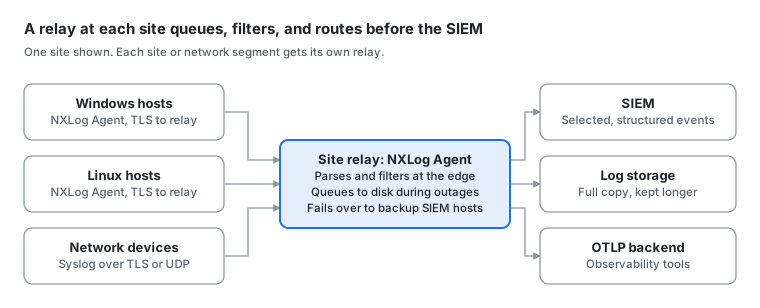
Primary sources describe the same layout. OpenTelemetry’s gateway pattern sends signals to one central OTLP endpoint before the backends, and its docs show how to combine it with collectors that run as agents on each host. The 2024 joint guidance on event logging from ASD’s ACSC, CISA, the FBI, the NSA, and partner agencies recommends a central logging facility that forwards selected, processed logs to SIEM and XDR tools.
Get these three design choices right:
- Transport
-
Prefer TCP with TLS where the source supports it. RFC 5425 defines syslog over TCP with TLS on port 6514. RFC 6587 recommends TLS over plain TCP. Check the framing as well. With newline framing, a message containing a line break can arrive as several messages. RFC 5425’s octet-counted framing avoids that, and NXLog Agent’s Syslog_TLS input reader and output writer handle it.
- Processing location
-
Parse and filter at the collector or relay, before data crosses the WAN or reaches the SIEM. The joint guidance advises filtering logs before they reach a SIEM or XDR to limit cost and capacity issues.
- Buffering and failover
-
NXLog Agent keeps a queue in front of every processor and output, and flow control pauses inputs instead of dropping data when an output stalls (buffering and flow control). You can persist those queues to disk and list several destination hosts, so the agent fails over when one is down (high availability).
For device-specific intake, such as Cisco ASA, PAN-OS, and FortiGate, see the firewall log analyzer guide.
What to look for in a log collector
Check what each collector can read, then test how it behaves when a destination fails.
| Criterion | Question to ask | How to test it |
|---|---|---|
Source coverage |
Does it run on every OS and version in your inventory, including legacy and Unix systems? |
Compare the vendor’s supported platforms list, such as NXLog Agent’s, with your asset inventory, not your target state. |
Delivery through outages |
What happens to events while the destination is down, and after the collector restarts? |
Block the destination for longer than your longest maintenance window, keep generating events, then restore it and count the gaps. |
Backpressure |
Does one slow destination stall every route, or does the collector drop data? |
Slow down one output and watch what happens to the others. |
Record integrity |
Does it split or merge events during file rotation or multiline parsing? |
Send sequence-numbered test events through a rotation and check for gaps and fragments. |
Resource use |
What does it use at your peak event rate, with your parsing rules? |
Load-test with your own sources under the CPU and memory limits you’ll run in production. |
Transport security |
Does it support TLS 1.3 and mutual authentication, and how do you rotate certificates? |
Connect to the listener with openssl s_client and check the protocol and certificate chain. |
Self-monitoring |
Can it alert you when a source goes silent or a queue keeps growing? |
Stop a source and time how long it takes to get an alert. |
Fleet operations |
How do you enroll agents, push configuration, and control who can change it? |
Push a change to a test group of agents, then roll it back. |
The comparison table and vendor docs answer the source coverage and fleet operations rows. Delivery, backpressure, record integrity, and self-monitoring only show up in testing. The outage drill at the end of the next section gives you a starting point.
Configuration packs: a log collector pipeline with NXLog Agent
The configuration samples below build the two-tier layout from the architecture section. Agents on Windows and Linux hosts forward to a site relay, and the relay also receives syslog from network devices. Paths assume default install locations, and certificates come from your own CA. Test the packs in a lab before you roll them out.
Pack 1: Windows host agent
The Event Log for Windows input module reads the Windows Event Log through the native API. The query collects the Security, Sysmon, and PowerShell channels. Its Suppress element drops Windows Filtering Platform events 5156 and 5158 on the host because Microsoft rates their subcategory’s event volume as high.
Event 1102, which records a cleared Security log, stays in. MITRE ATT&CK tracks clearing Windows event logs as sub-technique T1685.005.
The agent forwards data over NXLog Transport, which compresses records and keeps every field, so the relay doesn’t parse the data again.
Two Host entries give it a backup relay.
<Input windows_events>
    Module         im_msvistalog
    <QueryXML>
        <QueryList>
            <Query Id="0">
                <Select Path="Security">*</Select>
                <Select Path="Microsoft-Windows-Sysmon/Operational">*</Select>
                <Select Path="Microsoft-Windows-PowerShell/Operational">*</Select>
                <Suppress Path="Security">*[System[(EventID=5156 or EventID=5158)]]</Suppress>
            </Query>
        </QueryList>
    </QueryXML>
</Input>

<Output relay>
    Module         om_batchcompress
    Host           relay1.example.com:2514
    Host           relay2.example.com:2514
    UseSSL         TRUE
    CAFile         C:\Program Files\nxlog\cert\ca.pem
    CertFile       C:\Program Files\nxlog\cert\agent-cert.pem
    CertKeyFile    C:\Program Files\nxlog\cert\agent-key.pem
</Output>

<Route windows_to_relay>
    Path           windows_events => relay
</Route>
The Sysmon channel exists only where Sysmon is installed. PowerShell events depend on policy too, and the joint guidance recommends turning on script block and module logging.
Pack 2: Linux host agent
The Linux Audit System input module reads the kernel audit system directly, with rules kept in the NXLog Agent configuration. Turn off flow control on this input, as NXLog’s documentation recommends. If NXLog Agent suspends the input and the audit backlog fills, every process that generates audit messages blocks.
If auditd is installed, it must not be running, because the module won’t start while another audit collector holds the audit system.
The -e 1 rule activates the audit system.
The File input module picks up the authentication log, and the same NXLog Transport output sends both to the relay.
<Extension syslog>
    Module         xm_syslog
</Extension>

<Input audit>
    Module         im_linuxaudit
    FlowControl    FALSE
    <Rules>
        -w /etc/passwd -p wa -k identity
        -w /etc/sudoers -p wa -k privilege
        -a always,exit -F arch=b64 -S execve -k exec
        -e 1
    </Rules>
</Input>

<Input auth_log>
    Module         im_file
    File           '/var/log/auth.log'
    Exec           parse_syslog();
</Input>

<Output relay>
    Module         om_batchcompress
    Host           relay1.example.com:2514
    Host           relay2.example.com:2514
    UseSSL         TRUE
    CAFile         /opt/nxlog/cert/ca.pem
    CertFile       /opt/nxlog/cert/agent-cert.pem
    CertKeyFile    /opt/nxlog/cert/agent-key.pem
</Output>

<Route linux_to_relay>
    Path           audit, auth_log => relay
</Route>
The authentication log path shown is the one Debian and Ubuntu use when rsyslog is installed.
Debian 12 and later don’t install rsyslog by default, so read authentication events from the journal with the Systemd input module there.
RHEL-family systems write authentication logs to /var/log/secure instead.
The execve rule records process launches through the 64-bit system call interface, in line with the joint guidance to log process creation and command lines.
On hosts that also run 32-bit programs, add the same rule with arch=b32, as the auditctl man page advises.
The rule produces high event volume, so measure it on a few hosts before a wide rollout.
Pack 3: Relay intake
The relay listens on three ports. The NXLog Transport input module receives data from agents with fields intact. The TLS/SSL input module accepts syslog over TCP with TLS on port 6514, with RFC 5425 framing. Finally, the UDP input module collects data from devices that can only send over UDP.
If your devices can’t present a client certificate, set RequireCert to FALSE on the TLS listener, since the default is TRUE.
The UDP input gets a larger socket buffer and no flow control, because pausing a UDP listener doesn’t slow the sender.
See the log buffering common settings.
<Extension syslog>
    Module         xm_syslog
</Extension>

<Input nxlog_agent>
    Module         im_batchcompress
    ListenAddr     0.0.0.0:2514
    CAFile         /opt/nxlog/cert/ca.pem
    CertFile       /opt/nxlog/cert/relay-cert.pem
    CertKeyFile    /opt/nxlog/cert/relay-key.pem
</Input>

<Input tcp_tls>
    Module         im_ssl
    ListenAddr     0.0.0.0:6514
    CAFile         /opt/nxlog/cert/ca.pem
    CertFile       /opt/nxlog/cert/relay-cert.pem
    CertKeyFile    /opt/nxlog/cert/relay-key.pem
    RequireCert    FALSE
    InputType      Syslog_TLS
    Exec           parse_syslog();
</Input>

<Input udp>
    Module         im_udp
    ListenAddr     0.0.0.0:514
    SockBufSize    150000000
    FlowControl    FALSE
    Exec           parse_syslog();
</Input>
The 150 MB socket buffer comes from NXLog’s buffering examples.
Size it to your own burst rate.
On Linux, the kernel can cap the buffer at net.core.rmem_max, so check that setting too (socket(7)).
Pack 4: Delivery to the SIEM
The TLS/SSL output module lists two SIEM hosts and fails over when the first is unreachable.
By default, each log queue is 2 MiB and memory-based (LogqueueSize).
This output raises its queue to 64 MiB to buy time during an outage, and PersistLogqueue keeps that queue on disk instead of in memory.
NXLog Agent saves a memory queue to disk when it stops cleanly, so the disk-based queue helps when the agent or host fails.
See the log buffering common settings.
For outages measured in hours, add a disk buffer using the Buffer processor module in front of the output.
Its MaxSize is in kilobytes, so 4194304 is 4 GiB, and WarnLimit logs a warning at 80 percent.
NXLog’s buffering guide notes the cost: persistent queues and disk buffers add disk I/O and reduce throughput.
<Extension json>
    Module             xm_json
</Extension>

<Processor disk_buffer>
    Module             pm_buffer
    Type               Disk
    MaxSize            4194304
    WarnLimit          3355443
</Processor>

<Output siem>
    Module             om_ssl
    Host               siem-a.example.com:6514
    Host               siem-b.example.com:6514
    CAFile             /opt/nxlog/cert/ca.pem
    CertFile           /opt/nxlog/cert/relay-cert.pem
    CertKeyFile        /opt/nxlog/cert/relay-key.pem
    PersistLogqueue    TRUE
    LogqueueSize       67108864
    Exec               to_json();
</Output>

<Route to_siem>
    Path               nxlog_agent, tcp_tls, udp => disk_buffer => siem
</Route>
Serializing to JSON keeps every field intact. If your SIEM expects another ingestion path, NXLog’s SIEM integration guides cover Microsoft Sentinel, Splunk, and others.
Pack 5: A second destination that can’t stall the SIEM
Add an OTLP output for your observability backend with the OpenTelemetry Exporter output module and turn off its flow control. In a route with several outputs, one blocked output can pause the whole route. With flow control off, a blocked output discards records until it recovers, and the SIEM output keeps receiving. See the FlowControl common setting.
<Output otlp_backend>
    Module         om_otel
    URL            https://otel-gateway.example.com:4318/
    Format         json
    HTTPSCAFile    /opt/nxlog/cert/ca.pem
    FlowControl    FALSE
    Exec           $RecordType = 'Log';
</Output>

<Route to_siem>
    Path           nxlog_agent, tcp_tls, udp => disk_buffer => siem, otlp_backend
</Route>
This route replaces the one in Pack 4.
The OpenTelemetry Exporter output module sends gRPC by default, so you must set Format json for an OTLP/HTTP endpoint on port 4318.
Setting $RecordType to Log sends each record through the OTLP logs pipeline, as the module documentation shows.
Pack 6: Watch the collector itself
By default, an input that stops receiving data raises no error. Two additions catch it. The Internal input module collects the agent’s own logs, and a scheduled check raises an error when an input stops receiving data.
The check is adapted from NXLog’s inactive data source guide. It counts records per hour and logs an error when the count drops to one or less. The Internal input module then carries that error to your SIEM, and it stays in its own route, as the docs recommend, to avoid message loops.
<Input nxlog_agent> (1)
    Module         im_batchcompress
    ListenAddr     0.0.0.0:2514
    CAFile         /opt/nxlog/cert/ca.pem
    CertFile       /opt/nxlog/cert/relay-cert.pem
    CertKeyFile    /opt/nxlog/cert/relay-key.pem
    <Exec>
        create_stat("msgrate", "RATE", 3600);
        add_stat("msgrate", 1);
    </Exec>
    <Schedule>
        Every       3600 sec
        <Exec>
            create_stat("msgrate", "RATE", 10);
            add_stat("msgrate", 0);
            if (defined get_stat("msgrate") and get_stat("msgrate") <= 1) {
                log_error("No records received from agents in the last hour");
            }
        </Exec>
    </Schedule>
</Input>

<Input internal>
    Module         im_internal
</Input>

<Route collector_health>
    Path           internal => siem
</Route>This catches a silent input on one relay, not one host going quiet among thousands. For that, alert on per-host event counts in your SIEM, and watch agent connectivity in NXLog Platform’s agent status view. If the SIEM itself is down, these errors wait in the same queue, so alert on relay silence inside the SIEM as well.
Verify it: syntax, TLS, and an outage drill
Run these before you call the pipeline done. The outage drill matters most: block the SIEM, keep events flowing, then restore it and count.
$ sudo /opt/nxlog/bin/nxlog -v -c /opt/nxlog/etc/nxlog.conf (1)
$ openssl s_client -connect relay1.example.com:6514 -CAfile ca.pem -brief (2)
$ sudo kill -SIGUSR1 $(cat /opt/nxlog/var/run/nxlog/nxlog.pid) (3)
$ sudo iptables -I OUTPUT -p tcp --dport 6514 -j REJECT (4)
$ sudo iptables -D OUTPUT -p tcp --dport 6514 -j REJECT (5)| 1 | Check the configuration syntax before you restart the agent. |
| 2 | Check the TLS listener’s negotiated protocol and certificate chain. |
| 3 | Write the agent’s current status to its log file. |
| 4 | Start the outage drill on the relay by blocking the SIEM port, then wait out a maintenance window. |
| 5 | Unblock the SIEM port to end the drill. |
On Windows hosts:
> & "C:\Program Files\nxlog\nxlog.exe" -v -c "C:\Program Files\nxlog\conf\nxlog.conf"
> sc.exe control nxlog 200
Call sc.exe by its full name, because Windows PowerShell maps sc to Set-Content.
The NXLog Agent command reference lists these flags and signals.
To generate countable traffic, add a Test Generator input module instance with MaxCount set to the number of events you want.
Each event carries an incrementing number, so gaps are easy to spot.
The Blocker processor and output modules simulate a blocked route without touching the network.
The offline buffering guide covers sizing queues for the outage you expect.
Managing log collectors at scale
At thousands of agents, the work shifts from writing configurations to keeping them consistent. The usual problems are configuration drift, mixed versions, expiring certificates, and new hosts nobody enrolls.
NXLog Platform handles the agent side of that work:
- Enrollment
-
Auto-enroll rules enroll new agents that match a rule when they connect, and can apply a configuration template at the same time. You can bulk-deploy NXLog Agent with Microsoft GPO, Ansible, Puppet Bolt, Chef, or Salt.
- Configuration templates
-
Templates package NXLog’s recommended configuration for a data source, so agents of the same kind get a consistent setup.
- Role-based access control
-
Roles group fine-grained permissions that define what each user can access.
- Certificates
-
The Certificates view syncs certificates to agents, so you don’t maintain certificate files host by host.
- Status
-
Agent status shows each agent’s connectivity to the platform.
NXLog publishes sizing for the platform. The deployment guide’s largest standard size, xlarge, manages 50,001 to 100,000 agents on a host with at least 8 CPU cores and 38 GB of RAM, or 54 GB when the platform also stores logs. The host needs an x86_64 CPU with AVX2 (system requirements).
Best practices for running log collectors
- Prefer TLS over UDP
-
Plain UDP syslog has no delivery guarantee and no encryption. The joint guidance recommends TLS 1.3 and cryptographic verification of log integrity in transit and at rest. NXLog Agent’s TLS modules accept TLS 1.2 and 1.3 by default, and SSLProtocol restricts them to TLS 1.3 where both ends support it.
- Normalize timestamps at collection
-
The same guidance prefers UTC and ISO 8601 with the year first, down to milliseconds, as in
2024-07-25T20:54:59.649Z. The guide to normalizing log timestamps to ISO 8601 shows how. - Structure events at the edge
-
Forward JSON or another structured format with a consistent schema. The guidance also recommends automated normalization for logs whose format changes without notice, such as SaaS logs.
- Filter before the SIEM
-
Every event you drop at the collector or relay saves bandwidth, storage, and ingest costs. Filtering after ingestion still pays for the transfer and the ingest.
- Persist the queues you can’t lose
-
NXLog Agent saves its queues to disk when it stops cleanly. Disk-based queues and buffers reduce what you lose when the agent or host fails, and SyncLogqueue makes a queue crash-safe at a large performance cost. Size them for your longest expected outage, as the offline buffering guide explains.
- Alert on silence and on queue growth
-
A source that stops sending should page someone, and so should a buffer that keeps filling. The pm_buffer
WarnLimitsetting gives you that warning. - Protect the collector itself
-
MITRE ATT&CK lists logging agents among the tools adversaries disable or tamper with (T1685). The joint guidance lists unexpected log clearing and configuration changes to logging software as anomalies to watch. Restrict who can change collector configuration, and alert when it changes.
- Keep retention out of the collector
-
Buffers hold events through an outage, but they don’t replace retention. The joint guidance notes that some incidents take up to 18 months to discover, so route a full copy to storage with retention set by policy.
How NXLog Agent and NXLog Platform help
NXLog Agent runs every pack above. For log collection, it gives you:
- Both collection modes in one agent
-
It collects locally from files, databases, cloud services, and APIs, and it relays data from syslog sources, network devices, and third-party agents (NXLog Agent).
- Coverage for mixed environments
-
It runs on over 80 platform and architecture combinations, including AIX, Solaris, and legacy 32-bit Windows such as Windows 2000 and XP (supported platforms). The 32-bit Windows package has a smaller module set than the 64-bit one.
- 120+ modules
-
Inputs, processors, and outputs cover files, event APIs, network protocols, cloud services, and SIEM destinations.
- Processing at the source
-
Deduplication, enrichment, filtering, and format conversion run before data leaves the host.
- Delivery you configure
-
Log queues, flow control, persistent queues, disk buffers, and failover across destination hosts.
- OpenTelemetry in and out
-
Te OpenTelemetry Collector input module receives OTLP, and the OpenTelemetry Exporter output module sends logs, metrics, and traces over HTTP(S) or gRPC.
NXLog Platform adds agent management, built-in storage, search, and dashboards. Ports of Auckland chose NXLog for production for its manageability and scalability, and its team singled out the "configuration granularity and filtration abilities" that let it ingest only valuable events and save on EPS volume (case study).
Conclusion
A log collector reads, parses, filters, buffers, and forwards logs. Collectors differ most in how they keep events when destinations fail, files rotate, and devices only speak UDP.
Use agents where you can install them, a relay tier for devices that can’t run one, and alerts that fire when a source or collector goes silent.
If you’re setting this up now, here’s a practical order of work:
-
Check each candidate’s supported platforms list against your asset inventory.
-
Decide agent or agentless for each source type, and put a relay at each site.
-
Move every source you can to TCP or TLS.
-
Persist the queues on outputs you can’t lose, then run an outage drill.
-
Filter at the edge, and measure the change in SIEM ingest.
-
Alert on silence.
NXLog Platform runs this pipeline on-premises. NXLog Agent collects and processes at the edge, and the platform adds agent management, storage, search, and dashboards. Try it free for up to 10 sources.
FAQ
- What is the difference between a log collector and a log shipper?
-
A log shipper is one kind of log collector: a lightweight agent that reads logs and sends them on with little processing. "Log collector" is broader. It also covers central receivers that parse, filter, buffer, and route logs from many sources.
- What is the difference between a log collector and a SIEM?
-
A log collector moves and prepares log data. A SIEM stores it, correlates events across sources, and runs detections. The two work together: collectors feed the SIEM structured, filtered events.
- Do you need an agent to collect logs?
-
Not always. Many network devices can’t run third-party software, so they send syslog to a central collector instead. On servers and workstations, an agent filters events before they leave the host, which agentless collection can’t do (NIST SP 800-92, section 3.4). An agent also lets you choose the transport and add buffering, instead of relying on what the source supports (data collection modes).
- How does a log collector avoid losing logs when the SIEM is down?
-
It queues events in memory or on disk and forwards them once the SIEM is reachable again. For long outages, add disk-based queues or a disk buffer, and size them for your longest expected outage. For UDP sources, put the relay close to the source, because a datagram lost on the way isn’t resent.
- Which log collector should you use?
-
It depends on your operating systems, your SIEM, and how many agents you manage. If Splunk or Elastic is your SIEM, its own agent connects to it most directly. If your workloads run in Kubernetes and your backends speak OTLP, Fluent Bit or the OpenTelemetry Collector fits that model.
If you run a mixed environment that includes Windows, AIX, Solaris, or legacy systems, one agent that covers all of them, such as NXLog Agent, means one configuration language and one management plane. The comparison table above and the five-tool comparison go further.
- Is a syslog server a log collector?
-
Yes. A syslog server that receives messages from devices and forwards or stores them is an agentless log collector. A general-purpose collector also reads files and operating system event APIs, parses other formats, and routes to several destinations. For the basics, see What is syslog?


