
The syslog-ng alternative for Windows, Linux, and macOS
One agent across six operating systems, managed from a single console.
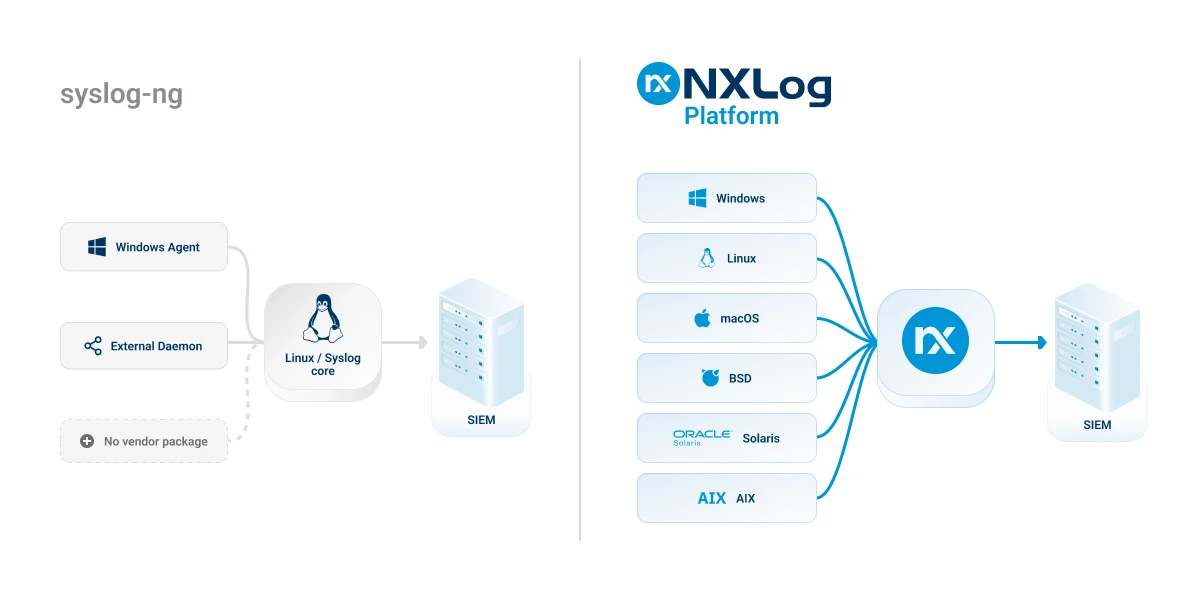
syslog-ng covers Linux well. Your infrastructure runs on more than Linux. NXLog Platform gives you one agent for Windows, Linux, macOS, BSD, Solaris, and AIX - with native Windows Event Log collection, SNMPv3 trap reception, and centralized management for the whole fleet. Keep your SIEM. Close the gaps.
Fortune 500 companies trust NXLog





syslog-ng vs. NXLog Platform at a glance
Already on syslog-ng Premium Edition?
syslog-ng PE vs. NXLog Platform
Need help? Book a short migration workshop
Why teams choose NXLog Platform

Windows done right
Collect Windows Event Log and ETW natively, read EVT and EVTX archives, and run Windows Event Collection on Windows or Linux with full WEF support. No extra forwarder on any host.

One agent for every OS
Run the same agent on Windows, Linux, macOS, BSD, Solaris, and AIX. Parse, filter, normalize, and enrich at the source, so every platform ships consistent data.

Manage the fleet centrally
Control up to 100,000 agents from one console: grouping, templates, visual routing, remote configuration updates, and health monitoring.

Integrates with your stack
More than 120 modules connect SIEMs, databases, message queues, and cloud services. Route to several destinations at once for redundancy or retention requirements.

Reliable at scale
Multithreaded processing, disk buffering, load balancing, and automatic failover keep data flowing through spikes and outages.

Security and compliance built in
TLS and mutual TLS, log encryption, role-based access with audit trails, file integrity monitoring, PII masking, and SNMPv3 trap security.
Value by Team

Platform / Observability engineer
• Replace per-host syslog-ng configs with one agent and one console across six operating systems.
• Parse and enrich at the source to cut central pipeline load.
• Collect logs and metrics in the same pipeline, instead of running a metrics agent alongside syslog-ng.

DevOps / SRE
• Keep your log paths, but filter noise before it reaches incident tools.
• Cut MTTR with structured, correlated data instead of forwarded text.
• Get buffering, failover, and load balancing without hand-built relay tiers.

Cloud / Infrastructure engineer
• Deploy one agent on VMs, bare metal, and containers, with no separate Windows forwarder.
• Fan out one route to several platforms at once.
• Automate rollout with templates and CI/CD instead of scripting per-host config pushes.

Platform owner / IT architect
• Enforce governance with role-based access and audit trails, included rather than edition-gated, included rather than edition-gated.
• Standardize on a vendor-neutral pipeline and avoid lock-in.
• Control spend with selective routing, filtering, and built-in retention.
Try NXLog Platform for free
FAQs
NXLog Platform is a full replacement for syslog-ng, but not a drop-in fork - it’s a different agent with its own configuration format. The building blocks map almost one-to-one: sources become Input blocks, destinations become Output blocks, and log paths become Routes. The migration section above shows the translation, and our engineers run short workshops if you want a guided start.
Yes. NXLog Platform is vendor-neutral and feeds Splunk, Elastic, Microsoft Sentinel, Graylog, Datadog, and other analytics platforms through built-in output modules. Many teams run NXLog in front of the SIEM to filter and enrich data first, which improves data quality and trims ingest volume.
The agent receives SNMP v1, v2c, and v3 traps natively and parses them into structured fields - SNMPv3 uses the User-based Security Model for authentication and encryption, with no external trap parser. Beyond SNMP, NXLog Platform collects sources outside syslog-ng’s scope, including Windows ETW.
No. The NXLog agent on Windows reads the Windows Event Log API directly through its im_msvistalog module - Application, Security, System, and custom channels - and preserves full event detail, including the XML. There is no equivalent of the separate syslog-ng Agent for Windows to install or maintain.
Yes. The agent processes high event rates with multithreaded processing, and disk buffering holds data when a destination slows down or drops. Automatic failover switches to a secondary target until the primary returns, and load balancing spreads traffic across receivers - so the pipeline keeps flowing under stress.
syslog-ng is a trademark of One Identity LLC. Product information is based on publicly available documentation for syslog-ng OSE 4.12 and syslog-ng PE 8.2 as of August 2026.
Follow us



© Copyright NXLog Ltd.