
The default advice for any system running an unsupported operating system is simple: replace it. Upgrade to a supported platform. Move to modern hardware. Problem solved.
It’s good advice in theory. However, as with many other things in life, in practice it ignores everything that makes legacy infrastructure hard to deal with in the first place.
For organizations running Windows XP, Server 2003, or other legacy 32-bit Windows systems, "just upgrade" is often the most expensive, disruptive, and operationally risky option on the table. The better question isn’t when can we rip this out, but how do we secure it where it stands — and keep securing it for as long as it needs to stay.
Why rip-and-replace fails as a strategy
The phrase "rip and replace" implies a clean swap: old system out, new system in. But in the environments where legacy Windows persists, nothing about the swap is clean.
- The hardware problem
-
Legacy operating systems often exist because the hardware they control demands them. An MRI machine, a CNC controller, or a SCADA terminal was built and validated around a specific software stack. The vendor may no longer exist, may no longer support the device, or may never have produced drivers for anything beyond the original OS. Replacing the software means replacing the hardware — and that hardware can cost hundreds of thousands or millions of dollars.
- The certification problem
-
In regulated industries, the device and its software form a validated unit. In healthcare, changes to a medical device’s software stack can trigger regulatory resubmission — a process that, depending on device classification, can take 6 to 18 months and cost upward of $250,000 per component change. In manufacturing, recertifying a modified control system against safety standards means months of validation and potential production halts. The cost of compliance with the upgrade can exceed the cost of the equipment itself.
- The downtime problem
-
A 2025 survey of OT and ICS decision-makers across Europe, conducted by TXOne Networks, found that 50% of respondents said at least half of their OT environments still rely on legacy systems. One in five reported that more than 75% of their infrastructure is legacy-dependent. For organizations where production downtime costs thousands of dollars per minute, the risk calculus of a system migration is not abstract. Any disruption — planned or unplanned — to a working production line has a direct revenue impact.
- The cascade problem
-
Legacy systems rarely exist in isolation. They connect to other systems, feed data to downstream processes, and depend on specific network configurations and protocols. Changing one component can trigger incompatibilities across the production line. In the TXOne survey, compatibility with legacy equipment was the top reason cited (by 54% of respondents) for keeping outdated systems in place.
None of this makes the security risk acceptable. It means that the response to the risk needs to be realistic about the constraints.
The myth of the air gap
A common justification for leaving legacy systems unmonitored is that they’re "air-gapped" — physically isolated from the rest of the network and therefore unreachable by attackers.
True air gaps do exist, but they’re rarer than most organizations believe. Many systems described as air-gapped actually sit on segmented VLANs with some connectivity to the broader network, share data with other systems through removable media, or receive occasional maintenance connections from vendor laptops. Each of these touchpoints is an attack vector.
Even where a system is fully isolated, the air gap only addresses network-borne threats. It doesn’t protect against insider threats, compromised maintenance equipment, supply chain attacks through vendor-provided updates loaded via USB, or physical access by unauthorized personnel. The Stuxnet attack on Iranian nuclear centrifuges demonstrated that air-gapped industrial control systems running Windows are reachable — the malware crossed the gap via infected USB drives and targeted Windows-based systems to reprogram PLCs.
Air-gapping is a valid control, but it’s one control. It’s not a security strategy on its own, and it doesn’t eliminate the need to know what’s happening on the system.
Securing in place: what it actually involves
If replacement isn’t happening this quarter — or this year, or this decade — then the security plan needs to account for the system as it is, not as you wish it were. Securing legacy Windows in place means layering defenses around systems that can’t defend themselves.
Network segmentation
This is the single most effective non-disruptive control for legacy systems. Placing legacy devices on dedicated network segments with strict firewall rules limits their exposure to threats from the broader network and restricts lateral movement if a system is compromised.
Effective segmentation means more than a separate VLAN. It means deny-by-default firewall policies that allow only the specific traffic the legacy system needs to function. If a Windows XP workstation controlling a CNC machine only needs to communicate with one application server on one port, that’s the only path that should be open. Everything else is blocked.
This limits the blast radius of a compromise. An attacker who reaches a segmented legacy system finds nowhere to go — and an anomalous connection attempt from that system to an unexpected destination becomes a detectable event.
Application and device control
On systems where installing new software is either impossible or carries risk, locking down what can run is more effective than trying to detect what shouldn’t. Application whitelisting — allowing only a predefined set of executables to run — prevents unauthorized software from executing, even if it reaches the system. On a dedicated-purpose machine that runs the same application year after year, the whitelist is simple to define.
Similarly, disabling unused ports (USB, Wi-Fi, Bluetooth), restricting removable media, and enforcing physical access controls reduce the avenues through which malware or unauthorized changes can reach the system.
Monitoring and log collection
This is where most organizations have the biggest gap — and where the security posture of a legacy system is won or lost.
Segmentation limits exposure. Application control limits execution. But neither tells you what’s happening on the system right now. For that, you need visibility: logs, event data, and telemetry flowing from the legacy system to your central security monitoring platform.
Windows Event Log captures authentication events, process execution, policy changes, and system errors. On legacy systems, these logs exist — but if no agent is collecting and forwarding them, they might as well not. They’ll fill up, roll over, and disappear before anyone looks at them.
The challenge is that most modern log collection and SIEM agents have dropped support for older 32-bit Windows platforms. The agents require OS features, libraries, or hardware resources that a 20-year-old system can’t provide. This leaves security teams in a bind: the systems that generate the most risk generate the least telemetry.
Closing this gap requires purpose-built, lightweight agents designed for the constraints of legacy hardware. These agents need to operate within tight memory and CPU budgets, work with the APIs available on older platforms, and reliably forward log data to wherever the security team is watching — whether that’s a SIEM, a log management platform, or a dedicated OT monitoring system.
The forwarded data doesn’t need to be exotic. Authentication successes and failures, process creation events, service start and stop events, and Windows Firewall logs provide a meaningful baseline. Deviations from that baseline — an unexpected user login, an unfamiliar process, a connection attempt to a new destination — become investigation triggers.
That purpose-built agent has since shipped. NXLog Agent now runs on 32-bit Windows, back to Windows XP and Server 2003. It collects from Windows Event Log, buffers locally when the network is unreliable, and bundles a TLS 1.2 build of OpenSSL so log traffic stays encrypted in transit even on platforms that modern libraries abandoned. A minimal collector forwarding the Windows event channels to your SIEM as JSON over TLS looks like this:
<Extension json>
    Module         xm_json
</Extension>

<Input windows_events>
    Module         im_mseventlog
    Sources        Security, System, Application
</Input>

<Output siem>
    Module         om_ssl
    Host           siem.example.com:6514
    CAFile         %CERTDIR%/ca.pem
    CertFile       %CERTDIR%/agent-cert.pem
    CertKeyFile    %CERTDIR%/agent-key.pem
    Exec           to_json();
</Output>

<Route windows_events_to_siem>
    Path           windows_events => siem
</Route>
The legacy host shows up in the same Agents view in NXLog Platform as every other system being monitored — status, health, and configuration visible alongside modern hosts, not sitting in a blind spot outside the monitoring platform.
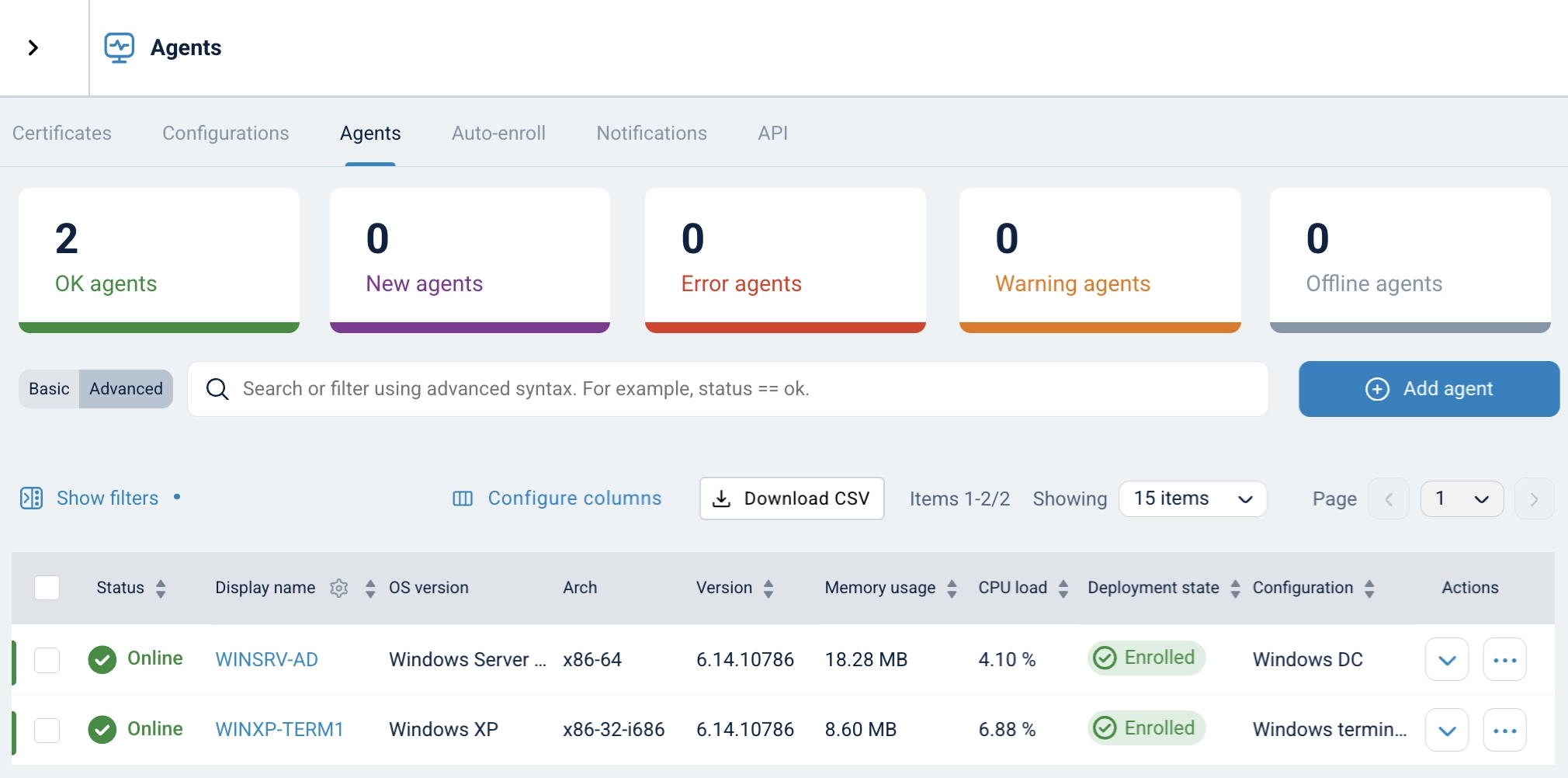
NXLog Agent for 32-bit Windows is available now on the NXLog downloads page.
Network-level detection
Where host-based tools are limited, network-level monitoring compensates. Capturing and analyzing traffic to and from legacy systems can reveal reconnaissance activity, command-and-control communication, lateral movement attempts, and data exfiltration — without installing anything on the legacy device itself.
Network detection works well alongside host-level log collection. The network view tells you what’s crossing the wire. The host logs tell you what triggered it. Together, they provide a more complete picture than either one alone.
Documented risk management
Every control mentioned above needs documentation: what the risk is, what mitigation is in place, who owns it, and when it was last reviewed. This isn’t just a compliance exercise — though it serves that purpose too, as NIS2, HIPAA, and PCI DSS all require documented risk management for systems that can’t meet standard requirements. It’s the mechanism by which an organization moves from "we have old systems and we hope nothing happens" to "we have old systems, we know the risks, and we’re actively managing them."
Documentation should include an inventory of every legacy system (OS version, location, function, network connectivity), a risk assessment for each system mapped to the relevant threats and compliance requirements, a description of the compensating controls in place, and a long-term plan — even if the timeline is measured in years.
Making it work, not making it perfect
Securing legacy Windows in place isn’t about achieving the same security posture as a modern, fully patched system. That’s not possible, and pretending otherwise is counterproductive. It’s about reducing risk to a manageable level, detecting threats when they appear, and maintaining the visibility that informed decision-making requires.
The real danger isn’t running a legacy system. It’s running one without knowing what’s happening on it. A Windows XP workstation behind strict segmentation, with application controls enforced, logs forwarded to a SIEM, and a documented risk assessment on file, is in a fundamentally different security position than the same system sitting on a flat network with no monitoring and no plan.
One is a managed risk. The other is a blind spot.
The goal isn’t perfection. It’s to stop treating legacy systems as an exception to your security program and start treating them as a part of it — one that needs different tools, different expectations, and a realistic view of what’s possible.


