
At NXLog, we’ve been in the log collection space long enough to know that the toughest challenges aren’t technical but political. There’s always that Windows XP machine running the ATM firmware that no one can touch. Or the Windows Server 2003 box that keeps the conveyor belt running 24/7. Then there’s the industrial SCADA system installed before smartphones existed, quietly humming along in a corner of the plant floor.
In our articles, Why legacy Windows systems are a persistent security blind spot and Securing legacy Windows in place, we discussed why these systems stick around and why replacing them isn’t the answer, especially when the replacement would cost millions and take years. If you missed those posts, they’re worth checking out.
Here’s what keeps security teams up at night: regulations don’t care about your upgrade timeline. Standards like NIS2, PCI DSS, HIPAA, SOX, and NIST 800-171 all require you to monitor and audit every system in your environment, including the ones running an operating system that Microsoft stopped supporting years ago.
So what are your options? You can’t upgrade, you can’t ignore the problem, and most log collection agents won’t install on 32-bit Windows. The good news is that our latest NXLog Agent now supports 32-bit Windows. If your team needs to support legacy systems, this article is for you.
Why legacy Windows makes log collection difficult
Most log collection vendors don’t support 32-bit Windows because modern agents are built for 64-bit systems and use libraries that don’t work on 32-bit machines. For example, OpenSSL 3 no longer supports Windows Server 2008 and older. Without a supported TLS library, you can’t encrypt log traffic in transit, which most compliance frameworks require. The industry moved on without ever looking back.
So what do organizations do in the meantime? We often hear about the same four approaches, but none of them hold up.
| Approach | Why it falls short |
|---|---|
Do nothing |
The logs exist but you’re not collecting them. Auditors and incident responders will eventually notice the gap. |
Manual export |
Someone exports the logs manually. You lose real-time visibility and create a process that depends entirely on whoever remembers to do it. |
Network taps |
Capture network traffic, not host-level events. You won’t get local logon events, file access, process execution, or application logs. |
Generic agent |
A 64-bit agent forced onto a 32-bit host. If it installs at all, it’s usually unsupported and untested. |
Unfortunately, every workaround sacrifices security, completeness, or reliability. What’s really needed is an agent built for 32-bit Windows, one that supports encrypted connections and is lightweight enough for the hardware.
Introducing NXLog Agent for 32-bit Windows
NXLog Agent for 32-bit Windows is a lightweight log collector built specifically for legacy Windows environments. It supports a reduced set of functionality compared to its 64-bit counterpart, but it includes all the log collection and forwarding modules and extensions you’ll need on these systems. For anything the 32-bit version doesn’t handle, you can forward data to a relay running on a modern host for further processing.
The 32-bit agent runs on:
-
Windows 2000 Desktop
-
Windows XP
-
Windows Server 2003
-
Windows Server 2008
-
Windows 7
-
Windows 8 / 8.1
-
Windows 10
What it collects
The agent can collect data from a wide range of sources, including Windows Event Log, log files, file integrity monitoring (FIM), and ODBC data sources. For output, it can write to a file, send data over TCP, UDP, or HTTP, or send it to another NXLog Agent instance. It also supports syslog, JSON, XML, KVP, CEF, and LEEF formats, so it can feed almost any SIEM without needing a relay just to convert formats.
TLS without the dependency headache
Because OpenSSL 3 doesn’t support Windows Server 2008 and earlier, the 32-bit NXLog Agent bundles the latest OpenSSL version compatible with these operating systems. TLS 1.2 is supported out of the box, so your data is encrypted in transit even on the oldest supported platforms, with no patches or workarounds needed.
Local data buffering for unreliable networks
Legacy environments often come with aging network infrastructure and unreliable connections. NXLog Agent handles this with local disk or memory buffering. If the connection to the relay or SIEM goes down, the agent stores logs locally and flushes them automatically when the connection is restored.
The two-tier architecture
Usually, one NXLog Agent instance on a legacy host sending data straight to your SIEM is enough. Adding a second tier is helpful in two cases:
-
If your telemetry pipeline requires heavy data processing and you don’t want to overload a machine running critical software, it’s better to move the processing to another agent on a modern operating system.
-
Or, if you need features that the 32-bit agent doesn’t support.
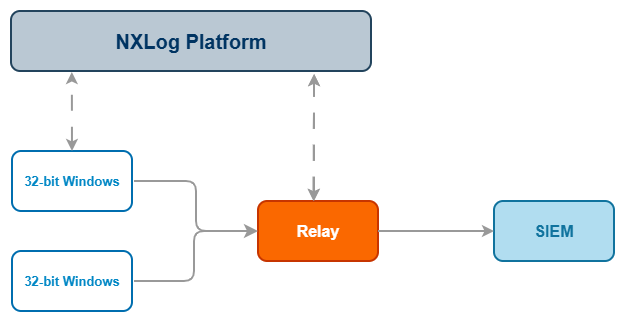
In a two-tier setup, the work is split between two levels:
-
Tier 1 — 32-bit collectors run on each legacy host. The agent pulls events from local sources, applies basic filtering to reduce noise, and sends the data upstream. The main goal is to keep the agent lightweight on the legacy host.
-
Tier 2 — Relays run on Linux or modern 64-bit Windows servers. They receive data from the 32-bit collectors and handle processing such as parsing, enrichment, normalization, and format conversion, before forwarding it to your SIEM.
A single relay can handle around 5,000 events per second (EPS) and support 50 to 100 collectors, depending on the number of events each host generates. It’s best to plan your capacity based on your peak event rate rather than the average.
NXLog Platform lets you manage and monitor both tiers from one interface. You can deploy agents, update configurations, and track health and throughput across all your agents without having to access each host individually.
Walkthrough: deploying the solution
Let’s look at a real scenario: a manufacturing plant runs process historian servers on Windows Server 2008. These servers record sensor data and operational events from the production line and fall under the NIS2 scope as part of a critical OT environment. The goal is to collect Windows events from each server and send them to a SIEM in JSON format with encryption during transit.
We’ll use a two-tier setup: the 32-bit NXLog Agent runs on each Windows Server 2008 host, and a relay on a modern Linux server handles format conversion and TLS forwarding to the SIEM. If your configuration does not perform heavy data processing, you can skip the relay and have the agent send events directly to the SIEM.
- Step 1: Install NXLog Agent
-
Download the NXLog Agent installers from the NXLog downloads page, selecting the installers for your 32-bit Windows version and your relay’s host operating system.
Run the relevant installer on each host. On Windows, it creates a service that starts automatically on boot and places the configuration file at
C:\Program Files\nxlog\conf\nxlog.conf.You can find detailed installation instructions for each operating system in the NXLog Agent Reference Manual.
- Step 2: Configure the agent on the 32-bit Windows systems
-
The collector’s main job is to gather events from Windows Event Log and send them to the relay.
Add the following configuration to the default
nxlog.confon each Windows Server 2008 host:nxlog.conf<Input windows_events> Module im_msvistalog <QueryXML> (1) <QueryList> <Query Id='0'> <Select Path='Application'>*</Select> <Select Path='Security'>*</Select> <Select Path='System'>*</Select> </Query> </QueryList> </QueryXML> </Input> <Output relay> Module om_batchcompress Host 192.168.0.100:2514 (2) </Output> <Route r1> Path windows_events => relay </Route>1 The query selects all events from the Application, Security, and System logs — the three most relevant for NIS2 audit trails covering logons, privilege use, and application activity on OT systems. 2 Replace 192.168.0.100with the IP address of your relay’s host. - Step 3: Configure the relay agent
-
The relay receives events, converts them to JSON, and forwards them to the SIEM over a mutually authenticated TLS connection.
Use the following configuration on your relay:
nxlog.conf<Extension json> Module xm_json </Extension> <Input nxlog_agent> Module im_batchcompress ListenAddr 0.0.0.0:2514 Exec to_json(); </Input> <Output siem> Module om_ssl Host 192.168.0.101:514 (1) CAFile %CERTDIR%/relay-ca.pem (2) CertFile %CERTDIR%/agent-cert.pem CertKeyFile %CERTDIR%/agent-key.pem </Output> <Route r1> Path nxlog_agent => siem </Route>1 Replace 192.168.0.101with the address of your SIEM, and adjust the port number if your SIEM listens on a different port.2 Configures mutual TLS for transport security. The agent verifies the SIEM with CAFileand authenticates itself with the client certificate and key.
Managing agents with NXLog Platform
If you use NXLog Platform, you can manage and monitor your 32-bit Windows hosts along with the rest of your fleet. There are two ways to connect an agent:
- New agent installation
-
The NXLog Agent installer accepts command line arguments to connect directly to your NXLog Platform instance. See Connecting to NXLog Platform in the NXLog Agent Reference Manual.
- Existing agent
-
Configure the Remote Management instance in the agent’s
managed.confto connect to your NXLog Platform address. See Enrolling an agent manually in the NXLog Platform User Guide.
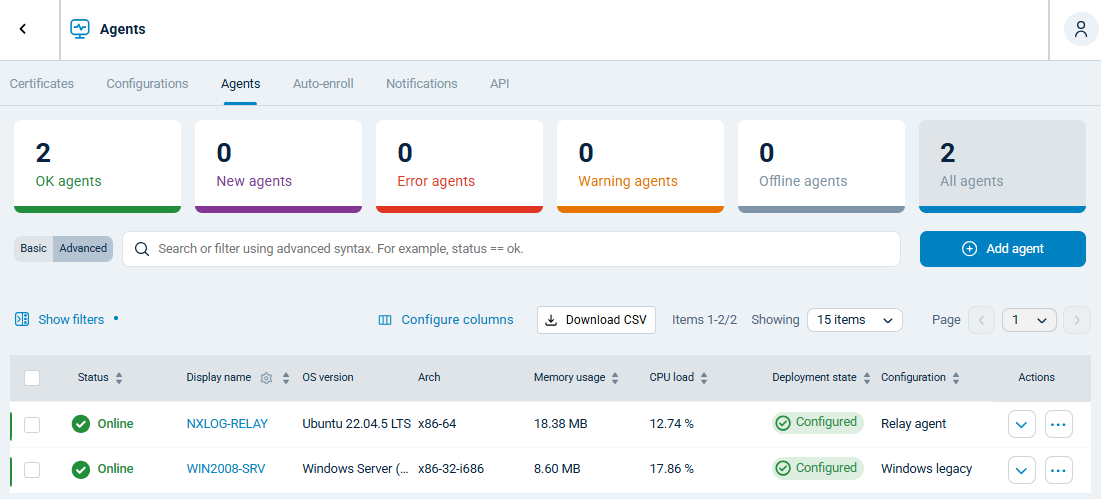
Once enrolled, all your 32-bit Windows hosts appear in the same Agents view as the rest of your fleet. From a single interface, you can push configuration changes, check agent health, and monitor log throughput. This is especially useful for environments with many agents distributed across sites.
Conclusion
For many, legacy Windows systems are an unavoidable part of their environment. Whether it’s a Windows XP machine running ATM software, a Server 2003 box keeping the conveyor belt moving, or a SCADA system that no one is allowed to touch, compliance requirements still apply.
NXLog Agent for 32-bit Windows closes the gap. It runs on hardware and operating systems that modern agents won’t, encrypts log traffic in transit, and buffers data locally when the network is unreliable. Paired with a relay on a modern host, it integrates with any existing telemetry pipeline without requiring changes upstream.
If you’re ready to bring your legacy Windows systems out of the blind spot, contact us or request a demo to see NXLog Agent in action.


