
Offline buffering is a log shipper’s ability to store events in memory or on disk while the destination is unreachable, then forward them automatically once the connection recovers. Without it, every SIEM outage, network partition, or agent restart becomes a permanent gap in your security telemetry.
Every SIEM eventually goes down. So does the WAN link to your central collector, and eventually the host running the agent itself. None of these events should cost you log data, but whether they do depends on how your log shipper buffers when it can’t deliver data to the destination. Every mainstream shipper can buffer through an outage. The defaults, size limits, and full-buffer behavior differ, and those differences tend to surface during an incident, when it is too late to reconfigure.
This article explains how offline buffering works, how NXLog Agent implements it, how to size and test your buffers, and how other popular shippers compare.
What is offline buffering in a log shipper?
A log shipper sits between your event sources (Windows Event Log, syslog, files, APIs) and destinations such as a SIEM, data lake, or another collector. When the destination accepts data slower than the sources produce it, or stops accepting it altogether, the shipper needs somewhere to put the backlog. That temporary storage is the buffer, and the discipline of holding events safely through an outage is offline buffering.
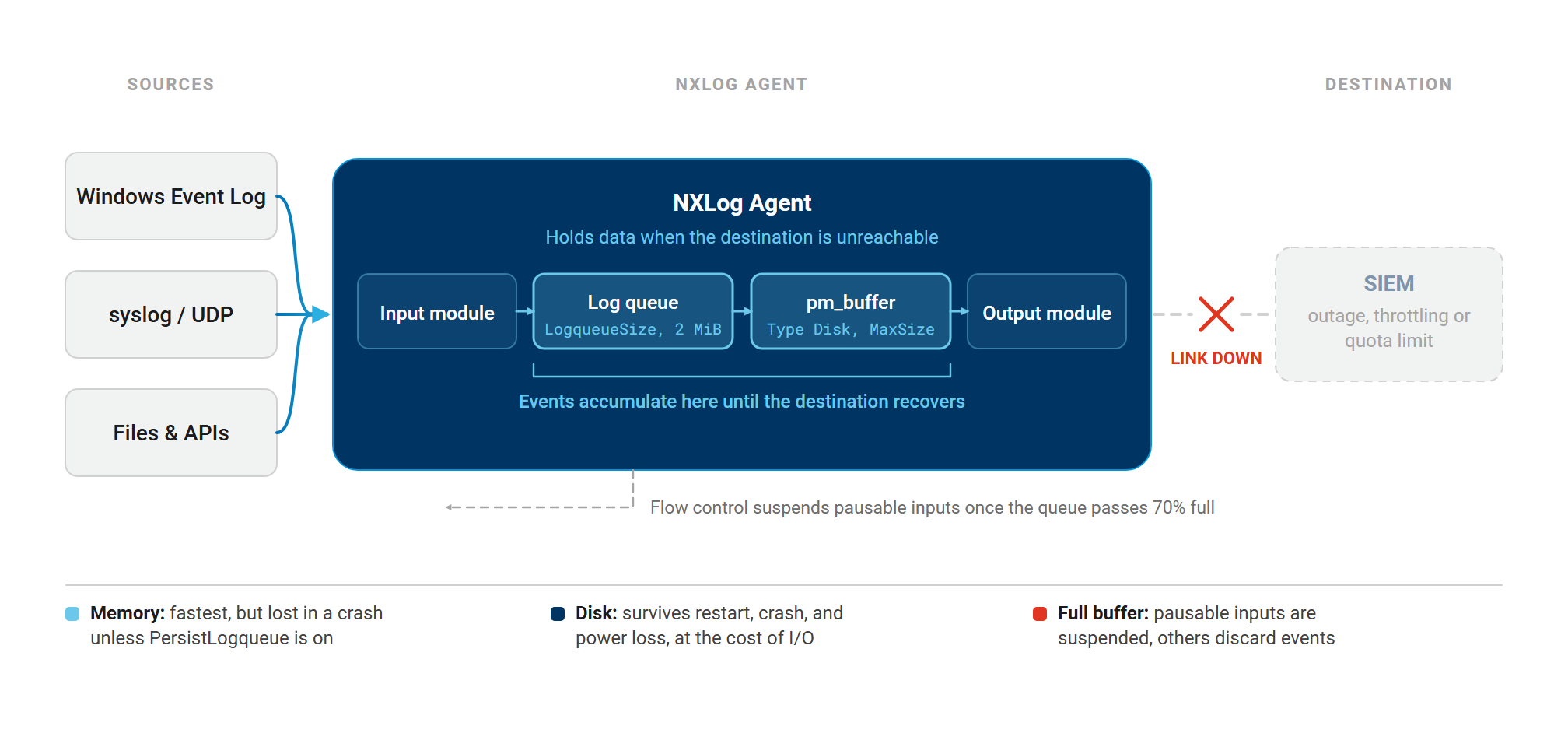
For a SecOps team, a gap in collection is a gap in detection: correlation rules can’t fire on events that never arrived, and threat hunters can’t query them later. The same gap weakens your audit evidence, because you can no longer show a complete record for the outage window. However, buffering turns that outage from data loss into delayed delivery.
Where log pipelines lose data
Four failure modes account for most lost logs, and each calls for a different mechanism.
- The destination goes down
-
SIEM maintenance windows, ingest throttling, and license or quota limits all block the output side. The shipper needs a queue or buffer large enough to hold events until the destination recovers.
- The network partitions
-
A dropped VPN tunnel or a saturated WAN link has the same effect as a dead destination, except recovery is often gradual. Backpressure handling matters here as much as buffer size.
- The agent or host restarts
-
Patching, power loss, and crashes wipe anything held only in process memory, unless the shipper persists its queues to disk.
- The source can’t wait
-
UDP syslog and the local
/dev/logsocket deliver events that the OS must accept immediately. If the shipper pauses, the operating system or the sending application drops the data before the shipper ever sees it.
Memory vs. disk buffering
| Memory buffer | Disk buffer | |
|---|---|---|
Speed |
Fastest |
Slower; every event costs disk I/O |
Survives agent restart |
Only if flushed to disk on shutdown |
Yes |
Survives a crash or power loss |
No |
Yes, if writes are synced |
Main cost |
RAM |
Disk space and I/O load |
There is no free option. Persistent queues and disk-based buffers reduce the risk of data loss, but they substantially increase disk read and write operations, so add them where reliability is critical rather than everywhere by default. Most production configurations land on a mix: memory for short blips, disk for the sources you cannot afford to lose.
How NXLog Agent buffers logs when the destination is offline
NXLog Agent layers several mechanisms, and the first two are already working before you configure anything.
Log queues and flow control: the defaults
Every processor and output module instance in NXLog Agent has an input log queue that holds data the instance hasn’t processed yet.
The LogqueueSize directive sets its size.
For a memory-based queue the default is 2 MiB, and NXLog Agent enforces a minimum of 512 KiB.
The preceding module keeps placing batches in the queue while it is less than 70% full.
Past that point, flow control takes over: NXLog Agent suspends the upstream module until the congested instance catches up. This is automatic backpressure with zero configuration, and for pausable sources (files, Windows Event Log, TCP) it prevents loss on its own.
Two default behaviors are worth knowing during incident review.
First, when NXLog Agent stops, it writes any records in the log queue to a file on disk and processes them first after restart, before any new incoming records, regardless of the PersistLogqueue setting.
A clean restart does not lose queued data.
Second, in a route with multiple outputs, you can switch flow control off for one output module so a blocked destination doesn’t stall the others.
The preceding input or processor module keeps forwarding to the healthy outputs, and the blocked output module discards data until it recovers.
Make that tradeoff deliberately.
Persistent queues for crash safety
A clean shutdown flushes queues to disk, but a crash or power loss does not.
To protect the queue itself, make it disk-based with PersistLogqueue, and optionally sync every record with SyncLogqueue:
<Input windows_events>
    Module             im_msvistalog
</Input>

<Output siem>
    Module             om_elasticsearch
    URL                https://siem.example.com:9200/_bulk
    LogqueueSize       4194304    (1)
    PersistLogqueue    TRUE       (2)
    SyncLogqueue       TRUE       (3)
</Output>

<Route r1>
    Path               windows_events => siem
</Route>| 1 | Doubles the default queue size to 4 MiB. |
| 2 | Keeps the queue on disk. |
| 3 | Syncs every record to disk before processing the next one — the safest option, and the slowest. |
SyncLogqueue TRUE writes each record to disk before processing the next one.
That is the strongest guarantee NXLog Agent’s queues offer against a hard crash, and the most expensive in terms of I/O.
Reserve it for sources where a single lost event matters.
Bigger, dedicated buffers with the Buffer processor module
Queues are sized for backpressure, not for hours-long outages.
For that, add a Buffer processor module instance to the route.
It supports memory and disk buffers, sized in kilobytes with a required MaxSize and an optional WarnLimit that logs a warning when the buffer crosses a threshold:
<Input syslog_udp>
    Module        im_udp
    ListenAddr    0.0.0.0:514
</Input>

<Processor disk_buffer>
    Module        pm_buffer
    Type          Disk      (1)
    MaxSize       512000    (2)
    WarnLimit     409600    (3)
</Processor>

<Output siem>
    Module        om_http
    URL           https://siem.example.com:8080/
</Output>

<Route r1>
    Path          syslog_udp => disk_buffer => siem
</Route>| 1 | Persists the buffer to disk instead of memory. |
| 2 | Sets a 500 MiB buffer (the value is in KB). |
| 3 | Logs a warning at 400 MiB, 80% of MaxSize. |
If buffering happens often, you can chain a small memory buffer in front of a large disk buffer so routine blips stay in memory and only sustained outages spill to disk.
The sources you must not pause
Flow control protects pausable sources by suspending them.
For sources that cannot be paused, suspension is the failure.
UDP is connectionless, so the receiver must accept packets immediately; NXLog Agent’s SockBufSize directive enlarges the socket buffer to absorb bursts.
And a suspended reader on the local /dev/log socket would block the syslog() call for every application on the host, so the documented pattern switches flow control off and enlarges the downstream queue instead:
<Extension syslog>
    Module          xm_syslog
</Extension>

<Input dev_log>
    Module          im_uds
    UDS             /dev/log
    Exec            parse_syslog();
    FlowControl     FALSE    (1)
</Input>

<Output siem>
    Module          om_elasticsearch
    URL             https://siem.example.com:9200/_bulk
    LogqueueSize    4194304    (2)
</Output>

<Route r1>
    Path            dev_log => siem
</Route>| 1 | Turns off flow control so the reader is never suspended — a paused reader blocks syslog() for every application on the host. |
| 2 | Doubles the default queue size to 4 MiB. |
The tradeoff is explicit: with flow control off, the input discards incoming data once the queue fills. Size the queue, or add a Buffer processor module, for the longest outage you expect to survive.
Buffering is not delivery confirmation
A full buffer strategy still leaves one gap: TCP itself. TCP’s delivery guarantee operates at the packet level. If the receiver closes a connection at the wrong moment, unsent data in the operating system’s socket buffers is lost; the OS owns that buffer, and the shipper cannot tell which events made it through. The fix is application-level acknowledgment. NXLog Agent’s NXLog Transport module pair confirms receipt of each compressed batch between agents. Combined with persistent queues, this gets you at-least-once delivery: an unacknowledged batch stays queued, and NXLog Agent retransmits it. Pair it with duplicate protection if your destination is sensitive to replays.
Rolling these directives out one agent at a time doesn’t scale.
With NXLog Platform you manage buffering settings in centralized configurations, assign them to agent groups, and view each agent’s own logs, where WarnLimit warnings surface, from one console.
How big should the buffer be?
To size a buffer, calculate the expected data volume: multiply the event rate by the average event size, then multiply that result by the length of the outage window you want to survive. The following is a worked example, not a benchmark. Substitute your own measured values. An agent handling 2,000 events per second at an average of 800 bytes per event produces roughly 1.6 MB per second, or about 5.8 GB per hour. Surviving a 4-hour SIEM outage therefore requires roughly 23 GB of disk buffer, before adding headroom.
In practice, keep three things in mind:
-
Measure real event sizes rather than assuming, since a parsed Windows event is far larger than a firewall syslog line.
-
Set
WarnLimitaround 80% ofMaxSizeso you receive a warning before the buffer fills and data loss begins. -
Keep disk buffers off the root partition, because a buffer that fills the root filesystem turns a log outage into a host outage.
Test the buffer before an outage does
NXLog Agent ships tooling to rehearse failure. The Blocker output module simulates a blocked destination, and the Blocker processor module lets you block and unblock a route on demand or on a schedule. Put your production buffer in the drill route, so you can watch it fill and drain:
<Input app_logs>
    Module       im_file
    File         '/var/log/app/*.log'
</Input>

<Processor disk_buffer>
    Module       pm_buffer
    Type         Disk
    MaxSize      512000
    WarnLimit    409600
</Processor>

<Output blackhole>
    Module       om_blocker    (1)
</Output>

<Route outage_drill>
    Path         app_logs => disk_buffer => blackhole
</Route>| 1 | Stands in for a destination that stops accepting data. |
Run the drill and check three things: that the buffer fills at the rate your sizing math predicted, that WarnLimit warnings appear in the agent log, and that the backlog drains fully and in order once you swap the Blocker output module back for the real output.
To rehearse against your live destination instead of a stand-in, configure a Blocker processor module stage in front of the real output and block the route on a schedule.
A buffer you have never watched drain is a hypothesis, not a control.
How other log shippers handle offline buffering
The differences that bite are the defaults and what happens when the buffer is full.
| Shipper (org) | Default buffering | Offline / disk option | When the disk buffer fills |
|---|---|---|---|
NXLog Agent (NXLog) |
Memory log queues + flow control, on by default; queues flushed to disk on clean shutdown |
|
Flow control pauses pausable inputs; inputs with flow control off discard until the route recovers |
Fluent Bit (Fluent Bit project / CNCF) |
In-memory chunks |
|
With |
Filebeat (Elastic) |
Memory queue |
Disk queue persists events across restarts; default |
Once past the limit, the input either pauses or drops events, depending on how that input is configured |
Vector (Datadog) |
Per-sink in-memory buffers, not durable |
Disk buffers work as a write-ahead log; syncs to disk every 500 ms by default |
Configurable per sink: block upstream or drop events |
rsyslog (rsyslog project) |
In-memory queues |
Disk-assisted mode spools to disk past |
Delayable inputs (e.g., TCP) are blocked; non-delayable inputs (e.g., UDP) lose data at the OS |
syslog-ng OSE (syslog-ng project) |
Output and memory queues |
|
Works with flow control to push back on sources |
Behavior verified against vendor documentation current as of August 2026: NXLog Agent (current), Fluent Bit v4.x, Filebeat (current), Vector (current), rsyslog 8.x, syslog-ng OSE 3.x. Defaults change between releases, so confirm against the version you run.
A few patterns stand out. Memory is the default everywhere, so out of the box, most shippers trade crash safety for speed. Full-buffer behavior splits the field between pausing sources and dropping data: Fluent Bit drops the oldest chunks, Filebeat and rsyslog depend on the input type, NXLog Agent pauses whatever can be paused. And only some designs persist queued data through an unclean crash without extra sync options. Test each behavior against your own sources and destinations before you rely on it.
Keep collecting when everything else is down
Every destination in your pipeline eventually goes down. NXLog Agent gives you queues and flow control by default, persistent queues and disk buffers when the data warrants them, and acknowledged transport between agents. NXLog Platform then lets you roll those settings out and watch them work across your whole fleet. If you’d like to see how your current buffering setup holds up, start free with NXLog Platform or talk to us. We’re happy to help you pressure-test it.
FAQ
- Does a log shipper lose logs when the SIEM is down?
-
By default, often yes. Most shippers buffer in memory, which overflows or vanishes on restart. With disk-based buffering configured, events accumulate locally and forward automatically when the SIEM recovers.
- What is the difference between NXLog Agent log queues and the Buffer processor module?
-
Log queues are built into every processor and output instance and absorb short backpressure. The Buffer processor module is an explicit route stage for large memory or disk buffers sized for real outages.
- Should I buffer in memory or on disk?
-
Memory for short interruptions where speed matters; disk when losing events is unacceptable. Disk buffering substantially increases disk I/O, so apply it to the sources that justify the cost.
- Does offline buffering guarantee delivery?
-
No. Buffering protects data the shipper holds; delivery guarantees require application-level acknowledgment, such as NXLog Agent’s NXLog Transport module pair, so unacknowledged batches are retransmitted.
- How do I test offline buffering?
-
Simulate a dead destination with the Blocker output module or block a route on schedule with the Blocker processor module, then confirm the buffer fills as predicted and drains fully after recovery.


