
Microsoft ended Windows XP support in April 2014. If an ATM, a plant-floor HMI, or a lab instrument on your network still runs on Windows XP, your SOC and your auditors still need its logs.
Current Splunk, Elastic, and IBM QRadar agents don’t install on Windows XP, and XP’s built-in TLS stack doesn’t support TLS 1.2. To work around both gaps, install NXLog Agent for 32-bit Windows on each Windows XP host and collect events with the Event Log for Windows XP/2000/2003 input module. Then send them over TLS 1.2 to a relay that forwards them to Splunk HEC, the Elasticsearch Bulk API, or IBM QRadar.
For background, see why legacy Windows systems stick around and how 32-bit support works. Running Windows Server 2000, 2003, or 2008 too? See log forwarding for Windows Server 2000, 2003, and 2008. Sending to Microsoft Sentinel instead? See Microsoft Sentinel on legacy Windows.
Why can’t you use the Splunk, Elastic, or QRadar agents on Windows XP?
Go 1.10 was the last Go release that runs on Windows XP, and Winlogbeat and Elastic Agent are both written in Go.
Windows XP also lacks TLS 1.2. Microsoft’s TLS 1.1 and 1.2 update covers Windows Server 2008 SP2 and two XP-based embedded editions, Windows Embedded POSReady 2009 and Windows Embedded Standard 2009, but not Windows XP itself.
Agent support for Windows XP as of October 2026:
| Option | Runs on Windows XP? | Details |
|---|---|---|
Splunk Universal Forwarder |
No |
Version 10.6 lists Windows 10, Windows 11, and Windows Server 2019 through 2025. |
Winlogbeat, Elastic Agent |
No |
Elastic Agent and Beats 8.0 and later don’t support 32-bit systems. Beats 7.17.19 and later 7.17 releases, Winlogbeat included, also dropped Windows 7. |
IBM WinCollect 10 |
No |
Version 10.1.16 supports Windows 10, Windows 11, and Windows Server 2016 through 2025. |
QRadar MSRPC polling |
Partly |
Has an MS-EVEN option for Windows XP, but IBM’s supported list starts at Windows Server 2012, polling caps at 100 EPS per host, and Windows XP hosts must accept inbound RPC. |
Windows Event Forwarding |
Partly |
Windows XP SP2 and later can forward events with a WinRM add-on, but the collector needs Windows Vista, Server 2008, or later, plus a forwarder to your SIEM. |
NXLog Agent, 32-bit package |
Yes |
Already running WEF? See where native WEC collectors hit their limits.
What makes Windows XP event log collection different?
Windows XP writes events through the legacy Event Logging API.
The Windows Event Log API that newer collectors expect arrived with Windows Vista (which, fun fact, is how NXLog Agent’s im_msvistalog module got its name).
The module
NXLog Agent reads Windows XP logs with the Event Log for Windows XP/2000/2003 input module. It resolves message text from DLLs registered on the Windows XP host, so messages leave the host already rendered.
The event IDs
Windows XP security events use their own numbering. Microsoft’s Eric Fitzgerald explains that most IDs map to their Windows Vista equivalents by adding 4096. Logon events are the exception, because Microsoft merged them:
| Windows XP event ID | Windows Vista and later | What it records |
|---|---|---|
528, 540 |
4624 |
Successful logon |
529-537, 539 |
4625 |
Failed logon |
592 |
4688 |
Process creation |
624 |
4720 |
User account created |
636 |
4732 |
Member added to a local security group |
Use the table for searches, and keep the original IDs in the pipeline. Microsoft renumbered the events because the schema changed, and some old events have no equivalent. A rule for 4624 won’t match a Windows XP logon, so data from Windows XP needs its own rules.
The audit policy
Windows XP records only what its audit policy enables. Turn on success and failure auditing for logon events, account logon events, account management, policy change, and process tracking, then raise the Security log’s maximum size. If the relay goes down, NXLog Agent stops reading when its queue fills, and the Security log holds the backlog up to its maximum size, so that size sets how long an outage you can absorb.
Reference architecture for Windows XP event log forwarding
One NXLog Agent per Windows XP host can send straight to your SIEM, and our 32-bit overview notes that this is usually enough. For Windows XP, we suggest adding a relay: a 64-bit NXLog Agent on Linux or a current Windows server that converts formats and talks to your SIEM. NXLog Platform manages and monitors both tiers.
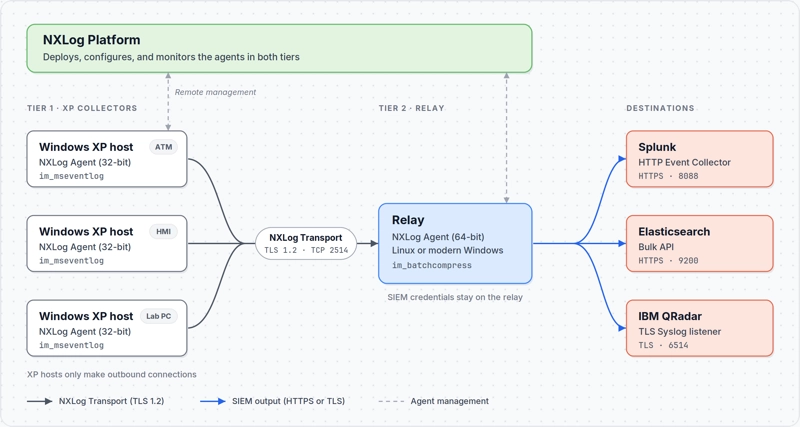
The relay adds three things on Windows XP:
-
SIEM credentials stay off hosts you can’t patch. HEC tokens and API keys live on the relay.
-
Windows XP hosts need no network path to the SIEM. They connect only to the relay on TCP 2514, plus NXLog Platform if you manage them centrally.
-
Format changes happen on a host you can update. You rarely need to touch the Windows XP configuration.
Sending directly works too, because the 32-bit package includes every module the outputs below use. In an air-gapped network, keep the relay and NXLog Platform inside the enclave.
Our 32-bit overview puts one relay at about 5,000 EPS and 50 to 100 collectors. Size relays for your peak event rate.
Before you start
You’ll need:
-
The 32-bit NXLog Agent MSI (version 6.14 at the time of writing).
-
A relay running the current 64-bit NXLog Agent (6.16 at the time of writing).
-
A CA certificate and certificates for the relay and each Windows XP host. Our TLS tutorial covers the setup.
-
Firewall rules for TCP 2514 to the relay, and from the relay to your SIEM (8088 for HEC, 9200 for Elasticsearch, 6514 for QRadar).
-
A Splunk HEC token, an Elasticsearch API key, or a QRadar TLS Syslog listener.
Step 1: Configure NXLog Agent on the Windows XP host
Add this to C:\Program Files\nxlog\conf\nxlog.conf on each Windows XP host:
<Input windows_events>
    Module             im_mseventlog
    Sources            Application, Security, System
    ReadFromLast       FALSE (1)
</Input>

<Output relay>
    Module             om_batchcompress
    Host               relay-1.example.com:2514 (2)
    Host               relay-2.example.com:2514
    UseSSL             TRUE
    CAFile             %CERTDIR%\ca.pem
    CertFile           %CERTDIR%\xp-host.pem
    CertKeyFile        %CERTDIR%\xp-host.key
    SSLProtocol        TLSv1.2 (3)
    PersistLogqueue    TRUE (4)
    LogqueueSize       67108864
</Output>

<Route windows_events_to_relay>
    Path               windows_events => relay
</Route>| 1 | Setting ReadFromLast to FALSE collects existing events on first start, then resumes from the saved position on following restarts. |
| 2 | Two Host lines give you relay failover. |
| 3 | Pins TLS 1.2, which the 32-bit package supports on every operating system it runs on. |
| 4 | Keeps the 64 MiB queue on disk. |
NXLog Transport resends unacknowledged batches, so a dropped connection can produce duplicates (the Elasticsearch section shows how to absorb them). Our guide to log shipper offline buffering covers queue sizing. Filter lightly on Windows XP, because a dropped Security event is gone for good.
To manage the agent centrally, enroll it in NXLog Platform.
Step 2: Configure the relay
The relay accepts mutual TLS connections from your Windows XP hosts:
<Extension json>
    Module             xm_json (1)
</Extension>

<Extension syslog>
    Module             xm_syslog (2)
</Extension>

<Input nxlog_agent>
    Module             im_batchcompress
    ListenAddr         0.0.0.0:2514
    AllowIP            192.168.1.0/24 (3)
    CAFile             %CERTDIR%/ca.pem
    CertFile           %CERTDIR%/relay.pem
    CertKeyFile        %CERTDIR%/relay.key
    RequireCert        TRUE
    TLSConnectLog      TRUE
</Input>| 1 | Required to send logs to Splunk and Elasticsearch. |
| 2 | Required to send logs to IBM QRadar. |
| 3 | Replace with your Windows XP subnets. |
NXLog Transport preserves every field, including $Hostname, so events keep the Windows XP host’s identity.
Don’t call host_ip() or hostname_fqdn() on the relay, because they return the relay’s details.
TLSConnectLog records the TLS version of each connection, which gives auditors evidence that the Windows XP hop is encrypted.
Send Windows XP event logs to Splunk
This output, adapted from our Splunk integration guide, sends logs to Splunk’s HTTP Event Collector (HEC) and sets Splunk’s host field to the Windows XP hostname:
<Extension splunk_fields>
    Module             xm_rewrite
    Keep               time, host, source, sourcetype, event
</Extension>

<Output splunk_hec>
    Module             om_http
    URL                https://splunk.example.com:8088/services/collector/event
    AddHeader          Authorization: Splunk <your-hec-token>
    HTTPSCAFile        %CERTDIR%/splunk-ca.pem
    BatchMode          multiline
    Compression        gzip
    <Exec>
        $event = to_json();
        $time = string(integer($EventTime));
        $time =~ /^(?<sec>\d+)(?<ms>\d{6})$/;
        $time = $sec + "." + $ms;
        $host = $Hostname;
        $source = $FileName;
        $sourcetype = "nxlog:winxp:eventlog";
        splunk_fields->process();
        to_json();
    </Exec>
</Output>
Events go to the Splunk HEC token’s default index.
Add this stanza to props.conf on your search heads so Splunk extracts the JSON fields at search time:
[nxlog:winxp:eventlog]
KV_MODE = json
For Splunk CIM mapping, add field aliases.
To verify, run this search:
sourcetype="nxlog:winxp:eventlog" EventID IN (528, 529, 540)
| stats count by host, EventID
Send Windows XP event logs to Elasticsearch
The Elasticsearch output module forwards logs to the Bulk API. This configuration renames fields to Elastic Common Schema (ECS) names, following our ECS guide. The document ID stops a resent batch from creating duplicates:
<Extension ecs>
    Module             xm_rewrite
    Rename             EventTime, @timestamp
    Rename             Hostname, host.name
    Rename             EventID, event.code
    Rename             FileName, winlog.channel
    Rename             SourceName, winlog.provider_name
    Rename             RecordNumber, winlog.record_id
    Rename             AccountName, winlog.user.name
    Rename             Domain, winlog.user.domain
    Rename             Message, message
</Extension>

<Output elasticsearch>
    Module             om_elasticsearch
    URL                https://es.example.com:9200/_bulk
    AddHeader          Authorization: ApiKey <your-api-key>
    HTTPSCAFile        %CERTDIR%/elastic-ca.pem
    Index              strftime(${@timestamp}, "winxp-eventlog-%Y.%m.%d")
    ID                 ${host.name} + "-" + ${winlog.channel} + "-" + string(${winlog.record_id}) + "-" + string(integer(${@timestamp}))
    <Exec>
        $EventID = string($EventID);
        ecs->process();
        to_json();
    </Exec>
</Output>
To write to a data stream, set DataStream to TRUE and put the stream name in the URL, as the module reference shows.
To verify, run this query in Kibana Discover:
winlog.channel : "Security" and event.code : ("528" or "540")Send Windows XP event logs to IBM QRadar
QRadar’s Microsoft Windows Security Event Log DSM parses a tab-delimited key-value format, which our QRadar integration guide recommends over LEEF or Snare. This output builds that format from the Event Log for Windows XP/2000/2003 input module fields and sends it over TLS:
<Output qradar>
    Module             om_ssl
    Host               qradar.example.com:6514
    CAFile             %CERTDIR%/qradar-ca.pem
    <Exec>
        if ($EventType == 'AUDIT_SUCCESS') {
            $TypeNum = 8;
            $Keywords = 'Audit Success';
        }
        else if ($EventType == 'AUDIT_FAILURE') {
            $TypeNum = 16;
            $Keywords = 'Audit Failure';
        }
        else if ($EventType == 'ERROR') {
            $TypeNum = 1;
            $Keywords = '';
        }
        else if ($EventType == 'WARNING') {
            $TypeNum = 2;
            $Keywords = '';
        }
        else {
            $TypeNum = 4;
            $Keywords = '';
        }
        $Epoch = string(integer($EventTime));
        $Epoch =~ /^(?<sec>\d+)(?<us>\d{6})$/;
        $Message = "AgentDevice=WindowsLog" +
            "\tAgentLogFile=" + $FileName +
            "\tSource=" + $SourceName +
            "\tComputer=" + $Hostname +
            "\tOriginatingComputer=" + string($MessageSourceAddress) +
            "\tUser=" + $AccountName +
            "\tDomain=" + $Domain +
            "\tEventIDCode=" + $EventID +
            "\tEventType=" + $TypeNum +
            "\tEventCategory=" + $CategoryNumber +
            "\tRecordNumber=" + $RecordNumber +
            "\tTimeGenerated=" + $sec +
            "\tTimeWritten=" + $sec +
            "\tKeywords=" + $Keywords +
            "\tMessage=" + $Message;
        delete($SourceName);
        to_syslog_bsd();
    </Exec>
</Output>
On QRadar, install IBM’s TLS Syslog protocol package and add one TLS Syslog listener on port 6514, set up as a Universal DSM gateway. It passes each event to the log source that matches its syslog hostname. If QRadar doesn’t auto-discover a Windows XP host, add a Microsoft Windows Security Event Log source with the Syslog protocol. Our guide also suggests raising QRadar’s maximum syslog payload length to 8,192 bytes.
If you send directly from a Windows XP host, replace string($MessageSourceAddress) with host_ip().
To verify, filter Log Activity by the Windows XP hosts' log source. Unknown event names mean your DSM version doesn’t parse Windows XP event IDs. In that case, use the LEEF extension to send to a Universal LEEF log source instead.
Validate the pipeline
Run three checks before you roll out to more hosts:
-
On the Windows XP host, create a test event with
eventcreate:eventcreate /t information /id 100 /l application /d "NXLog XP test". It can’t write to the Security log, so also runrunas /user:nosuchuser cmdwith any password. With logon failure auditing on, Windows XP records a failed logon, typically event ID 529. -
On the relay, check
nxlog.logfor theTLSConnectLogentry that shows TLS 1.2. -
In your SIEM, search for
NXLog XP testand for the failed logon. Then confirm in NXLog Platform that both tiers report healthy agents.
Harden and operate the Windows XP tier
- Keep collection outbound-only.
-
Windows XP hosts don’t need inbound RPC, SMB, or RDP for collection. Microsoft shipped a Windows XP BlueKeep fix in May 2019, five years after support ended, so close every inbound service you don’t need.
- Know what’s in the package.
-
Check the supported platforms page for our CVE coverage policy for OpenSSL 1.0.2 and 1.1.1 builds.
- Lock down the relay.
-
Restrict
AllowIPto your Windows XP subnets, keepRequireCert TRUE, and monitor certificate expiry, because the relay rejects expired certificates by default. - Scope your compliance claims.
-
Document Windows XP as an unsupported system with compensating controls, including this pipeline.
Next steps
Start free with NXLog Platform to try this setup on your Windows XP hosts, or contact us to plan your rollout.
FAQ
- Can Splunk Universal Forwarder run on Windows XP?
-
No. Splunk 10.6 lists the universal forwarder for Windows 10, Windows 11, and Windows Server 2019 through 2025. Use a collector that supports Windows XP, such as NXLog Agent for 32-bit Windows, to send events to HEC.
- Does Winlogbeat or Elastic Agent work on Windows XP?
-
No. Go dropped Windows XP support after version 1.10, and Elastic doesn’t support Elastic Agent or Beats 8.0 and later on 32-bit systems.
- Can QRadar collect Windows XP events without an agent?
-
Partly. QRadar’s MSRPC protocol has an MS-EVEN option for Windows XP, but IBM’s supported list starts at Windows Server 2012, polling caps at 100 EPS per host, and Windows XP hosts must accept inbound RPC.
- Can Windows XP send logs over TLS 1.2?
-
Not natively, because Microsoft’s TLS 1.2 update doesn’t cover Windows XP. NXLog Agent for 32-bit Windows bundles an OpenSSL build that supports TLS 1.2 on Windows XP.
- Which NXLog Agent module reads Windows XP event logs?
-
im_mseventlog, which reads the legacy Event Logging API on Windows XP, Windows 2000, and Windows Server 2003.im_msvistalogis for Windows Vista and later. - Do Windows XP security event IDs match Windows 10?
-
No. Most Windows XP IDs map by adding 4096, so 592 becomes 4688. Logons merged: 528 and 540 became 4624, and 529-537 and 539 became 4625.


