
NXLog Platform can now be installed using the official Helm chart, following the same Kubernetes deployment standard as any other enterprise Kubernetes application. Red Hat OpenShift is also fully supported using native OpenShift Routes.
According to the CNCF 2025 Annual Cloud Native Survey, 82% of container users run Kubernetes in production, and 81% prefer Helm as their package manager of choice. Kubernetes adoption spans every major cloud provider and distribution, including GKE (32%), AKS (17%), OpenShift (13%), and Amazon EKS, and continues to grow as the default substrate for enterprise infrastructure.
Why Kubernetes deployment matters
When an organization standardizes on Kubernetes, that decision carries an expectation: every service in the stack should fit the cluster lifecycle. Deployment, upgrade, monitoring, and recovery all run through the same tooling. A service that sits outside the cluster, installed via a custom script on a standalone VM, falls outside the standard infrastructure lifecycle and demands its own operational procedures. The NXLog Platform Helm chart addresses this directly.
- Unified operations
-
Running NXLog Platform inside the cluster means it is deployed, upgraded, and recovered using the same workflows as every other workload. There is no separate runbook and no bespoke automation to maintain alongside the rest of the stack.
- Compliance and policy alignment
-
In many large enterprises, deploying services outside Kubernetes requires explicit internal approval that is difficult to obtain and rarely guaranteed long-term. Kubernetes-based deployment is not a preference in these environments: it is a hard requirement. The NXLog Platform Helm chart removes that barrier entirely.
- Familiar tooling
-
Helm is the de facto standard for managing Kubernetes applications. Teams that already use Helm to manage other services can apply the same skills, the same workflows, and the same CI/CD pipelines to NXLog Platform, with no new tools to learn.
- First-class workload
-
Deploying NXLog Platform via Helm makes it a first-class workload in the cluster. It is subject to the same RBAC policies, network policies, and resource governance as everything else.
What the Helm chart provides
The NXLog Platform Helm chart installs the application on a Kubernetes cluster from a publicly available repository. Configuration uses YAML values files, making it easy to integrate with Git-based configuration management and existing CI/CD pipelines. As a result, changes are versioned, auditable, and reviewable, just like any other infrastructure change.
Pre-configured size profiles (small, medium, large, and xlarge) cover the most common deployment scenarios out of the box, reducing the amount of manual tuning needed before the first install.
The Helm chart supports common ingress controllers including OpenShift Routes, Traefik, and Istio.
Installing NXLog Platform follows the standard Helm workflow:
helm repo add nxp https://charts.cloud.nxlog.com/
helm repo update
helm install nxp nxp/nxp \
    --values custom-values.yaml \
    --values nxp/profiles/ingress-<ingress_controller>.yaml \
    --values nxp/profiles/size-<deployment_size>.yaml \
    --namespace nxp
Add the repository, prepare the YAML values file, and install. No custom scripts and no manual provisioning steps — just the same three-step process used for any other Helm-managed application.
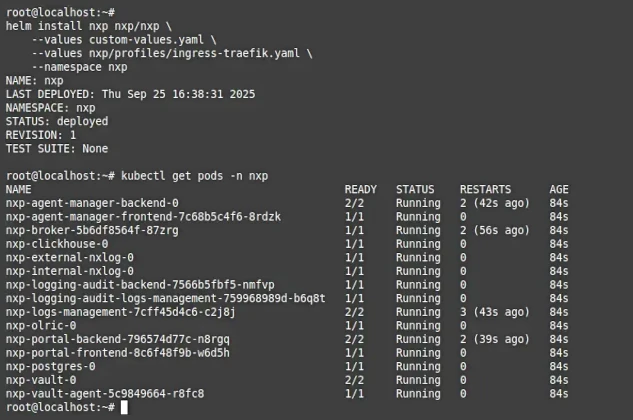
Key benefits of deploying NXLog Platform with Helm
Kubernetes-native deployment goes beyond simply running NXLog Platform inside a cluster. It brings operational advantages that compound over time.
Simplified deployment and lifecycle management
Every aspect of the NXLog Platform lifecycle (initial install, configuration changes, version upgrades) is handled through standard Helm commands.
Upgrades that previously required following a custom procedure become helm upgrade operations, consistent with how the rest of the cluster is managed.
Because configuration lives in a values file under version control, every change is tracked, rollbacks are straightforward, and every deployment is reproducible across environments.
Easier disaster recovery
When NXLog Platform runs on Kubernetes, the cluster handles the recovery work: a node failure triggers automatic pod rescheduling, while persistent volumes declared in the chart ensure that data survives the event. This means that NXLog Platform inherits the disaster recovery posture of the cluster it runs in.
Unified monitoring and observability
NXLog Platform pods appear alongside every other workload in whatever monitoring stack the cluster already uses, whether that is Prometheus, Grafana, cloud-provider native tools, or any other Kubernetes-aware observability platform. Resource consumption, restart counts, and readiness signals are all exposed through standard Kubernetes mechanisms. There is nothing additional to wire up — the visibility that the cluster provides for other services extends automatically to NXLog Platform.
Conclusion
The NXLog Platform Helm chart makes it possible to deploy and manage NXLog Platform as a native Kubernetes workload, using the same tools, the same workflows, and the same operational standards as the rest of the cluster. For organizations where Kubernetes is the infrastructure standard, this removes the last barrier to adopting NXLog Platform at scale.
Getting started
The following resources will help you get started with deploying NXLog Platform using Helm:


