
We are happy to announce the latest release of NXLog Platform, version 1.15. This update lets you export log search results for offline analysis, gives you clearer visibility into agent connectivity, and makes it easier to manage agent configurations programmatically. NXLog Agent 6.16 supports more reliable macOS log collection and automatic format detection for incoming telemetry data.
Read on for more details about these updates.
Export log search results for offline analysis and reporting
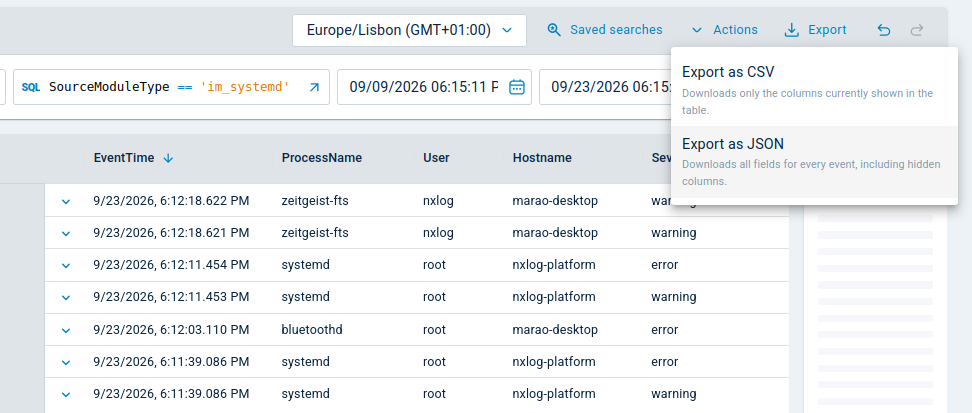
NXLog Platform 1.15 adds an Export option to log search, so you can take your investigation results with you for offline analysis or share them with another team.
You can download the matching events as a CSV or JSON file that respects your active query, filters, and time range. Each format is useful for different purposes:
-
Export as CSV downloads the columns currently shown in the table, ready to open in a spreadsheet for reporting.
-
Export as JSON downloads every available field for each event, ready to ingest into a forensic or reporting tool.
This makes it easy for analysts to hand investigation findings to another team or pull them into the tool they already use for deeper analysis.
Spot agent connectivity problems at a glance
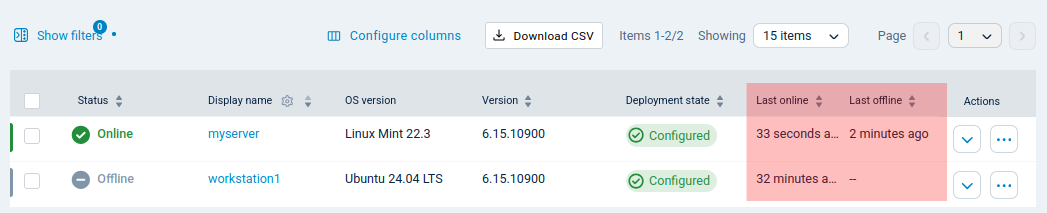
NXLog Platform 1.15 adds the new columns Last online and Last offline to the Agents view, so you can quickly see which agents are actively reporting and for how long.
Last online shows when the agent last reported to NXLog Platform, and Last offline shows when it last reconnected after being offline. They are sortable and are included when you export the agent list to CSV.
Together they make it obvious which agents have quietly stopped reporting and which ones have recently reconnected. That is usually the first thing you want to know when log data goes missing from a source.
Upload agent configuration files directly to the API
The Agent Management API now accepts file uploads when you create or update agent configurations.
Previously, you had to embed the configuration inside a JSON request body, escaping it correctly before performing the API request. That is awkward and easy to get wrong in a script, especially for large configurations. Now you can upload a configuration file as-is from the command line or an automation pipeline.
This makes NXLog Platform easier to fit into the workflows and toolchains you already have, rather than asking you to prepare payloads specifically for it.
Get complete, reliable visibility into macOS activity
NXLog Agent 6.16 adds a new macOS OSLog input module that collects macOS system logs through the official Apple OSLog API, starting with macOS 10.15 (Catalina).
Until now, macOS log collection relied on the macOS ULS input module, which reads files in an undocumented format. This could occasionally result in missed events or noisy error messages on busy macOS fleets.
The new module collects logs through the same API that macOS itself uses to serve log data. You now get more complete and reliable visibility into macOS activity, particularly on fleets with high log volume or frequent log rotation.
The macOS ULS input module remains available, so existing configurations that use it keep working while you migrate to the new module.
Automatically detect and parse common data formats
NXLog Agent 6.16 includes the experimental Automatic Data Parser extension module. It automatically detects and parses telemetry data, such as CSV, JSON, and syslog, allowing you to obtain structured data without having to manually configure a parser for each source.
<Extension autoparse>
    Module        xm_autoparse
</Extension>

<Input tcp_listen>
    Module        im_tcp
    ListenAddr    0.0.0.0:1514
    InputType     autoparse
</Input>
This functionality is especially useful when onboarding a source you haven’t profiled yet, or when a single source mixes formats. Configure your input module to use the Automatic Data Parser, and NXLog Agent identifies and parses the format of each line on its own.
Detection rules and the fields that the module produces may change in upcoming releases. If you give the Automatic Data Parser a try, we’d love to hear how it performs on your data.
Find out more
The NXLog Platform and NXLog Agent release notes include all of the new features and fixes. Our comprehensive documentation provides additional details. Contact us below if you need help upgrading, have a feature request, or have any other questions.


