
Every application depends on the network, yet networks are often the hardest part of the stack to diagnose when something goes wrong. Devices are up, utilization looks normal, and yet users report slowness or disconnections with no obvious cause in sight.
The instinct is to rely on metrics alone: poll devices at regular intervals, watch the dashboards, set thresholds. That approach catches obvious outages, but it struggles with the harder questions: Why did latency spike when nothing looked congested? Why does a VPN keep dropping on a healthy WAN link? Why did an application go offline the morning after a maintenance window?
Answering those questions requires more than metrics.
What is network performance monitoring?
Network performance monitoring is the practice of continuously measuring and analyzing the health and behavior of network infrastructure to detect problems before they affect services or users.
The goals of monitoring network performance go beyond checking whether devices are up. Teams rely on it to:
-
Maintain availability: detect and resolve outages before they affect users
-
Preserve performance: surface degradation trends before they become incidents
-
Protect user experience: ensure latency and throughput stay within service-level expectations
-
Accelerate incident response: reduce mean time to resolution by surfacing root causes faster
-
Support capacity planning: use baseline and peak usage data to make informed decisions about infrastructure investment
The scope typically covers on-premises LAN and WAN infrastructure, VPNs, firewalls, and load balancers, as well as cloud network services and hybrid environments where traffic crosses both private and public paths. Any network component that carries application traffic is a candidate for monitoring, but the specific devices and metrics tracked will depend on the organization’s network architecture and priorities.
Core metrics for network performance monitoring
The following network performance monitoring metrics each surface a different failure mode and point toward a different root cause.
| Metric | Why it matters | Common cause |
|---|---|---|
Latency and jitter |
Elevated latency degrades interactive applications, and jitter (the variation in delay between packets) makes real-time traffic such as VoIP and video unreliable even when average latency looks acceptable. |
Congested uplinks, misconfigured QoS policies, or routing changes that shift traffic onto a longer path. |
Packet loss and retransmissions |
Even small amounts of loss force TCP to retransmit, compounding latency and reducing effective throughput, while for UDP-based traffic such as streaming video, loss produces visible artifacts. |
Faulty hardware (cables, transceivers, switch ports), interface errors, or buffer drops when queues overflow. |
Throughput and utilization |
Interface utilization tells you how close a link is to saturation. Sustained high utilization is a leading indicator of congestion before it becomes an incident. |
Unplanned traffic bursts, new application deployments, or backup jobs competing with production traffic on the same WAN circuit. |
Errors and discards |
CRC errors, input/output errors, and discards indicate hardware problems or mismatched settings that corrupt or silently drop frames at the link layer. |
Duplex mismatches, damaged cables or transceivers, or switch port auto-negotiation failures. |
Availability and path changes |
Interface up/down transitions and route flaps affect reachability and can cause brief outages that are invisible in trend charts if they occur between polling intervals. |
Physical link failures, spanning-tree topology changes, or routing protocol instability. |
DNS and application handshake timing |
Slow DNS resolution or long TCP handshakes are often mistaken for network slowness when the real problem is an overloaded resolver or a firewall rule blocking or delaying connection establishment. |
Overloaded DNS servers, firewall state table exhaustion, or asymmetric routing that disrupts connection setup. |
Device health (CPU, memory, temperature) |
High CPU or memory utilization on routers and firewalls degrades packet forwarding and can trigger unexpected failovers that only become visible when you correlate device health with traffic metrics. |
Routing table churn, DDoS conditions, or resource-intensive features such as deep packet inspection consuming more capacity than expected. |
Data sources for network performance monitoring
No single data source gives you the full picture: metrics show trends, traps deliver time-sensitive alerts, and logs explain why a metric changed.
- SNMP polling
-
SNMP polling is the most common method for collecting network performance metrics. A polling engine queries network devices at a fixed interval, typically every one to five minutes, and records metrics such as interface traffic, error rates, CPU load, and memory. Over time, these data points build the baselines and trend graphs that show whether performance is degrading or utilization is growing toward capacity.
The limitation of polling is its cadence: a 60-second poll will miss a 10-second traffic spike, and it produces no narrative context. SNMP metrics can tell you that an interface error counter climbed, but not what caused it.
- SNMP traps
-
Unlike polling, SNMP traps are push-based: the device sends a trap message to a receiver the moment a specific event occurs, without waiting to be asked. Common traps include link up/down notifications, interface error threshold crossings, hardware alarms, and fan or power supply failures. Because traps fire immediately, they close the gap that polling cadence leaves open. For example, a link that flaps and recovers in under a minute may never show up in a polled metric chart but will produce an SNMP trap.
A practical challenge is trap storms, where hundreds of devices can generate traps simultaneously during a major failure and flood the receiver. Effective trap management requires filtering to suppress low-value traps and deduplication to avoid alert fatigue.
- Syslog logs
-
Syslog messages are the event log stream emitted by network devices and services. Where metrics record numerical state, syslog records what happened, including configuration changes, authentication failures, VPN session resets, firewall denials, and so on. This narrative context is often what converts a metric anomaly into an actionable diagnosis. A latency spike is a symptom; the syslog entry showing a QoS policy was modified five minutes earlier is the cause.
In many environments, teams use a log collector such as NXLog Platform to collect and parse syslog events and route them to their analytics, SIEM, or observability platform so network events can be searched and correlated alongside metrics.
- Flows and streaming telemetry
-
Flow records (NetFlow, IPFIX, sFlow) capture conversation-level data: which source talked to which destination, over which port, for how long, and how many bytes were exchanged. Where interface metrics show that a link is saturated, flow data shows which applications or hosts are responsible.
Streaming telemetry, typically delivered over gRPC using the gNMI protocol, is a newer alternative to SNMP polling. Devices push structured, high-frequency metric updates to a collector instead of waiting to be queried, producing finer time resolution and lower overhead at scale. Both flows and streaming telemetry complement the core SNMP and syslog pipeline rather than replace it.
Why logs matter for root cause analysis
Metrics are essential for detecting that something is wrong, but they rarely explain why. The scenarios below illustrate how logs and traps fill the gap that metrics leave open.
In each scenario, network performance monitoring surfaces the symptom quickly, but logs and traps cut directly to the cause, thus reducing the time spent investigating the wrong layer.
Latency spike without network congestion
Application response times climb sharply, but interface utilization and bandwidth metrics are within normal range, meaning there is no network congestion to explain the spike. Latency counters are elevated across multiple flows to the same destination subnet, with no packet loss visible.
The core switch syslog shows a QoS policy change was committed 12 minutes before the spike: it had inadvertently deprioritized the traffic class used by the affected application. Reverting the change restores normal latency, a fix that would have taken hours to reach without the syslog timestamp.
Packet loss and CRC errors
Users on a specific floor report intermittent connectivity drops and slow file transfers. CRC error counters on one access switch uplink are climbing steadily.
The switch fires an interface error threshold trap confirming the affected port, and syslog entries from the same device reference transceiver signal degradation on that port. Replacing the transceiver module clears the errors immediately.
VPN instability
Remote workers report frequent disconnections and fluctuating tunnel throughput. However, the underlying WAN link appears healthy.
The VPN gateway syslog shows repeated VPN authentication handshake resets, certificate validation failures, and rekey timeouts, all pointing to a certificate that expired the previous night. Renewing and pushing the certificate resolves the instability without any hardware intervention.
Firewall-induced outage
A business-critical application becomes unreachable shortly after a maintenance window, while server-side metrics look healthy.
The firewall syslog shows a rule change applied during maintenance is now blocking the application’s database port, and an intrusion prevention system (IPS) signature update applied in the same window triggered false-positive blocks on the application’s traffic. Rolling back the rule and suppressing the false-positive signature restores service.
Reference architecture
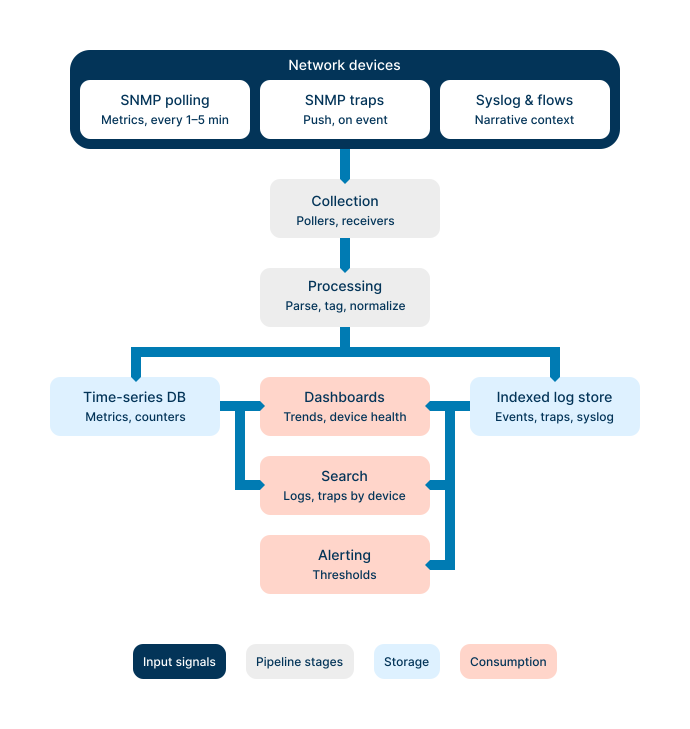
Monitoring network performance effectively requires more than individual tools. It requires a pipeline that collects, processes, stores, and surfaces data in a consistent way. The following four layers describe how that pipeline fits together.
- Collection
-
The data collectors sit at the edge of the pipeline: an SNMP polling engine querying devices at regular intervals, a trap receiver accepting push notifications from those same devices, and a syslog collector ingesting the event stream. Each collector handles a different data type, which is why no single source can replace the others.
- Processing, parsing, and tagging
-
Raw data arrives in many formats: SNMP counter values, syslog text strings, trap messages. A processing stage parses each into structured fields, normalizes timestamps to a common time zone and format, and attaches metadata tags such as device name, site, device role, and interface identifier. Consistent tags are the foundation of cross-source correlation. Matching a syslog event to the right metric series requires shared tags, not just overlapping timestamps.
- Storage
-
Metrics and events have different storage needs. Time-series data (SNMP counters and polling results) is best stored in a time-series database optimized for range queries and aggregation. Event data (syslog messages and traps) belongs in an indexed log store that supports full-text search and structured field filtering. Both stores should retain enough history for post-incident analysis, typically 30 to 90 days for high-resolution data and longer for aggregated summaries.
- Dashboards, search, and alerting
-
The consumption layer makes collected data actionable:
-
Dashboards show time-series trends and device health at a glance.
-
Search lets teams query logs and traps by device, interface, or event type.
-
Alert rules fire when a metric crosses a threshold or a specific log pattern appears.
A network system monitor that integrates all pipeline layers can correlate a metric anomaly with the log events that explain it, reducing the time from alert to diagnosis.
-
Where NXLog Agent fits
The previous section described the monitoring pipeline as four abstract stages. In practice, each stage is a concrete piece of software with a configuration file, and the design decisions made at the collection and processing layers determine whether the rest of the pipeline can do its job. This is where NXLog Agent collects and processes the three signal streams, producing the tagged, normalized output that the downstream pipeline depends on. The configuration below shows what that looks like for a minimal three-signal deployment.
########  Extensions: parsers and helpers  ########
<Extension json>
    Module        xm_json
</Extension>

<Extension syslog>
    Module        xm_syslog
</Extension>

<Extension snmp>
    Module        xm_snmp
    MIBDir        /usr/share/snmp/mibs/iana
    MIBDir        /usr/share/snmp/mibs/ietf
</Extension>

<Extension netflow>
    Module        xm_netflow
</Extension>

########  Input 1: syslog from network devices (TCP/514)  ########
<Input input_syslog>
    Module        im_tcp
    ListenAddr    0.0.0.0:514
    <Exec>
        parse_syslog();
        # Add shared tags for cross-source correlation
        $site = "dc-lis-01";
        $device_role = "core-switch";
        $source = "syslog";
    </Exec>
</Input>

########  Input 2: SNMP traps (UDP/162)  ########
<Input input_snmp>
    Module        im_udp
    ListenAddr    0.0.0.0:162
    InputType     snmp
    <Exec>
        # Resolved OIDs from xm_snmp populate $SNMP.* fields
        # Add shared tags for cross-source correlation
        $site = "dc-lis-01";
        $device_role = "core-switch";
        $source = "snmp-trap";
    </Exec>
</Input>

########  Input 3: NetFlow / IPFIX (UDP/2055)  ########
<Input input_netflow>
    Module        im_udp
    ListenAddr    0.0.0.0:2055
    InputType     netflow
    <Exec>
        # Add shared tags for cross-source correlation
        $site = "dc-lis-01";
        $device_role = "core-switch";
        $source = "netflow";
    </Exec>
</Input>

########  Output: forward the unified stream to the backend  ########
<Output out_backend>
    Module        om_tcp
    Host          observability.example.internal:6514
    Exec          to_json();
</Output>

########  Route: all three inputs into one output  ########
<Route net_monitoring>
    Path          input_syslog, input_snmp, input_netflow => out_backend
</Route>
Three data streams arrive at the agent over different protocols, each carrying its own native semantics (parsed syslog fields, resolved SNMP OIDs, NetFlow records), and each enriched with the same $site, $device_role, and $source fields before merging into a single JSON stream.
Downstream, a metric anomaly and a syslog event both tagged site=dc-lis-01 correlate on a shared identifier rather than on a timestamp range, which is what closes the gap between "we saw a latency spike" and "we know why."
Best practices checklist
The following practices help keep a network performance monitoring deployment accurate, actionable, and maintainable over time:
-
Define your metrics first. Decide which metrics matter for your environment before configuring collection. Collecting everything produces noise and storage costs without adding diagnostic value.
-
Standardize tags and metadata. Every collected data point should carry consistent identifiers such as device name, site, device role, and interface so that metrics, traps, and syslog events from the same source can be correlated reliably.
-
Filter noisy traps and repetitive syslog events. Suppress low-value traps and high-frequency syslog messages that carry no actionable information. Unfiltered volume drives alert fatigue and makes the signal harder to find.
-
Set alert thresholds based on baselines, not guesses. Thresholds derived from observed baseline behavior produce fewer false positives than fixed defaults. Revisit thresholds after traffic patterns change significantly.
-
Retain enough history for post-incident analysis. High-resolution metric and event data should be kept for at least 30 to 90 days. Aggregated summaries can be retained longer for capacity planning purposes.
-
Protect log integrity. Log data is often relevant to security investigations and audit requirements. Restrict write access, preserve log integrity, and ensure retention policies meet any applicable compliance obligations.
-
Test your incident workflows regularly. Periodically verify that your monitoring setup can answer two questions: what changed, and what failed first? If the answer requires manual correlation across disconnected tools, the pipeline has gaps worth closing.
Conclusion
Effective network performance monitoring depends on three complementary signals: metrics to track trends and surface degradation early, traps to catch time-sensitive events the moment they occur, and syslog logs to explain what changed and why. No single source covers all three roles, which is why combining them produces faster, more accurate diagnoses than any individual tool can. The practical path forward is incremental: start by defining the metrics that matter most for your environment and establishing a syslog collection pipeline, then layer in trap filtering and cross-source correlation as the monitoring foundation matures.
As the pipeline matures and baselines accumulate, monitoring shifts from reactive firefighting to recognizing degradation patterns before they become outages. This is the point where network performance monitoring pays back its setup cost many times over.
FAQ
- What is network performance monitoring?
-
Network performance monitoring is the practice of continuously measuring and analyzing the health and behavior of network infrastructure, including latency, packet loss, interface utilization, and device health, to detect problems before they affect services or users. It combines metrics, event notifications, and log data to give operations teams both early warning of degradation and the context needed to diagnose the cause.
- What does network performance monitoring track?
-
Network performance monitoring tracks metrics such as latency, jitter, packet loss, throughput, interface errors, and device health on routers, switches, firewalls, and other network infrastructure. Beyond raw metrics, it also captures SNMP traps for time-sensitive events and syslog messages that record configuration changes, authentication failures, and other events that help explain why a metric changed.
- Is SNMP enough for monitoring network performance?
-
SNMP polling alone is not enough for comprehensive network performance monitoring. It provides regular metric samples useful for trend analysis, but its polling cadence means it can miss short-lived events, and it produces no narrative context. It can show that an error counter climbed but not why. Combining SNMP polling with SNMP traps and syslog logs fills both gaps.
- What is the difference between SNMP polling and SNMP traps?
-
SNMP polling is pull-based: a monitoring system queries devices at a fixed interval to collect metrics such as interface counters and CPU utilization. SNMP traps are push-based: the device sends a notification to a receiver the moment a specific event occurs, such as a link going down or an error threshold being crossed, without waiting to be asked. Polling is better suited for trend tracking; traps are better suited for immediate alerting on discrete events.
- Why should I include syslog logs in network performance monitoring?
-
Syslog events provide the narrative context that metrics lack. They record what happened on a device, including configuration changes, authentication failures, interface flaps, and firewall rule matches. When a metric anomaly such as a latency spike, a surge in CRC errors, or a drop in tunnel throughput appears, the corresponding syslog entry often identifies the cause directly, reducing the time spent investigating the wrong layer.


