
-
Microsoft retired the Log Analytics agent (MMA) on August 31, 2024, and can shut down its cloud ingestion services at any time after March 2, 2026.
-
The Microsoft Azure Monitor Agent (AMA) runs only on 64-bit Windows Server 2016 or later and Windows 10 1803 or later. It won’t install on Windows Server 2008, Server 2003, or any 32-bit Windows.
-
Windows Event Forwarding (WEF) and syslog forwarders help, but each has hard limits on these hosts.
-
NXLog Agent for 32-bit Windows sends events over TLS 1.2 to a relay, which writes them to Microsoft Sentinel through the Logs Ingestion API.
Most Microsoft Sentinel workspaces have a few Windows hosts that nobody can onboard: the Windows XP machine inside an ATM, the Windows Server 2003 host that runs a production line, the 32-bit Windows 7 PC attached to lab equipment. You can’t upgrade them, and the teams that own them won’t let anyone change them. If they’re in scope for PCI DSS or NIS2, your auditors still expect their logs.
What the Log Analytics agent retirement means for legacy Windows
Microsoft retired the Log Analytics agent, also known as the Microsoft Monitoring Agent (MMA), on August 31, 2024. Its migration guide says Microsoft can shut down the agent’s cloud ingestion services at any time after March 2, 2026. The only exception is an agent connected exclusively to an on-premises System Center Operations Manager (SCOM) installation.
For Windows 7, Server 2008, and 32-bit Windows, MMA was Microsoft’s last agent path into Microsoft Sentinel. Microsoft’s archived install guide lists Windows 7 SP1, Server 2008 SP2, and Server 2008 R2 SP1. Windows XP and Server 2003 were never on the list.
Custom scripts have their own deadline. Microsoft ended support for the HTTP Data Collector API on September 14, 2026. Its migration guide says ingestion continues, but only for clients that negotiate TLS 1.2 or later.
To find hosts that still depend on MMA, query the Heartbeat table, where MMA reports with the category Direct Agent:
Heartbeat
| where TimeGenerated > ago(90d)
| where Category == "Direct Agent"
| summarize LastHeartbeat = max(TimeGenerated)
    by Computer, OSType, OSName, OSMajorVersion, OSMinorVersion
| extend DaysSilent = datetime_diff('day', now(), LastHeartbeat)
| order by DaysSilent desc
Match the lookback to your workspace retention, because a host whose uploads stopped before the window starts won’t appear. OS version 6.0 is Windows Vista or Server 2008, and 6.1 is Windows 7 or Server 2008 R2, per Microsoft’s version reference.
Does the Microsoft Azure Monitor Agent run on Windows Server 2008?
No. Microsoft’s AMA supported operating systems page, last updated August 31, 2026, starts with Windows Server 2016 and Windows 10 1803 and states that Microsoft doesn’t support x86 on any operating system. Servers outside Microsoft Azure also need Microsoft Azure Arc, and Microsoft’s 32-bit support article notes that extensions such as AMA don’t work on 32-bit Microsoft Azure VMs.
| Windows version | Log Analytics agent (retired) | Azure Monitor Agent | NXLog Agent |
|---|---|---|---|
Windows 2000, XP, Server 2003 (32-bit) |
Not supported |
Not supported |
32-bit package |
Windows Server 2008 SP2 |
Supported until retirement |
Not supported |
32-bit (x86) or 64-bit (x64) package |
Windows Server 2008 R2 SP1, Windows 7 SP1 (64-bit) |
Supported until retirement |
Not supported |
64-bit package |
Windows 7, 8, and 10 (32-bit) |
x86 installer, now retired |
Not supported |
32-bit package |
NXLog Agent coverage comes from our supported platforms list.
What Microsoft still offers for legacy Windows
Microsoft Sentinel has no agent of its own. It collects Windows data through AMA, so a host that can’t run AMA needs another path. Microsoft offers two.
Windows Event Forwarding to an AMA collector
Source machines forward events to a Windows Event Collector (WEC) running AMA, and the Windows Forwarded Events connector streams them into Microsoft Sentinel. Windows XP SP2 and Windows Server 2003 SP1 or later can be WEF sources once you add WinRM. On those hosts, expect these limits:
-
To forward the Security log, WinRM must run as Local System, an elevation Microsoft says has security implications.
-
WEF traffic is Kerberos-encrypted inside a domain. Outside one, it needs HTTPS, and Windows Server 2003 can’t negotiate TLS 1.2.
-
The collector must run Windows Server 2016 or later, Arc-enabled on-premises.
-
The connector writes to
WindowsEvent, while many built-in analytics rules querySecurityEvent. -
WEF carries event logs only, and collectors have scaling limits of their own.
Syslog or CEF through a Linux forwarder
The Syslog and CEF via AMA connectors put AMA on a Linux forwarder. Windows doesn’t emit syslog, so each legacy host still needs an agent that does. Microsoft’s setup script opens port 514 for TCP and UDP, and TLS from your sources is a manual rsyslog or syslog-ng job.
How the routes compare, including unofficial scripts:
| Route | XP and Server 2003 | Legacy-hop encryption | Lands in | Main limit |
|---|---|---|---|---|
WEF to an AMA collector |
Yes, with WinRM |
Kerberos in a domain, no TLS 1.2 on Server 2003 |
|
Event logs only |
Syslog or CEF via AMA |
Only with an agent on the host |
Plain TCP or UDP unless you add TLS |
|
Flattens event structure |
Data Collector API script |
Not with the built-in TLS stack |
TLS 1.2 |
Classic custom table |
Support ended September 14, 2026 |
NXLog Agent for 32-bit Windows and a relay |
Yes |
TLS 1.2 through bundled OpenSSL |
|
A relay tier to run |
Why TLS 1.2 blocks a direct path from Windows XP and Server 2003
Both Microsoft APIs a legacy host could call directly now require TLS 1.2. Microsoft Azure Monitor began enforcing it on Logs Ingestion API endpoints on March 1, 2026, the same day the Data Collector API endpoint stopped accepting older versions.
Schannel, the TLS stack built into Windows, has no TLS 1.2 on Windows XP or Server 2003. Microsoft added it to Windows Server 2008 SP2 in July 2017, deactivated by default. The same update, KB4019276, covered Windows XP-based embedded editions such as POSReady 2009, but not standard Windows XP or Server 2003.
NXLog Agent for 32-bit Windows doesn’t depend on Schannel. The package bundles the latest OpenSSL version compatible with each supported OS, so TLS 1.2 works on all of them. NXLog covers CVEs in the bundled OpenSSL 1.0.2 and 1.1.1 builds on a best-effort basis and updates the package around twice a year. Keep the legacy hop inside your network and end it at a relay you patch on a normal schedule.
How to get Windows Server 2003 logs into Microsoft Sentinel
The setup has two tiers. NXLog Agent for 32-bit Windows on each legacy host sends events over TLS 1.2 to a relay. NXLog Agent on a Linux or 64-bit Windows relay maps the fields and writes to Microsoft Sentinel with the Microsoft Azure Logs Ingestion output module through the Logs Ingestion API and a data collection rule (DCR). The relay needs a Microsoft Entra app registration, not AMA or Microsoft Azure Arc.
The legacy host can’t handle the Microsoft Azure side itself. The 32-bit package doesn’t include the required output module, and the Microsoft Azure Sentinel output module it includes uses the workspace ID and shared key of the Data Collector API, which Microsoft no longer supports.
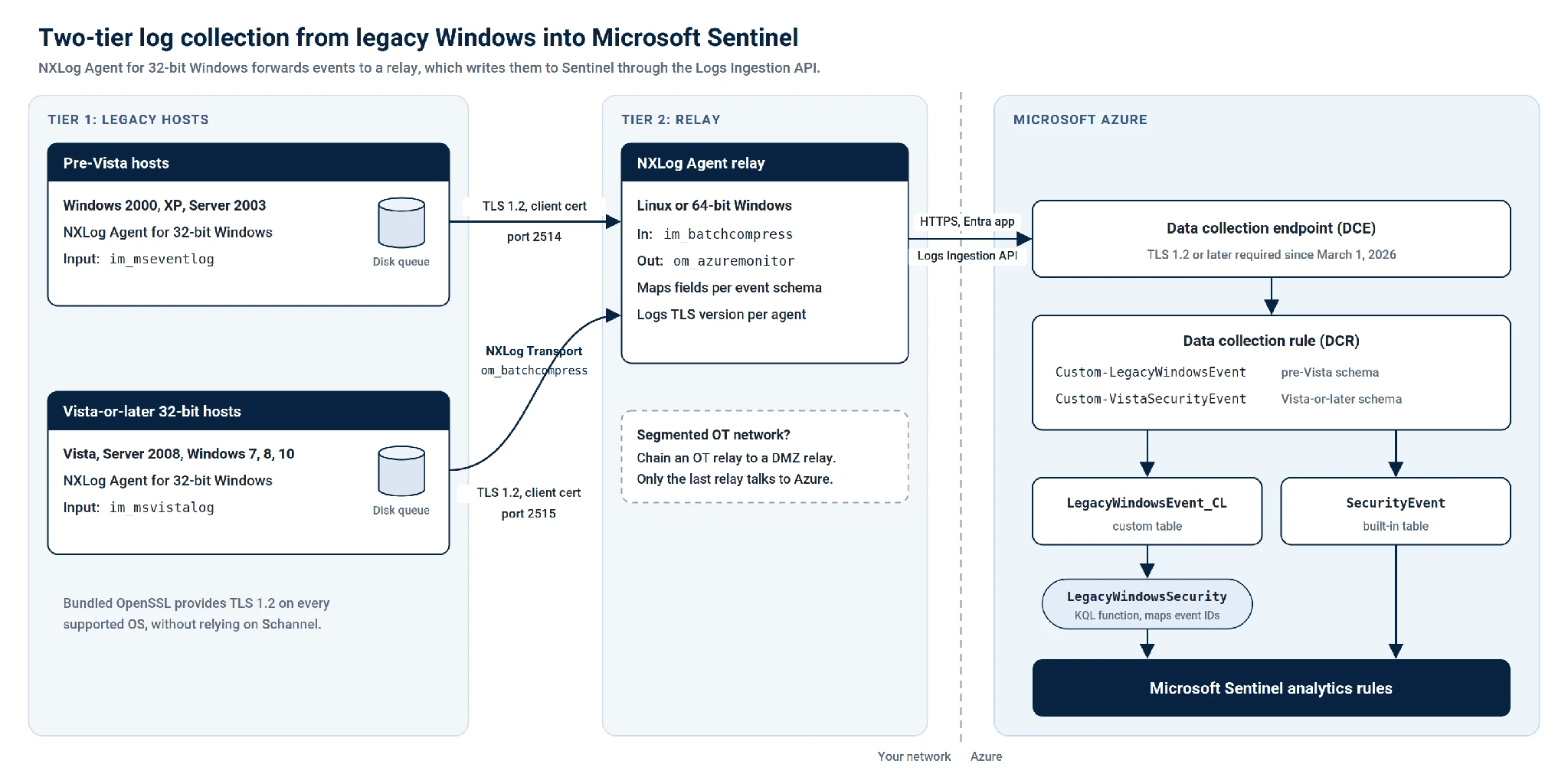
NXLog’s sizing guidance puts one relay at about 5,000 events per second and 50 to 100 collectors, depending on each host’s volume. Size for peak load and test with your own volume.
Step 1: Configure the agent on Windows Server 2003 and XP
On pre-Windows Vista hosts, the Event Log for Windows XP/2000/2003 input module reads the legacy Event Log API.
Add this to the default nxlog.conf, which already defines %CERTDIR%:
<Input windows_events>
    Module             im_mseventlog
    Sources            Application, Security, System
    ReadFromLast       TRUE (1)
</Input>

<Output relay>
    Module             om_batchcompress
    Host               relay-1.example.local:2514 (2)
    Host               relay-2.example.local:2514
    UseSSL             TRUE
    SSLProtocol        TLSv1.2
    CAFile             %CERTDIR%/ca.pem
    CertFile           %CERTDIR%/agent-cert.pem
    CertKeyFile        %CERTDIR%/agent-key.pem
    PersistLogqueue    TRUE (3)
    LogqueueSize       104857600
</Output>

<Route windows_events_to_relay>
    Path               windows_events => relay
</Route>| 1 | Set ReadFromLast to FALSE to backfill the existing log. |
| 2 | The two Host lines fail over between relays.
The NXLog Transport output module resends any batch the relay doesn’t acknowledge. |
| 3 | PersistLogqueue keeps queued events on disk through outages and reboots up to the 100 MiB soft limit set by LogqueueSize.
Our offline buffering guide covers the sizing trade-offs. |
For 32-bit Windows Vista or later hosts (Windows Server 2008 and Windows 7, 8, and 10), use the Event Log for Windows input module instead and point both Host lines at port 2515.
Step 2: Prepare Microsoft Sentinel
Our Microsoft Sentinel integration guide walks through the Microsoft Azure side. You need:
-
A Microsoft Entra app registration with a certificate or client secret for the relay.
-
A data collection endpoint (DCE).
-
A custom table,
LegacyWindowsEvent_CL, with columns that match the relay output in Step 3. -
A DCR with two data flows.
Custom-LegacyWindowsEventgoes to the custom table unchanged, andCustom-VistaSecurityEventgoes to the built-inSecurityEventtable, which accepts Logs Ingestion API data. -
The Monitoring Metrics Publisher role for the app on the DCR, which can take up to 30 minutes to apply.
Step 3: Configure the relay
The relay configuration follows our relay pattern. The NXLog Transport input module requires a client certificate by default, so each legacy agent authenticates with its own certificate. This is the 32-bit Windows path:
<Extension json>
    Module               xm_json
</Extension>

<Input legacy_agent> (1)
    Module               im_batchcompress
    ListenAddr           0.0.0.0:2514
    AllowIP              192.168.10.0/24
    CAFile               /opt/nxlog/cert/ca.pem
    CertFile             /opt/nxlog/cert/relay-cert.pem
    CertKeyFile          /opt/nxlog/cert/relay-key.pem
    TLSConnectLog        TRUE (2)
</Input>

<Output microsoft_sentinel>
    Module               om_azuremonitor
    URL                  https://<dce-name>.<region>-1.ingest.monitor.azure.com
    TenantId             <tenant-id>
    ClientId             <app-client-id>
    CertThumbprint       <certificate-thumbprint>
    CertKeyFile          /opt/nxlog/cert/entra-app-key.pem
    DcrImmutableId       <dcr-immutable-id>
    StreamName           Custom-LegacyWindowsEvent
    OutputRequestSize    1000000 (3)
    <Exec>
        $out_template = ( 'TimeGenerated'     => $EventTime,
                          'OriginalEventTime' => $EventTime, (4)
                          'Computer'          => $Hostname,
                          'Channel'           => $FileName,
                          'EventID'           => $EventID,
                          'EventType'         => $EventType,
                          'Provider'          => $SourceName,
                          'Category'          => $Category,
                          'AccountName'       => $AccountName,
                          'AccountDomain'     => $Domain,
                          'RecordNumber'      => $RecordNumber,
                          'Message'           => $Message );
        $raw_event = to_json($out_template);
    </Exec>
</Output>

<Route legacy_agent_to_microsoft_sentinel>
    Path                 legacy_agent => microsoft_sentinel
</Route>| 1 | Receives events from Windows 2000, XP, and Server 2003 agents. |
| 2 | TLSConnectLog records the negotiated TLS version for each agent connection, which gives auditors evidence for the legacy hop. |
| 3 | OutputRequestSize keeps requests under the API’s 1 MB per-call limit. |
| 4 | Microsoft Azure Monitor replaces a TimeGenerated value more than two days old with the receive time.
After a long outage, use OriginalEventTime for the real event time. |
For Windows Vista or later hosts, add a second listener on port 2515 and a second Microsoft Azure Logs Ingestion output module instance for the Custom-VistaSecurityEvent stream.
Map EventData fields such as TargetUserName, LogonType, and IpAddress to their SecurityEvent columns, so that built-in rules can query the new rows.
Make legacy events work with Microsoft Sentinel analytics
Built-in content won’t match pre-Windows Vista events because Windows Vista renumbered the Security events. As Microsoft’s Eric Fitzgerald explained, for almost all events, the new ID is the old ID plus 4096. Successful logon event IDs 528 and 540 became 4624, and logon failure event IDs 529-537 and 539 became 4625.
He also warns against automating a blanket mapping, because many events don’t map one-to-one.
So keep pre-Windows Vista events in their own table, map only the event IDs you’ve checked, and parse fields at query time.
Save this as a workspace function named LegacyWindowsSecurity:
LegacyWindowsEvent_CL
| where Channel == "Security"
| extend ModernEventID = case(
    EventID in (528, 540), 4624,
    EventID in (529, 530, 531, 532, 533, 534, 535, 536, 537, 539), 4625,
    EventID == 517, 1102,
    long(null))
| extend LogonType = toint(extract(@"Logon Type:\s*(\d+)", 1, Message)),
         TargetUserName = trim(@"\s+", extract(@"User Name:\s*([^\t\r\n]+)", 1, Message))
Event ID 517 is the exception to the +4096 rule.
On Windows Server 2003, it records a cleared audit log, which is event ID 1102 on Windows Vista and later.
Other events keep an empty ModernEventID until you map them.
Build detections on the function.
This one flags bursts of failed logons:
LegacyWindowsSecurity
| where ModernEventID == 4625
| summarize FailedLogons = count() by Computer, TargetUserName, bin(TimeGenerated, 10m)
| where FailedLogons >= 10
Catch hosts that go quiet
NXLog Agent doesn’t write to the Heartbeat table, so check freshness from the data itself.
On hosts that are quiet by design, add a Mark input module instance, which sends a marker every 30 minutes by default.
LegacyWindowsEvent_CL
| summarize LastSeen = max(TimeGenerated) by Computer
| where LastSeen < ago(2h)
| order by LastSeen asc
Keep legacy hosts in your Microsoft Sentinel coverage
Microsoft no longer has an agent for Windows 7, Server 2008, or 32-bit Windows, and WEF and syslog forwarders close only part of the gap. A 32-bit agent and a relay give you TLS 1.2 on the legacy hop, a disk buffer for outages, and events your analysts can query, while the Azure-facing side runs on a server you can patch.
Want to try it on your legacy hosts? Start free with NXLog Platform and deploy NXLog Agent on a test host and a relay.
FAQ
- Does the Microsoft Azure Monitor Agent support Windows Server 2008 R2?
-
No. AMA starts at Windows Server 2016 and doesn’t support x86. Windows Server 2008 and 2008 R2 relied on the Log Analytics agent, which Microsoft retired on August 31, 2024.
- How do I send Windows Server 2003 event logs to Microsoft Sentinel?
-
Install NXLog Agent for 32-bit Windows, collect events with the Event Log for Windows XP/2000/2003 input module, and forward them over TLS 1.2 to a relay. The relay writes to Microsoft Sentinel with the Microsoft Azure Logs Ingestion output module through the Logs Ingestion API.
- Will built-in Microsoft Sentinel rules detect activity on Windows XP and Server 2003?
-
Not without normalization. Windows versions before Vista use different event IDs and a different schema, such as 528 and 540 instead of 4624 for successful logons. Map the IDs you need in a KQL function and build detections on it.


